
 Visual Studio CodeThe mainstream code editor that now acts as an open orchestration surface for first-party and third-party AI coding agents.
VSCodium
A privacy-oriented, open-source VS Code distribution for developers who want the familiar editor workflow without Microsoft's proprietary desktop build.
Information checked: Jul 10, 2026 ·View sources
Tool details
- Type
- Developer workflows
- Platforms
- Windows, macOS, Linux
- Free plan
- Yes
- Open source
- Yes
- Bring your own key
- No
- Local models
- No
Overview
Best for
- Developers who prefer an open-source VS Code distribution
- Privacy-conscious local development
- Teams that want to control extension sources
- Linux and cross-platform desktop workflows
- Users building a modular AI setup through extensions
Strengths
- Familiar VS Code workflow with freely licensed binaries.
- Editor telemetry is disabled in official VSCodium builds.
- Open VSX, local VSIX files, and custom galleries are supported.
- Public build scripts make the distribution process inspectable.
- Broad Windows, macOS, Linux, and architecture coverage.
Limitations & trade-offs
- Users dependent on Marketplace-only Microsoft extensions
- Teams requiring a vendor-backed SLA and centralized admin console
- Developers wanting a built-in AI agent out of the box
- Workflows that rely on official VS Code-only remote or debugger integrations
- Some Visual Studio Marketplace extensions are missing from Open VSX.
- Several Microsoft extensions and debuggers restrict use outside official VS Code.
- AI functionality depends on third-party extensions rather than a native assistant.
- GitHub sign-in, sync, and remote workflows can require manual configuration.
- The community project does not provide a commercial support SLA or admin console.
Get started
Pricing & usage limits
Free tier available
Community$0
Free MIT-licensed desktop binaries and source code for supported platforms.
Pricing checked: Jul 10, 2026 · Subscription, usage limits, and model costs may be billed separately.
Features & details
Open Distribution
- Community-built binaries from the open-source VS Code codebase
- MIT-licensed release artifacts
- Public build scripts and release workflow
- Microsoft branding removed
Extension Control
- Open VSX registry configured by default
- Manual VSIX installation
- Custom extension gallery endpoints
- Self-hosted gallery support
Desktop Workflow
- VS Code-compatible interface and settings model
- Workspace, terminal, source control, and debugging workflows
- Command-line launcher through the codium command
- Portable-mode configuration
Platform Coverage
- Windows, macOS, and Linux builds
- x64 and Arm64 desktop packages
- Multiple Linux package formats
- Remote host, web host, and CLI release artifacts
Privacy Defaults
- VSCodium editor telemetry disabled
- Microsoft product endpoints removed or replaced
- No Microsoft account required for basic editing
- Extension privacy remains separately configurable
Why Choose VSCodium?
VSCodium is best understood as a distribution decision rather than a new editor paradigm. It takes the open-source VS Code codebase, builds installable desktop packages through a public community process, removes Microsoft branding, and ships without the Microsoft-specific telemetry configuration used by the official Visual Studio Code product.
That distinction matters for developers who like the VS Code interaction model but do not want their editor choice tied to Microsoft's proprietary binary license or service endpoints. The editing experience remains intentionally familiar, so adoption is usually driven by governance, privacy, packaging, or software-freedom requirements rather than a desire to learn a different interface.
VSCodium is not an AI-native IDE. It becomes an AI-assisted environment only after the user installs compatible extensions and connects them to hosted or local services. This modular approach offers more control, but it also transfers responsibility for provider selection, data handling, model access, and extension compatibility to the user.
How Does the Core Workflow Differ From Visual Studio Code?
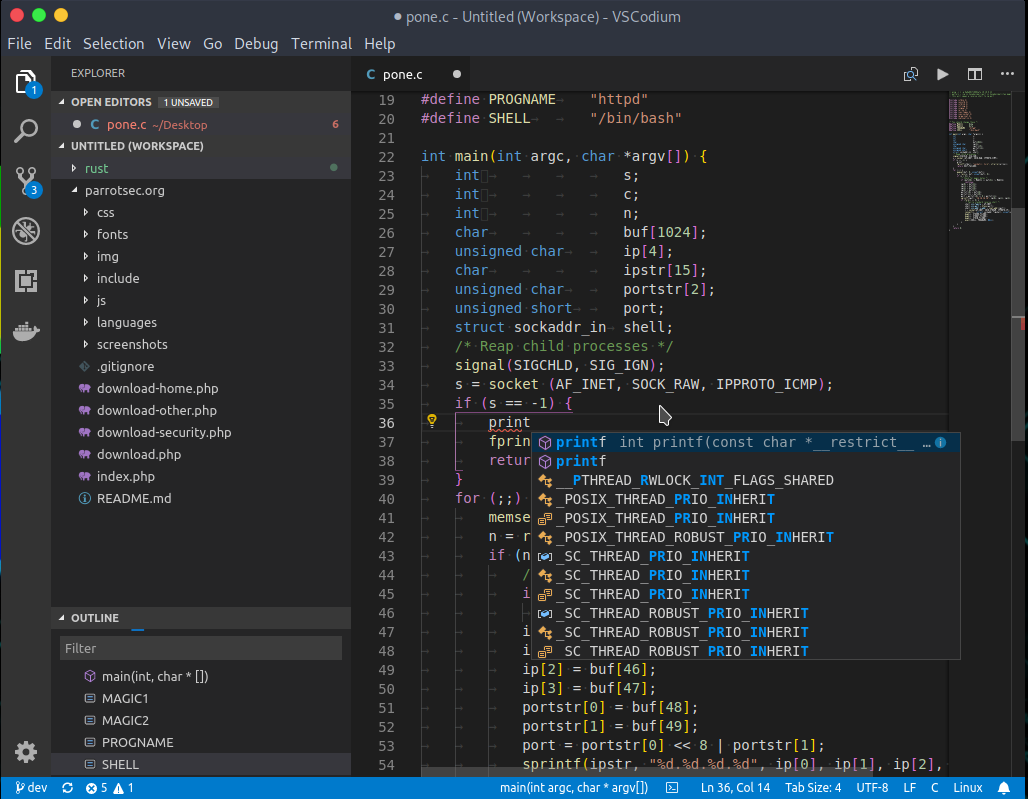
The daily workflow is close enough to Visual Studio Code that most users can keep their existing mental model. Projects are opened as folders or workspaces, commands are accessed from the Command Palette, settings use the same JSON-oriented structure, and the terminal launcher is available through codium.
The largest practical difference appears at the service boundary. VSCodium uses Open VSX as its default extension registry instead of Microsoft's Visual Studio Marketplace. Popular open extensions are often available, but the catalogs are not identical, release timing can differ, and some proprietary extensions are licensed or coded to run only in Microsoft's official build.
This means migration success depends less on themes and keyboard shortcuts than on the extension inventory. A web developer using broadly available open-source extensions may notice little friction. A C#, C++, remote-development, or Microsoft-service-heavy workflow can require substitutions, manual VSIX installation, or a return to official VS Code for specific projects.
How Does VSCodium Fit Into an AI Coding Stack?
VSCodium works best as a neutral host for AI extensions rather than as a single integrated AI product. The editor itself does not define a model catalog, agent mode, usage allowance, or cloud account. Those capabilities come from whichever extension or external service the developer chooses to install.
This separation can be valuable when a team wants to standardize the editor while allowing different AI backends. One developer can use a hosted coding assistant, another can connect an extension to a self-hosted endpoint, and a restricted environment can omit AI networking entirely. The editor remains stable while the intelligence layer changes independently.
The tradeoff is weaker end-to-end integration. AI-native editors can coordinate indexing, chat, inline edits, terminal actions, and billing within one product. VSCodium users must confirm that every required extension is available through Open VSX or a legitimate VSIX source, supports the current editor build, and follows acceptable privacy and licensing terms.
Which Use Cases Benefit Most From VSCodium?
VSCodium is especially useful in environments where the official binary distribution matters as much as the source code. Open-source-focused organizations, privacy-conscious developers, Linux users, educational deployments, and teams with controlled software repositories can retain a mainstream editor workflow while reducing dependence on Microsoft-specific packaging.
Security-conscious teams can point compatible builds at a custom or self-hosted extension gallery. This does not make every extension safe, but it creates a clearer approval path: administrators can mirror reviewed versions, restrict sources, and avoid treating a public marketplace as the only distribution channel.
VSCodium also suits developers who want to assemble an AI workflow incrementally. Instead of adopting a complete AI IDE, they can begin with a conventional editor and add only the completion, chat, agent, or local-model integrations that match their threat model and budget.
How Does VSCodium Compare With AI-Native Editors?
VSCodium prioritizes editor neutrality; AI-native editors prioritize a unified assistant experience. Products built around AI commonly provide repository indexing, built-in chat, agentic editing, model selection, and account-based usage management without requiring the user to assemble those components.
The VSCodium approach is more flexible but less turnkey. It avoids locking the editor to one assistant vendor and allows extensions to be replaced independently. However, the user must manage compatibility, API credentials, model endpoints, extension updates, and any conflicts between multiple coding assistants.
For individual developers, the choice comes down to control versus integration. VSCodium is attractive when the editor should remain open and provider-agnostic. An AI-native editor is more convenient when the priority is a polished, supported agent workflow that works immediately after sign-in.
What Is the Best Configuration for VSCodium?
A reliable setup starts with the official VSCodium packages or repository instructions for the target operating system. Package-manager installations simplify updates, while portable or updates-disabled packages are useful when reproducibility or change control matters more than immediate access to upstream releases.
The extension strategy should be explicit. Use Open VSX for normal discovery, install VSIX files only from legitimate project release pages, and document any custom gallery configuration. Teams should pin or validate critical extension versions instead of assuming that every upstream update will remain compatible with non-Microsoft builds.
For AI use, treat the extension as a separate product evaluation. Review what code or workspace context it sends, where requests are processed, whether API keys are stored locally, how model providers are selected, and whether telemetry can be disabled. VSCodium's privacy defaults do not automatically apply to third-party assistants.
A practical team configuration is to keep the base editor minimal, place project-specific recommendations in workspace files, and maintain an approved extension list. This reduces migration surprises and makes it easier to reproduce the same environment across developer machines.
What Should You Know Before Migrating From VS Code?
Settings and keybindings are straightforward to move, but they live in different application directories. VSCodium also stores extensions under .vscode-oss rather than the standard .vscode extension directory, so an existing VS Code installation does not automatically populate the new editor.
The safest migration process is to inventory extensions before copying anything. Classify each dependency as available on Open VSX, installable from an official VSIX release, replaceable with an open alternative, or restricted to Microsoft's product. This identifies blockers before VSCodium becomes the default application.
Settings should also be reviewed rather than copied blindly. Entries associated with Microsoft accounts, proprietary remote services, Marketplace-only extensions, or official VS Code paths may not behave as expected. A clean profile followed by selective migration usually produces a more predictable result than importing years of accumulated configuration at once.
Keeping both editors installed during evaluation is reasonable. VSCodium can handle general work while official VS Code remains available for projects that depend on restricted extensions or Microsoft-hosted integrations. The two applications use separate configuration and extension directories, which makes parallel testing practical.
What Tradeoffs Appear in Real-World Use?
The main cost is ecosystem asymmetry. VSCodium follows the open VS Code codebase closely, but Microsoft controls several services and extensions around the official product. Compatibility therefore depends on upstream APIs, extension licenses, publishing choices, and the timing of VSCodium's release builds.
Open VSX reduces dependence on Microsoft's Marketplace, yet it may not contain the exact extension, version, or publisher package expected by a tutorial or corporate setup guide. Manual VSIX installation can fill some gaps, but it adds maintenance work and does not override licenses that prohibit use with other products.
Support is community-based. The project provides documentation, issue tracking, release artifacts, and public build automation, but it does not offer the commercial account management, policy dashboard, procurement relationship, or service-level agreement expected from an enterprise software vendor.
Privacy also remains layered rather than absolute. The VSCodium build disables its own editor telemetry configuration, while extensions, language servers, source-control integrations, update services, and AI providers can establish independent network connections. A controlled editor is only one part of a controlled development environment.
Is VSCodium the Right Choice?
VSCodium is a practical choice when the goal is to keep the VS Code workflow while using community-built, freely licensed binaries and gaining more control over telemetry and extension distribution. It is particularly compelling for users whose essential extensions are available through Open VSX or maintained as legitimate standalone VSIX packages.
It is less suitable when the workflow depends heavily on Microsoft-exclusive extensions, seamless proprietary remote tooling, native account synchronization, or an integrated AI assistant with vendor support. In those cases, official VS Code or an AI-native editor may reduce operational friction.
The strongest reason to adopt VSCodium is not that it transforms coding productivity. Its value is that it separates a widely understood editor experience from Microsoft's proprietary desktop distribution and lets developers decide which services, extension sources, and AI providers should be added back.
Model support & data privacy
Privacy & data handling
Official VSCodium binaries disable the editor's telemetry configuration, but installed extensions, language services, update checks, and external AI providers may still make network requests or collect data. Each extension and connected service should be reviewed separately.
Guides, reviews & fixes
No published guides yet. Start with the official documentation above.
Product updates
No verified product updates listed yet. Follow this tool to see new relevant content in Saved.
See the content timelineAlternatives
Visual Studio CodeThe mainstream code editor that now acts as an open orchestration surface for first-party and third-party AI coding agents. VoidVoid is an open-source AI IDE and Cursor-style VS Code fork for developers who want model choice, local/BYOK workflows, and more control over AI coding data paths.
 Theia IDETheia IDE is an open-source cloud and desktop IDE for developers and organizations that want AI coding features with more control, transparency, and customizability than closed editor products.
 Zed AIZed AI is an open-source standalone AI code editor positioned around speed, agent review, flexible model access, and collaboration rather than VS Code compatibility.
Sources & verification
Verification dates record when this directory checked the information. Product release dates appear separately above.
Official websiteOfficial GitHub repositoryExtensions and marketplace documentationMigration documentationLatest official release
Directory revision history
Released VSCodium 1.121.03429, updating the editor base to VS Code 1.121.0 and refreshing platform packages.