
On This Page8 sections
Key Takeaways
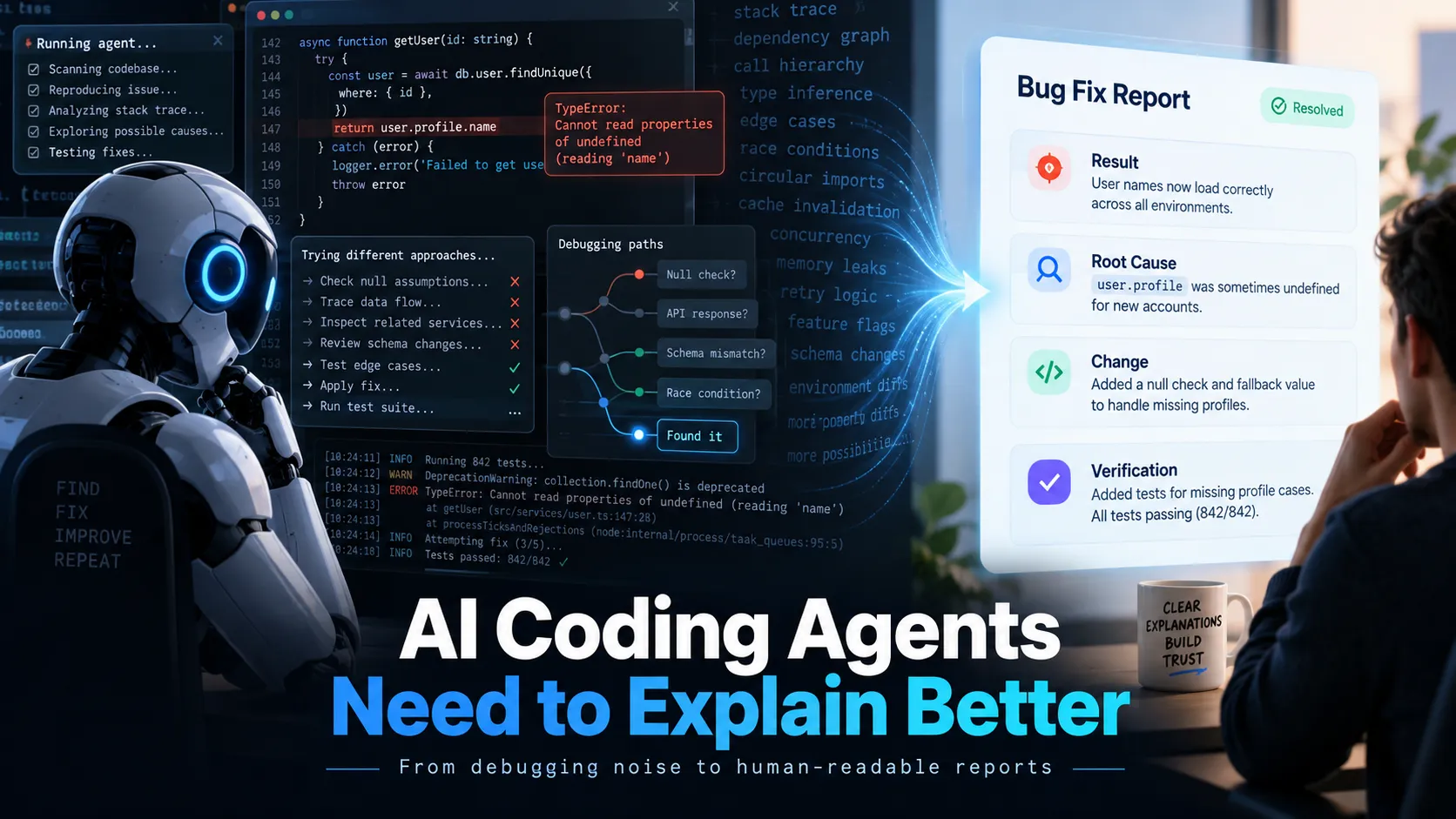
- AI coding agents can solve a bug correctly while still explaining it badly. The problem is often not coding capability; it is the mismatch between how much context an agent needs to work and how much context a human needs to understand the result.
- The most reliable fix is a Human Report Layer: let the coding agent investigate deeply, but constrain the final report to the result, root cause, concrete code changes, evidence, and verification.
- Avoid solving the problem with a 500-line
AGENTS.mdorCLAUDE.md. Long, overlapping instructions can consume context and create conflicts. - A practical default format is: Result → Root Cause → Change → Verification.
Why AI Coding Agents Are Becoming Harder to Understand
Modern coding agents can inspect repositories, trace callers, search dozens of files, run tests, modify several modules, compare hypotheses, and verify results with far less manual guidance than earlier coding assistants.
That capability creates a new interface problem.
An agent may legitimately need to inspect 30 files to diagnose one broken button. The developer does not need a 30-file narrative. The developer usually needs four answers:
- What was wrong?
- Why did it happen?
- What changed?
- Was the fix actually verified?
When the final response mirrors the agent's investigation instead of compressing it, a successful debugging session can become harder to understand than the original bug.
This is not simply a verbosity problem. It is a separation-of-concerns problem.
A coding agent has two distinct jobs:
- Perform the engineering work.
- Turn the result into a useful human mental model.
Many agent prompts optimize heavily for the first job while leaving the second unspecified.
Agent Context Is Not Human Context
Imagine a form that works once but cannot be submitted a second time.
The coding agent may need to perform an investigation like this:
Read src/components/Form.tsx
Read src/hooks/useForm.ts
Search for isSubmitting
Inspect the mutation wrapper
Trace the submit callback
Inspect API error handling
Run the reproduction
Modify state cleanup
Run unit tests
Run typecheck
Every step may be useful to the agent.
The final answer should not be a transcript of those steps.
A better human-facing report is:
Fixed.

Root cause:
src/hooks/useForm.ts left isSubmitting=true after a successful request, so the next click returned before sending another request.

Change:
submitForm() now resets the state in the completion path.

Verification:
Repeated submissions work. Unit tests and typecheck pass.
The shorter answer is not less technical. It preserves the important technical facts and removes investigation noise.
That leads to a critical rule for AI-assisted development:
Agent effort and report length should be controlled independently.
A difficult investigation can still end with a six-line report.
The Solution: Add a Human Report Layer
The cleanest architecture is:
Developer request
    ↓
Coding agent
    ↓
Search / inspect / reason / edit / test
    ↓
Human Report Layer
    ↓
Result / root cause / change / verification
The agent remains free to investigate deeply.
Only the final communication is compressed.
A practical default contract is:
Result:
What is the current state?

Root cause:
What specifically caused the problem?

Change:
Which file, function, configuration, or schema changed?

Verification:
What was actually run or checked?

Next action:
Only include this when the developer must do something.
This works better than repeatedly telling the model to be concise because it defines which information must survive compression.
A Practical AGENTS.md Rule for Codex
For Codex, the communication rule should remain short:
## Human-facing communication

When reporting completed work, optimize for human comprehension rather than a transcript of your investigation.

Lead with the result.

For debugging or code changes, normally report:
1. What was wrong.
2. The root cause.
3. What changed, with concrete file/function references.
4. How the change was verified.

Do not narrate every search, tool call, file read, or discarded hypothesis unless it is necessary to understand the result.

Prefer concrete nouns and precise verbs.

Prefer:
'src/api/auth.ts does not clear the token cache'

Over:
'the authentication lifecycle has a state synchronization issue'

Use standard developer terminology. Do not invent terminology when an established technical term already exists.

Keep small-task reports short.
The important detail is that this rule does not tell Codex to investigate less.
It tells Codex to report better.
A Practical CLAUDE.md Rule for Claude Code
The same pattern works for Claude Code:
## Communication style

Complete the necessary investigation and verification, but keep the final explanation proportional to the decision the developer needs to make.

For completed coding tasks, use:

Result:
- State whether the issue is fixed or what was completed.

Root cause:
- Explain the actual cause in 1-3 sentences.
- Reference the relevant file, function, state variable, request, schema, or configuration.

Change:
- Explain what changed and where.

Verification:
- State what was actually tested or checked.

Avoid reproducing the full investigation history.
Avoid abstract labels when a concrete code reference is available.
Keep common English technical terms when translating them would reduce clarity.
A positive structure such as Result / Root Cause / Change / Verification is usually more robust than a giant blacklist of words.
Add a "Speak Human" Shortcut
A useful secondary control is a short command that rewrites the previous response without asking the agent to perform the engineering work again.
Define it once:
When I say 'speak human', rewrite your previous answer for a developer who wants the result quickly.

Keep only:
- what happened;
- why it happened;
- where in the code it happened;
- what changed;
- whether the result was verified.

Use concrete file and function names.
Do not repeat the investigation history.
Keep it under 150 words unless essential technical detail would be lost.
Then the developer can simply type:
speak humanThis should be treated as a presentation transformation, not a second debugging pass.
Force Abstract Claims to Point to Real Code
One of the strongest communication rules is simple:
Every important abstract claim should point to a concrete code object whenever possible.
Bad:
The authentication flow has a synchronization issue.Better:
refreshSession() updates the cookie, but userStore is not invalidated afterward, so the UI continues reading the previous user object.Bad:
There is a race condition in the data pipeline.Better:
loadProfile() and saveProfile() both write profileCache. If loadProfile() finishes last, its older server response overwrites the newly saved value.Concrete explanations create a direct map between language and code.
Use Evidence, Not Possibility Lists
A common failure is the generic troubleshooting dump.
Possible causes:
1. Cookies
2. CORS
3. Session expiration
4. Cache
5. Middleware
6. Network
7. Token refresh
That list may be useful at the beginning of an investigation. It is poor final output when the agent has repository access and tools capable of determining the real cause.
A better contract is:
Do not stop at a list of possible causes if the repository and available tools can distinguish between them.

Investigate until you can identify:
- the observed symptom;
- the code responsible;
- why that code causes the symptom;
- the evidence supporting the conclusion;
- the change;
- the verification result.

If the root cause cannot be determined, state exactly what evidence is missing.
Keep Standard Technical Terms Instead of Inventing New Ones
AI explanations can become harder to understand when the model invents a translation for a term developers normally use in English.
Common examples include:
race conditionhydrationmiddlewaredebounceschemahooktree shakingcache invalidation
The useful rule is not always use English.
The better rule is:
Use the term that is standard among developers in the target language.
If a translated term is common and unambiguous, use it. If translation makes the concept stranger or less precise, retain the established English term.
Give the Agent an Information Budget
Be concise is subjective.
A simple information budget is more reliable:
Tiny change:
3-6 lines.

Normal bug fix:
Result + root cause + change + verification.
Usually under 150 words.

Medium feature:
Up to 300 words, plus important changed files when useful.

Architecture change, migration, security issue, or unresolved incident:
Use the detail required to explain trade-offs, risks, and evidence.
The report should scale with decision complexity, not with how many files the agent opened or how many tool calls it made.
Never Compress Away Verification
There is one major danger in shortening coding-agent responses: fixed can replace actual evidence.
A trustworthy report distinguishes among:
- changed but not run;
- compiled successfully;
- typechecked;
- unit tested;
- integration tested;
- reproduced manually;
- verified only by code inspection.
For example:
Verification:
- pnpm test --filter auth: passed
- pnpm typecheck: passed
- Manual browser login: not run
This is substantially more useful than:
Everything should work now.The best short reports remove narrative, not evidence.
Keep a Tiny ARCHITECTURE.md for the Human
AI-heavy development introduces another problem: the project can evolve faster than the developer's mental model.
A small ARCHITECTURE.md can solve part of this problem.
Request flow

Browser
  -> Cloudflare Worker
  -> Hono route
  -> service
  -> D1

Authentication

Browser
  -> /api/auth
  -> auth middleware
  -> session cookie

Billing

Stripe Checkout
  -> webhook
  -> subscriptions table
  -> entitlement service
Add a tiny directory map:
src/routes      HTTP endpoints
src/services    business logic
src/db          D1 access
src/components  React UI
src/lib         shared helpers
The goal is not exhaustive documentation. It is to preserve a lightweight system map that makes future agent explanations easier to place.
Do Not Turn AGENTS.md Into a Second Codebase
A common response to annoying agent behavior is to keep appending instructions:
Always read...
Always inspect...
Always summarize...
Always verify...
Never forget...
Always explain...
Eventually, the instruction file becomes hundreds of lines long.
That can make the system worse.
Persistent instructions should define stable behavior, not simulate every possible workflow.
Instead of:
Before every edit, read architecture.md, database.md, and deployment.md.Route documents by need:
Use architecture.md for service boundaries.
Use database.md for schema changes.
Use deployment.md when preparing a deployment.
This keeps the core instructions small while preserving deeper context when it is actually relevant.
Separate Persistent Rules, Repository Knowledge, and Task Instructions
A clean setup has three layers.
Persistent Communication Rules
Keep stable preferences in AGENTS.md or CLAUDE.md:
Lead with the result.
Anchor explanations to files/functions.
Report verification.
Keep routine reports concise.
Repository Knowledge
Keep durable system information in files such as:
ARCHITECTURE.md
DATABASE.md
DEPLOYMENT.md
Task-Specific Requirements
Put temporary constraints in the actual request:
Fix the duplicate webhook processing bug.

Do not change the database schema.
Reproduce it with the existing webhook fixture.
Run the Stripe webhook tests.
This separation reduces prompt debt and instruction conflicts.
A Better Debugging Prompt
For difficult bugs, the following pattern gives the agent freedom to investigate while tightly controlling the final output:
Investigate this until you can identify the actual root cause.

You may inspect the repository, trace callers, run relevant commands, reproduce the issue, and test the fix.

Do not give me a broad list of possible causes if the available evidence can distinguish between them.

When finished, report only:

Result:
Whether the issue is fixed.

Root cause:
The specific code and behavior that caused it.

Change:
The files/functions changed and what changed.

Evidence:
The key observation that confirms the diagnosis.

Verification:
The tests or checks actually performed.

Keep the report concise. Do not narrate every investigation step.
This prompt separates two requirements that are often accidentally combined: investigate thoroughly and report briefly.
Common Mistakes
Asking the Agent to Think Less
Bad:
Do not analyze too much.This can reduce debugging quality.
Better:
Investigate as deeply as needed, but compress the final report.Removing All Technical Terminology
The target is not beginner language at all costs. Developers still need precise technical vocabulary.
Use standard terminology plus concrete code references.
Asking for a Full Reasoning Diary
A useful engineering report should focus on evidence, code locations, decisions, and verification. A chronological reasoning transcript is usually longer and less useful.
Adding a Permanent Rule After Every Annoying Answer
Persistent prompts accumulate debt.
Rules should be short, stable, and high-value. Task-specific behavior belongs in the task prompt, not permanently in every future context.
Recommended Minimal Setup
For most developers using Codex or Claude Code heavily, the setup can remain surprisingly small:
AGENTS.md / CLAUDE.md
= stable communication behavior

ARCHITECTURE.md
= small system map

Task prompt
= current objective and constraints

Human Report Layer
= result, root cause, change, verification
The most important persistent rule can be only a few lines:
Lead with the result.

For coding work, report:
- root cause;
- concrete file/function changes;
- verification.

Do the necessary investigation, but do not narrate routine searches, tool calls, or discarded hypotheses.

Prefer concrete code references over abstract descriptions.
Keep small-task reports short.
Why This Matters More as Coding Agents Improve
The long-term direction of coding agents is toward greater autonomy.
Developers will increasingly review outcomes, evidence, and decisions instead of manually participating in every implementation step.
Communication quality therefore becomes part of engineering productivity.
A coding agent that saves 20 minutes of implementation time but creates a 15-minute explanation burden captures only part of the potential productivity gain.
The ideal agent performs a large amount of work and leaves the developer with a small, accurate mental update:
What changed?
Why?
Where?
Was it verified?
The better coding agents become at execution, the more important this compression layer becomes.
Conclusion
AI coding agents are not becoming harder to understand because they are necessarily becoming worse at engineering. In many cases, the opposite is happening: they are performing more autonomous work, handling more context, and then exposing too much of that context in their final response.
The practical fix is not to make Codex or Claude Code think less.
The fix is to define how completed engineering work should be reported to a human.
Use a short persistent communication rule. Anchor explanations to real files and functions. Preserve root cause, evidence, and verification. Keep established technical terms when forced translations reduce clarity. Maintain a lightweight architecture map. Avoid turning AGENTS.md or CLAUDE.md into a giant instruction manual.
Most importantly, separate deep agent execution from concise human communication.
Start with the four-part contract — Result, Root Cause, Change, Verification — and apply it to one active project. A good agent report should let a developer understand what changed and why in under a minute without removing the evidence needed to trust the fix.
Continue Reading
More articles connected to the same themes, protocols, and tools.

Referenced Tools
Browse entries that are adjacent to the topics covered in this article.
