On This Page8 sections
Key Takeaways
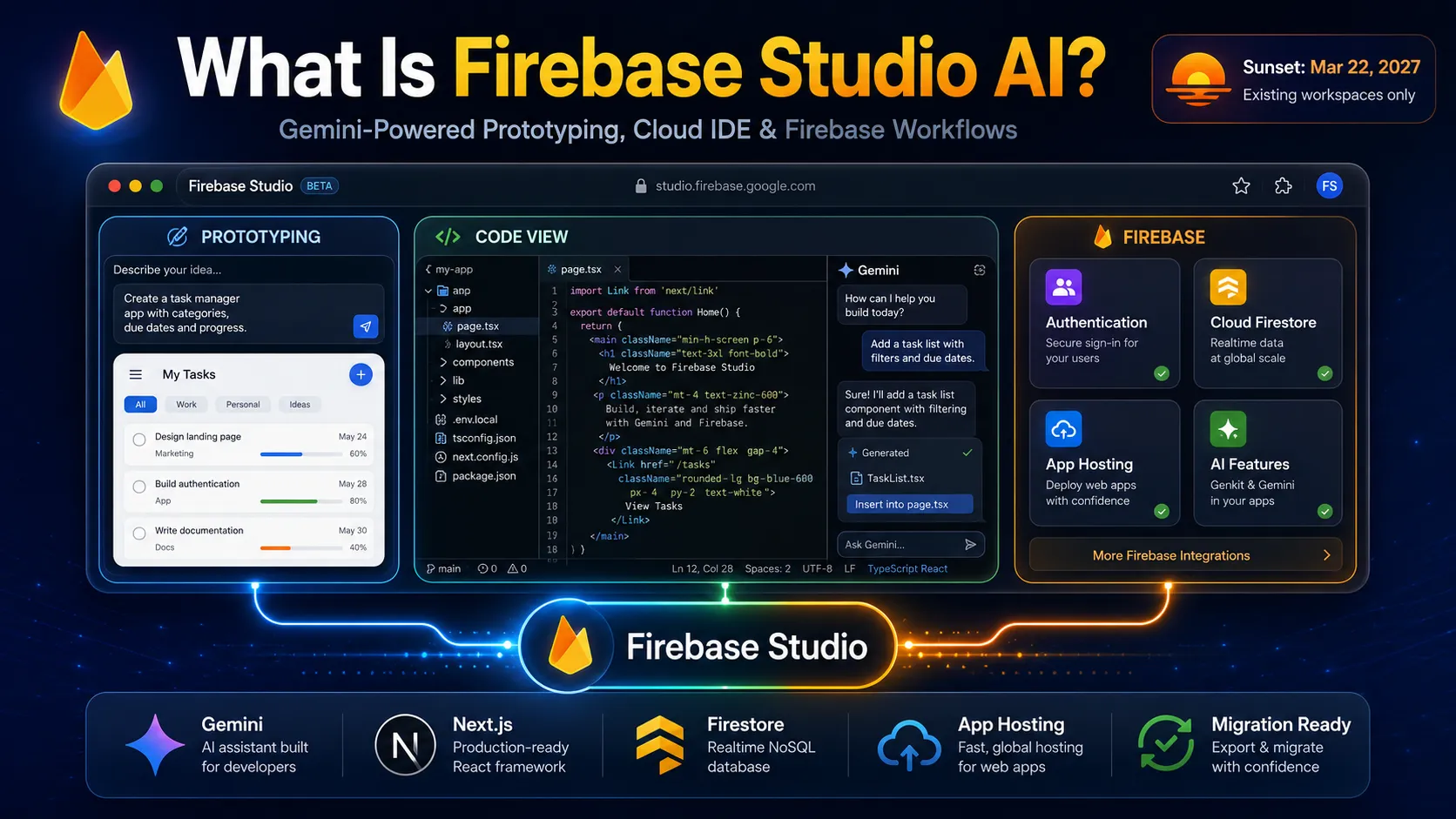
- Firebase Studio is Google's browser-based, agentic development environment built around Gemini, Firebase, Google Cloud, and the technology that originated in Project IDX. It combines a Code OSS-based IDE, cloud VM, AI coding assistance, application previews, Firebase emulators, and deployment workflows.
- The phrase Firebase Studio AI is not a separate Google product. It generally refers to Firebase Studio's Gemini-powered features, especially the App Prototyping agent and Gemini assistance inside Code view.
- The most important 2026 update is that Firebase Studio is being discontinued. Google announced the sunset on March 19, 2026, disabled new user signup and new workspace creation on June 22, 2026, and plans to shut Firebase Studio down on March 22, 2027.
- Existing Firebase Studio users can continue developing, testing, and deploying existing workspaces until the shutdown date. Already deployed Firebase apps and core services such as Cloud Firestore, Firebase Authentication, Firebase Hosting, and Firebase App Hosting are not being discontinued.
- Google recommends Google AI Studio for browser-based, prompt-first app prototyping and Google Antigravity for code-first, agentic development and more advanced autonomous workflows.
- Firebase Studio's App Prototyping agent can turn multimodal prompts into Next.js applications, generate an application blueprint, modify code, configure Firebase services, preview the result, and publish through Firebase App Hosting.
- In Code view, Gemini supports Ask, Agent, and Agent Auto-run modes, along with code completion, repository-aware chat, file modification, terminal commands, multimodal context, AI rules, and codebase indexing.
What Is Firebase Studio AI?
Firebase Studio is a cloud-based, agentic software-development workspace from Google that combines an online IDE with Gemini-powered coding and application-generation tools.
It was launched in preview on April 9, 2025 as an evolution of Project IDX. Google combined the Project IDX development environment with Gemini, Genkit, Firebase tooling, application prototyping, testing, and deployment capabilities.
A useful mental model is:
Firebase Studio
├── Cloud development VM
├── Code OSS editor
├── Gemini coding assistant
├── App Prototyping agent
├── Firebase / Google Cloud integrations
├── Nix development environment
├── Web and Android previews
└── Deployment and observability tools
Unlike a simple AI website builder, Firebase Studio was intended to support both ends of the development spectrum:
- Someone could describe an application and let Gemini create an initial prototype.
- An experienced developer could open the generated files, use a terminal, change dependencies, configure the environment, run tests, use Firebase emulators, and deploy the application manually.
That combination made Firebase Studio closer to a cloud IDE plus AI agent plus Firebase development environment than a conventional no-code generator.
Is Firebase Studio Still Available in 2026?
This is now the most important question for anyone searching for Firebase Studio AI.
Firebase Studio is still accessible to existing users, but it is no longer accepting new users or creating new workspaces.
Google's current timeline is:
| Date | Firebase Studio status |
|---|---|
| April 9, 2025 | Firebase Studio preview launched |
| March 19, 2026 | Google announced the sunset |
| June 22, 2026 | New signup and new workspace creation disabled |
| March 22, 2027 | Firebase Studio shuts down |
Existing users can continue using existing workspaces until March 22, 2027. After that date, remaining Firebase Studio workspace data is scheduled for deletion, so projects that need continued development should be migrated before shutdown.
This does not mean Firebase itself is shutting down.
Services such as:
- Firebase Authentication
- Cloud Firestore
- Firebase Hosting
- Firebase App Hosting
- Cloud Storage
- Firebase AI Logic
remain separate Firebase products. Applications already deployed using these services can continue running after Firebase Studio disappears.
Why Is Google Shutting Down Firebase Studio?
Google describes Firebase Studio as a preview that helped the company learn how developers use agentic full-stack development.
Instead of maintaining Firebase Studio as a separate destination, Google is moving the two major workflows into other products:
- Prompt-first browser application generation → Google AI Studio
- Code-first autonomous agent development → Google Antigravity
Google positions Antigravity as the path for advanced code-first and multi-agent workflows, while Google AI Studio provides a browser-based path from prompts to full-stack applications.
This strategy makes the Firebase Studio sunset easier to understand.
Firebase Studio attempted to combine two fairly different products:
- A professional cloud IDE inherited from Project IDX.
- A prompt-driven AI application builder.
Google is now separating those workflows rather than continuing to package them under Firebase Studio.
Where Did Firebase Studio Come From?
Firebase Studio inherited much of its development environment from Project IDX, Google's experimental cloud IDE.
When Firebase Studio launched, it incorporated Project IDX capabilities such as:
- A customizable cloud VM
- Nix-based environment configuration
- Built-in application previews
- Firebase emulators
- Dozens of templates
- Repository importing
- Custom templates
- Real-time workspace sharing
Firebase Studio then added deeper Gemini and Firebase integration plus the App Prototyping agent.
This heritage explains why Firebase Studio feels different from many newer vibe-coding tools. Under the AI interface is an actual development environment capable of running compilers, terminals, package managers, emulators, and application servers.
How Firebase Studio AI Works
Firebase Studio essentially provides two AI development experiences.
1. App Prototyping Agent
The App Prototyping agent is the prompt-first experience.
A user describes an application using natural language and can optionally provide images or drawings. Gemini then produces an application blueprint and generates a working application.
The workflow looks roughly like this:
Prompt or image
      ↓
Application blueprint
      ↓
Generate Next.js application
      ↓
Preview application
      ↓
Refine with natural language
      ↓
Add Firebase services
      ↓
Test and debug
      ↓
Publish
The agent can also revise the application iteratively instead of forcing users to regenerate everything from scratch.
2. Gemini in Code View
Code view exposes the underlying application files inside the Code OSS-based editor.
Gemini can:
- Explain code
- Generate code
- Complete code inline
- Modify existing files
- Create new files
- Refactor implementations
- Write documentation
- Diagnose errors
- Generate tests
- Run terminal commands
- Interpret command output
- Work with dependencies
- Use workspace files as context
This creates a useful transition from prompt-first generation to conventional software engineering.
Ask vs Agent vs Agent Auto-Run
Gemini's Code view includes multiple interaction modes.
Ask Mode
Ask mode is primarily for planning and questions.
Use it for tasks such as:
- Explaining unfamiliar code
- Understanding architecture
- Debugging conceptually
- Planning a refactor
- Comparing implementation options
It does not automatically apply proposed code modifications.
Agent Mode
Agent mode can propose and perform changes across the project, but modifications remain review-oriented.
For example:
Add passwordless authentication to this application.
Update the login UI, authentication state management,
and protected routes. Then explain every modified file.
Gemini can inspect the workspace, propose edits, modify project files with approval, and suggest commands needed to complete the task.
Agent Auto-Run
Agent Auto-run reduces the number of manual confirmations for file modifications.
Gemini can automatically apply code changes based on the task. However, terminal commands still require confirmation, even when Auto-run is enabled.
That distinction matters because editing source files and executing arbitrary shell commands have different security implications.
What Can the App Prototyping Agent Build?
The App Prototyping agent focuses on web applications using Next.js.
A prompt might look like:
Create a meal-planning application.

Requirements:
- Next.js
- Google sign-in
- Users can save recipes
- Cloud Firestore for recipe storage
- Search and category filters
- Responsive mobile layout
- Gemini-generated recipe suggestions
- Private recipes should only be visible to their owner
Firebase Studio can then generate a blueprint describing the application's functionality and visual direction before producing the implementation.
This blueprint step is more valuable than it may initially appear. It creates an intermediate specification that users can inspect before the model spends time generating a full codebase.
Firebase Integration Is the Real Differentiator
Many AI builders can generate React or Next.js applications.
Firebase Studio's original competitive advantage was the ability to connect generation directly to Google's backend ecosystem.
The App Prototyping agent can assist with services including:
- Cloud Firestore for application data
- Firebase Authentication for users
- Gemini Developer API for AI functionality
- Genkit for AI workflows
- Firebase App Hosting for deployment
Firebase Studio can automatically create or associate a Firebase project when the workflow requires Firebase resources.
This significantly reduces setup friction for prototypes because the user does not need to manually create every backend resource before testing an idea.
The tradeoff is that automatic provisioning makes it easier to create infrastructure without fully understanding its security rules, billing behavior, or production consequences.
Firebase Studio and Cloud Firestore
When an application needs persistent data, the App Prototyping agent can configure Cloud Firestore.
This means a generated application can move beyond a static frontend and support workflows such as:
- User profiles
- Saved items
- SaaS dashboards
- Content management
- Collaborative data
- AI conversation history
However, generated Firestore Security Rules require review.
A common vibe-coding failure is building a database-backed application that appears functional but accidentally exposes records because the generated security rules are too permissive.
Firebase Authentication
Firebase Studio can also help provision and integrate Firebase Authentication.
For example, the agent can generate flows for:
- Account creation
- Login
- User sessions
- Authenticated routes
- User-specific Firestore records
The important architectural point is that authentication must be enforced at more than the UI layer.
Hiding a button from unauthenticated users is not equivalent to securing Firestore data. Production applications should verify both Authentication logic and backend Security Rules.
Building AI Features with Gemini
If the generated application itself needs generative AI, Firebase Studio can provision access to the Gemini Developer API and use Genkit-powered flows in App Prototyping workflows.
Examples include:
- AI chat applications
- Content generation
- Document summarization
- Image understanding
- Recommendation tools
- AI-assisted search
- Structured-data extraction
This leads to an important distinction between two similarly named Firebase technologies.
Firebase Studio vs Firebase AI Logic
Firebase Studio and Firebase AI Logic are not the same product.
Firebase Studio is a development environment.
Firebase AI Logic is a set of client SDKs and backend infrastructure for calling Gemini models from mobile and web applications.
Firebase AI Logic supports platforms including:
- Web
- Android
- iOS
- Flutter
- Unity
It provides infrastructure such as App Check integration and a proxy layer intended to make client-side Gemini usage safer.
The distinction can be summarized as:
Firebase Studio
= where developers build applications

Firebase AI Logic
= how applications can access Gemini models
Firebase Studio is being discontinued. Firebase AI Logic is not part of that sunset.
The Cloud Development Environment
Firebase Studio workspaces run on Google Cloud virtual machines rather than being simple browser text editors.
The IDE itself is based on Code OSS, the open-source foundation associated with Visual Studio Code.
This means developers get access to familiar IDE concepts including:
- Project Explorer
- Terminal
- Debugging
- Extensions
- Source-control workflows
- Multiple files and panes
- Application previews
Extensions are installed through the Open VSX Registry rather than the Microsoft Visual Studio Marketplace.
Nix-Based Reproducible Workspaces
One of Firebase Studio's most technically distinctive features is Nix-based workspace configuration.
Workspace configuration lives in:
.idx/dev.nixThis file can declare:
- System packages
- Node.js versions
- Environment variables
- IDE extensions
- Preview commands
- Docker
- PostgreSQL
- MySQL
- Redis
- Pub/Sub emulator
- Other development services
Because configuration is stored as code, teams can put .idx/dev.nix into version control and reproduce the environment more reliably than with undocumented manual machine setup.
A simplified example looks like:
`nix { pkgs, ... }: { channel = "stable-24.11";
packages = [ pkgs.nodejs_20 ];
env = { APP_ENV = "development"; };
idx.previews = { enable = true; previews = { web = { command = [ "npm" "run" "dev" "--" "--port" "$PORT" "--host" "0.0.0.0" ]; manager = "web"; }; }; }; } `
This is far more flexible than a typical AI website generator's hidden runtime.
Built-In Application Preview
Firebase Studio can preview applications directly inside the browser.
Supported workspace previews include web applications and Android previews for supported Flutter environments. Developers can configure preview commands through .idx/dev.nix, perform reloads, and open previews separately from the IDE.
Public preview links can also be enabled for feedback.
However, making a preview public exposes the running preview to the internet while access is enabled. Workspace sharing has even broader implications because collaborators may be able to access code and credentials stored in the workspace.
Gemini Codebase Indexing
Gemini can index the workspace so that its responses incorporate more of the repository.
This improves tasks such as:
- Cross-file refactoring
- Finding related implementations
- Understanding application architecture
- Tracking types or API usage
- Debugging errors spanning multiple modules
Large repositories can exceed model-context limits, so developers should avoid indexing generated files, dependency directories, build outputs, logs, and other irrelevant content.
What Is .aiexclude?
Firebase Studio supports .aiexclude, a file similar in spirit to .gitignore that controls which project files Gemini can access.
For example:
.next/
dist/
coverage/
large-datasets/
internal-secrets/
Files excluded with .aiexclude are not used by Gemini codebase indexing, and Gemini's ability to provide chat or inline assistance for those files is restricted. Files ignored by .gitignore are also automatically excluded from AI indexing.
This serves two purposes:
- Reduce irrelevant context and token consumption.
- Limit which code or data is exposed to AI features.
It is particularly useful when repositories contain large build directories, generated code, proprietary assets, test fixtures, or other files Gemini does not need.
AI Rules and Project Instructions
Firebase Studio also supports AI rules files that provide persistent project-specific instructions to Gemini.
A project could define conventions such as:
- Use TypeScript strict mode.
- Prefer server components unless client state is required.
- Never write directly to Firestore from admin-only pages.
- Add unit tests for business logic.
- Do not add dependencies without explaining why they are needed.
This is substantially better than repeating the same architecture requirements in every prompt.
It also illustrates a broader lesson for agentic coding: persistent rules often produce more consistent results than increasingly long one-shot prompts.
Bring Your Own Gemini API Key
Firebase Studio allows existing users to configure their own Gemini API key in Code view and select supported Gemini models, including custom model IDs they have access to.
This can be useful when developers want:
- A different Gemini model
- Separate quota management
- Explicit API billing
- More control over model selection
Model choice should still be matched to the task. A larger reasoning model is not automatically the best option for every autocomplete, formatting, or repetitive coding operation.
Firebase Studio AI Pricing
Firebase Studio itself has been available at no cost during preview. Gemini assistance inside Firebase Studio has also been offered at no cost during the preview period.
However, that does not mean every application built through Firebase Studio is free to operate.
Paid costs can come from:
- Firebase App Hosting
- Cloud Firestore usage above free quotas
- Cloud Storage
- Cloud Functions or other Google Cloud services
- Gemini Developer API usage
- Other connected Google Cloud products
Linking a Cloud Billing account can upgrade the Firebase project to the Blaze pay-as-you-go plan, after which usage beyond free quotas can generate charges.
Because new Firebase Studio workspaces can no longer be created, the older workspace-count quotas are no longer particularly relevant to new users.
Publishing Apps From Firebase Studio
Firebase Studio provides two important deployment paths.
Firebase App Hosting
App Hosting is the natural option for dynamic full-stack frameworks such as Next.js and Angular.
For applications created with the App Prototyping agent, Firebase Studio can provision the required Firebase resources and launch an App Hosting rollout directly from the interface.
Firebase Hosting
Firebase Hosting is better suited to:
- Static websites
- Single-page applications
- HTML/CSS/JavaScript assets
- Globally distributed frontend content
It provides SSL and custom-domain support through Firebase's hosting infrastructure.
The important distinction is that deployment should follow application architecture, not simply whichever publish button is easiest to find.
Privacy and Data Usage
Firebase Studio's AI capabilities deserve careful attention from teams working with proprietary code or sensitive data.
Users should review how prompts, responses, code indexing, and AI-assistance settings affect data handling before placing confidential workloads into the environment.
For professional use, developers should review:
- Data-processing terms
- AI feature settings
- Code indexing
.aiexclude- API credentials
- Repository contents
- Workspace-sharing permissions
- Firebase Security Rules
before placing confidential workloads into an AI-assisted environment.
API Key Security
The App Prototyping agent can create or configure Gemini API access and store development configuration inside the workspace.
This is convenient for development but should not encourage careless credential management.
Avoid:
- Committing
.envfiles to public repositories - Exposing server-side secrets in client JavaScript
- Sharing entire workspaces with unknown users
- Copying production credentials into prompts
For production client-side Gemini integrations, Firebase AI Logic provides a more purpose-built architecture and can use App Check for abuse protection.
Firebase Studio vs Google AI Studio
After Firebase Studio's sunset announcement, this comparison became much more important.
| Area | Firebase Studio | Google AI Studio |
|---|---|---|
| New projects in Aug. 2026 | No | Yes |
| Primary model | Gemini | Gemini |
| Browser-based | Yes | Yes |
| Prompt-to-app workflow | Yes | Yes |
| Full cloud IDE | Yes | Different workflow |
| Firebase integration | Deep | Increasingly integrated |
| Recommended future use | Existing projects only | New prompt-first apps |
Google recommends Google AI Studio for users who primarily used Firebase Studio's App Prototyping agent or want browser-based prompt-driven development.
Google AI Studio now represents the strategic continuation of that part of the Firebase Studio experience.
Firebase Studio vs Google Antigravity
Google Antigravity is the recommended migration destination for developers who used Firebase Studio more like an IDE.
| Area | Firebase Studio | Google Antigravity |
|---|---|---|
| Development model | Cloud workspace | Local agent-first environment |
| Code-first workflows | Yes | Core focus |
| Agentic coding | Yes | Core focus |
| Multi-agent workflows | Limited compared with successor | Major focus |
| Model options | Gemini-focused | Can support multiple models |
| Recommended for new projects | No | Yes |
Google recommends Antigravity when developers:
- Primarily used Code view
- Imported existing repositories
- Need deeper control over the codebase
- Want terminal-oriented development
- Need autonomous multi-agent workflows
- Have applications that exceed browser/cloud prototyping constraints
Which Firebase Studio Replacement Should You Choose?
The choice can be reduced to one question:
Do you primarily want to prompt an app into existence, or actively engineer the codebase?
Choose Google AI Studio when the workflow is:
idea → prompt → prototype → iterate → deployChoose Google Antigravity when the workflow is:
repository → agent → code changes → terminal → tests → review → deployFor some projects, both can be useful. A project can begin with rapid browser-based prototyping and later move into a more engineering-focused agent environment when deeper control becomes necessary.
How to Migrate an Existing Firebase Studio Project
Existing users should not wait until the shutdown date to create an exit plan.
Migration to Google AI Studio
For Prototyper-oriented projects, Firebase Studio provides a migration path designed to move suitable application code toward Google AI Studio.
This route is best for projects that remain close to the original prompt-generated Next.js workflow.
Migration to Google Antigravity
For code-heavy workspaces, projects can be exported and opened in Antigravity.
A Firebase CLI export workflow uses a command in this form:
npx firebase-tools@latest studio:export PATHMigration tooling is particularly relevant to common Firebase Studio project types such as Next.js, Flutter, and Angular, while other stacks may require additional manual adjustment.
For long-lived production applications, migration should include more than moving files. Verify:
- Environment variables
- Firebase project IDs
- Authentication configuration
- Firestore rules
- Hosting configuration
- CI/CD
- Runtime versions
- Secrets
- Custom domains
- Build commands
before declaring the migration complete.
Best Firebase Studio AI Use Cases
For existing users, Firebase Studio remains useful during the transition period for several categories of work.
Rapid MVPs
A developer can move rapidly from idea to functioning Next.js application while still retaining access to the source code.
Firebase-Backed SaaS Prototypes
Authentication, Firestore, AI features, and deployment can be combined quickly for internal tools or early SaaS prototypes.
Learning Firebase
Because the IDE, terminal, emulators, application preview, and Firebase services are integrated, Firebase Studio can expose how the pieces of Firebase development fit together.
Repository Debugging
Gemini's workspace-aware Code view can inspect files, explain errors, propose changes, and run commands.
UI Prototyping From Visual Input
The Prototyping agent accepts natural language, images, and drawing input, making it possible to communicate intended UI direction without expressing every detail as text.
What Firebase Studio Did Well
It Bridged Vibe Coding and Real Development
Firebase Studio did not force users to choose permanently between natural-language generation and manual engineering.
A user could start in Prototyper, then switch into Code view and work directly with the generated source.
That transition remains one of the strongest ideas from the product.
The Environment Was Reproducible
Nix configuration provided significantly more control than the opaque sandboxes found behind many AI application builders.
Firebase Was Native to the Workflow
Authentication, Firestore, hosting, AI, emulators, and Google Cloud were not afterthoughts.
Gemini Could Actually Act on the Workspace
Agent mode moved beyond chat by allowing Gemini to edit files and propose terminal execution.
Firebase Studio Limitations
It Is No Longer a Long-Term Platform
This is now the decisive limitation.
No matter how useful Firebase Studio remains for an existing workspace, new development should be designed around its March 22, 2027 shutdown.
The App Prototyper Is Framework-Constrained
The dedicated App Prototyping agent is focused on Next.js web applications rather than serving as a universal prompt-to-any-framework generator.
The Code workspace supports far more frameworks, but that is a different workflow.
AI-Generated Backend Security Must Be Reviewed
An application can appear functional while containing weak Firestore rules, incorrect authorization logic, or exposed secrets.
Generated code is a starting point, not evidence of security.
Cloud Abstractions Can Hide Costs
Automatic provisioning makes it easy to create services. Once billing is linked, however, Firebase and Google Cloud resources may move beyond free quotas.
Large Repositories Can Overload AI Context
Generated assets, dependency trees, logs, build directories, and datasets can reduce Gemini's effective context quality. .aiexclude is important for both efficiency and data control.
Common Firebase Studio AI Mistakes
Mistake 1: Starting a new long-term project around Firebase Studio in 2026.
New workspaces are already disabled. Use Google AI Studio or Antigravity instead.
Mistake 2: Confusing Firebase Studio with Firebase itself.
Firebase Studio is being discontinued; Firebase Authentication, Firestore, Hosting, App Hosting, and Firebase AI Logic are not.
Mistake 3: Treating generated Firestore rules as production-ready.
Test authorization with multiple users and explicitly verify read/write boundaries.
Mistake 4: Committing generated .env files.
Treat generated API credentials with the same caution as manually created keys.
Mistake 5: Feeding the entire repository to Gemini.
Exclude build output, generated files, datasets, and irrelevant folders.
Mistake 6: Assuming Agent Auto-run means completely unattended execution.
Firebase Studio can auto-apply code modifications, but terminal commands still require confirmation under the documented Auto-run behavior.
Mistake 7: Ignoring the migration deadline because the deployed app still works.
A deployed app may continue running, but the Firebase Studio workspace itself is scheduled to disappear in March 2027.
Best Practices for Existing Firebase Studio Users
Put Everything Important in Git
Do not allow Firebase Studio to become the only location containing the application's source code.
Export the Workspace Early
Test the migration before Firebase Studio becomes operationally critical or the shutdown date approaches.
Keep Firebase Infrastructure Independent
Treat Firestore, Authentication, App Hosting, and other Firebase services as independent infrastructure rather than something that exists only through the Studio UI.
Review .aiexclude
Control what Gemini indexes instead of relying on defaults alone.
Separate Development and Production Credentials
The convenience of cloud workspaces should not collapse environment boundaries.
Require Acceptance Criteria for Agent Tasks
Instead of:
Fix the authentication.use:
Fix authentication with these acceptance criteria:

1. Anonymous users cannot access /dashboard.
2. Logged-in users are redirected away from /login.
3. Session state survives a page refresh.
4. Failed login displays an accessible error message.
5. Add tests for protected-route behavior.
6. Do not weaken Firestore Security Rules.
Agents perform better when completion can be evaluated objectively.
Is Firebase Studio AI Good for Production Apps?
Firebase Studio can generate and develop production-style applications, but the AI output itself should never be interpreted as production validation.
Before launch, verify:
- Authentication
- Authorization
- Firestore Security Rules
- API key exposure
- Input validation
- Dependency vulnerabilities
- Error handling
- Rate limiting
- App Check where applicable
- Logging
- Billing alerts
- Tests
- Deployment configuration
Gemini can generate plausible but incorrect output, so generated code should always be validated before production use.
Is Firebase Studio AI Free?
For existing workspaces, Firebase Studio access and Gemini assistance have been provided at no cost during preview.
But an app created in Firebase Studio can still incur costs from the infrastructure it uses.
A more accurate formula is:
Firebase Studio development environment
≈ free during preview

Deployed Firebase / Google Cloud resources
= priced according to each service
This distinction is important when evaluating AI builders. A free editor does not make database, inference, storage, hosting, or network usage free at production scale.
Should You Use Firebase Studio AI in 2026?
For a new user, the answer is effectively no, because Google disabled new signup and workspace creation on June 22, 2026.
For an existing Firebase Studio user, the product can still be useful for maintaining or completing existing workspaces, but every active project should now include a migration plan.
The recommended destination depends on the workflow:
- Prompt-first / browser-first → Google AI Studio
- Code-first / agent-first → Google Antigravity
- Firebase backend services → keep using Firebase directly
This is the most important takeaway for anyone discovering Firebase Studio through an older tutorial: the underlying ideas remain relevant, but Firebase Studio itself is now a transitional product rather than Google's future AI development platform.
Frequently Asked Questions
What is Firebase Studio AI?
Firebase Studio is Google's cloud development environment that combines a Code OSS-based IDE, Google Cloud VM, Firebase tooling, and Gemini-powered AI agents. The phrase Firebase Studio AI generally refers to its Gemini coding and application-prototyping capabilities.
Is Firebase Studio the same as Project IDX?
Firebase Studio evolved from Project IDX and incorporated its cloud VM, Nix configuration, templates, previews, and development workflows while adding deeper Gemini and Firebase integration.
Is Firebase Studio shutting down?
Yes. Google announced the sunset on March 19, 2026. New workspace creation stopped June 22, 2026, and Firebase Studio is scheduled to shut down on March 22, 2027.
Can new users sign up for Firebase Studio?
No. New user signup and new workspace creation have been disabled since June 22, 2026.
Will Firebase apps stop working when Firebase Studio shuts down?
No. The sunset applies to the Firebase Studio development environment. Firebase services and already deployed applications are not automatically shut down with Studio.
What should replace Firebase Studio?
Google recommends Google AI Studio for browser-based prompt-to-app development and Google Antigravity for code-first agentic software development.
Can Firebase Studio generate a full app from a prompt?
Yes. Its App Prototyping agent can use text, images, and drawings to generate an application blueprint and a Next.js web application, then help refine and publish it. Existing Prototyper workspaces can continue using this capability during the transition period.
Does Firebase Studio use Gemini?
Yes. Gemini powers both coding assistance inside Code view and the App Prototyping workflow.
Can Gemini edit files in Firebase Studio?
Yes. Agent mode can propose and apply project changes, while Agent Auto-run can automatically apply code modifications.
Can Gemini run terminal commands?
Yes. Gemini can propose terminal commands and interpret their output. Terminal execution requires approval under the documented workflow, including Agent Auto-run.
Does Firebase Studio support local-style development tools?
Yes. Each workspace runs on a cloud VM and supports terminals, system packages, Nix configuration, development services, and Open VSX extensions.
Is Firebase Studio the same as Firebase AI Logic?
No. Firebase Studio is an AI-assisted development environment. Firebase AI Logic provides client SDKs and infrastructure for adding Gemini-powered features to applications.
Is Firebase Studio free?
Firebase Studio access has been available at no cost during preview, but Firebase, Google Cloud, App Hosting, and Gemini API usage can create charges depending on the services and quotas used.
Conclusion
Firebase Studio AI was Google's ambitious attempt to combine Project IDX, Gemini, Firebase, cloud development environments, and prompt-driven app creation into one agentic workspace.
Technically, it introduced several strong ideas: a real cloud VM beneath the AI interface, reproducible Nix environments, repository-aware Gemini assistance, Agent mode, multimodal app prototyping, Firebase backend provisioning, integrated previews, and direct deployment workflows.
But the answer to Should I start using Firebase Studio? changed significantly in 2026.
Firebase Studio is now on a defined path to shutdown on March 22, 2027. New user signup and workspace creation have already stopped. Existing users should migrate rather than deepen long-term dependence on the environment.
For new projects, follow Google's new split:
- Choose Google AI Studio when speed, browser access, and prompt-driven app generation are the priority.
- Choose Google Antigravity when repository control, coding, terminals, autonomous agents, and advanced engineering workflows matter more.
- Continue using Firebase itself for Authentication, Firestore, Hosting, App Hosting, AI Logic, and other backend services when they fit the application's architecture.
For existing Firebase Studio projects, the most useful next action is not another experimental prompt. Export the code, verify that Firebase resources are independently configured, test the migration target, and complete the transition well before March 22, 2027.
Continue Reading
More articles connected to the same themes, protocols, and tools.


Referenced Tools
Browse entries that are adjacent to the topics covered in this article.