 Codex
Codex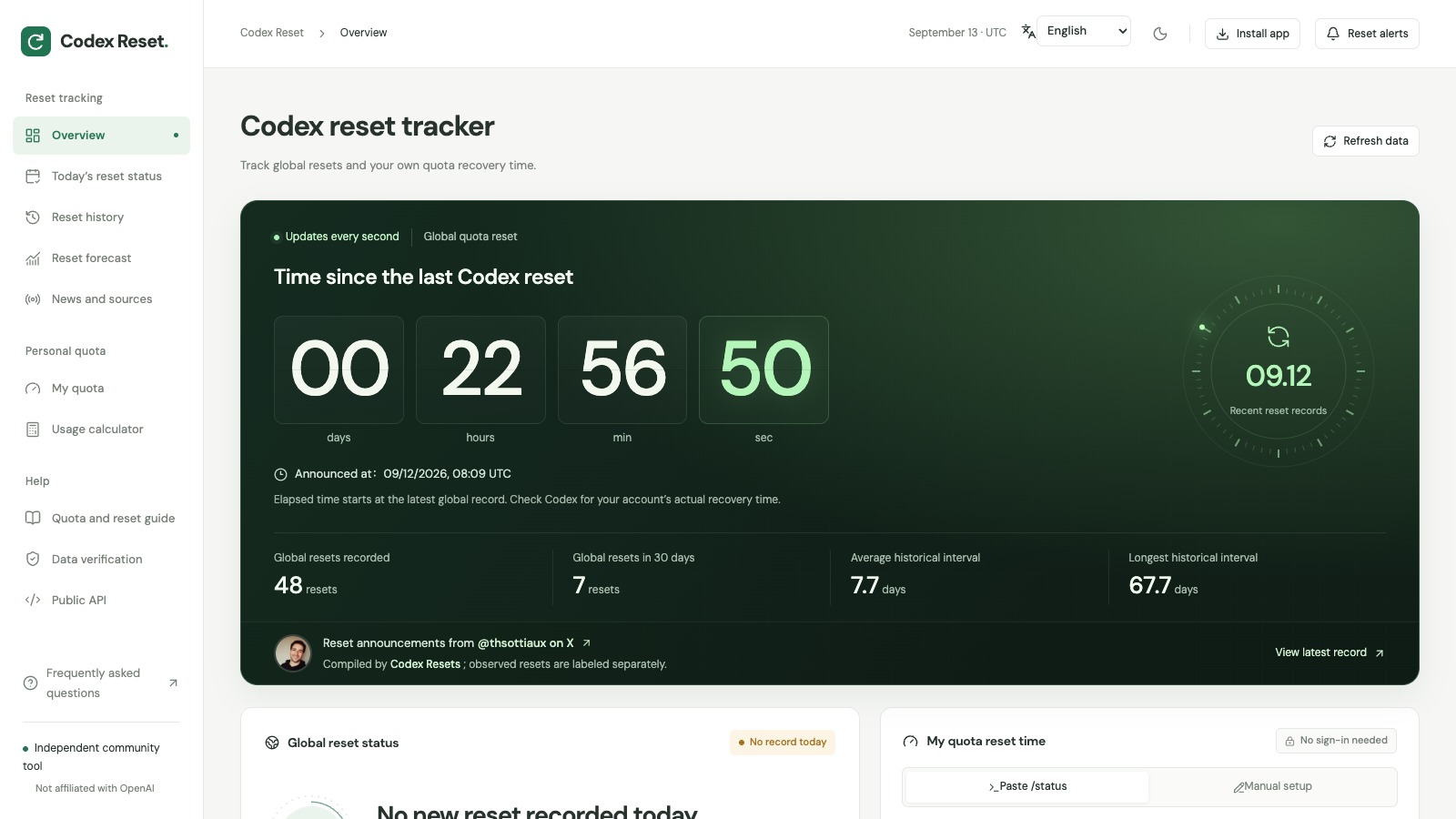
On This Page8 sections
Hit a Codex limit in the middle of a task? The most useful number is the reset time shown in your own account. A public reset announcement can provide context, but your account's Usage page tells you what is available to you.
The codex reset tracker brings three useful tools together: a personal quota timer, a history of public reset announcements, and a calculator for spreading your remaining allowance across the days ahead. It is an independent community site that you can use without connecting your OpenAI account.
Here is a practical workflow for using it before your next coding session.
First, identify which reset you mean
“Reset” can refer to several different things. Mixing them up makes an otherwise accurate announcement easy to misread.
| What you are checking | Where to check it | What it tells you |
|---|---|---|
| Your short usage window, such as a 5-hour allowance where shown | Codex Usage or CLI /status | The remaining allowance and reset time shown for your account. |
| Your weekly allowance | Codex Usage or CLI /status | Whether the longer usage window is limiting your work. |
| A global reset announcement | The original announcement, then your account's Usage page | Whether a reset was announced for eligible users and whether your own balance changed. |
| A banked reset | Your account's available resets | Whether you have a saved reset you can choose to use before it expires. |
The applicable limits depend on your plan and account. Use OpenAI's current usage guidance for account-specific options.
The large timer on the Codex Reset homepage measures time since the latest recorded global reset. It counts upward. Your personal quota timer counts down from a reset time you enter. Treat those as two separate pieces of information.
Step 1: Read your actual reset time in Codex
Open your Codex client's Usage settings or the Codex usage dashboard. If you use the CLI, enter this inside an active Codex session:
/statusNote the allowance that is running low, its remaining percentage, and the reset time displayed. Check the correct account or workspace if you use more than one. OpenAI documents the CLI command and dashboard in its Codex usage instructions.
You only need the quota lines for the tracker. There is no reason to copy an account email, project path, conversation, or access token.
What you should have: your current allowance and the reset time actually shown by Codex. If the client does not expose enough information to copy, use the tracker's manual input option.
Step 2: Set up your personal timer
Open My quota, then:
- Choose Paste /status and paste the relevant quota lines.
- Select Parse locally.
- Check that the remaining percentages and reset dates match Codex.
- If a date or time was not recognized, switch to Manual setup and enter it explicitly.
Pay attention to the time zone. A time without a zone is interpreted using your device's local time. A weekly reset also needs a date; a clock time on its own can point to the wrong day.
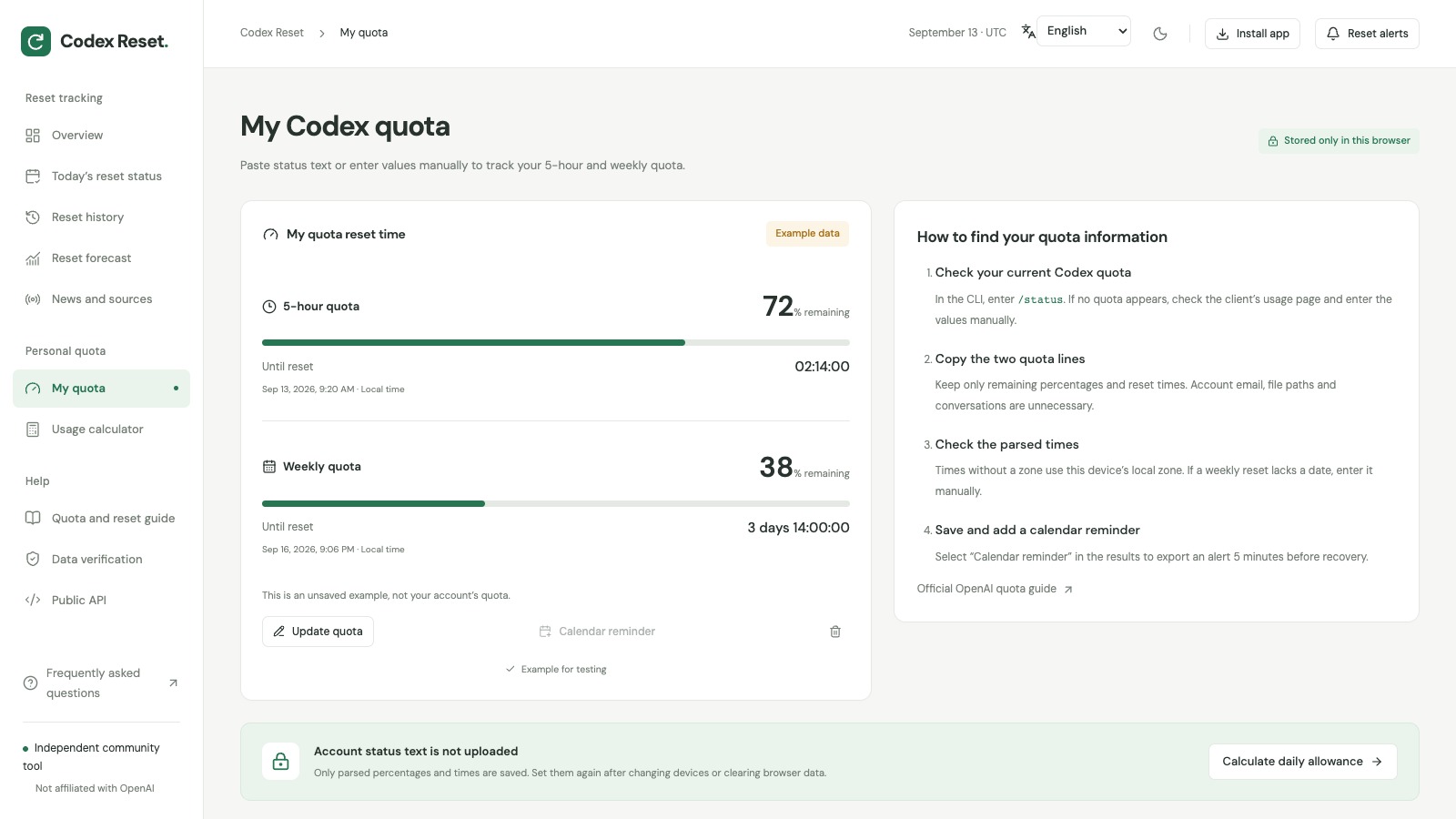
Source: Codex Reset — My quota. The built-in example shows how the results look. These are demonstration values, not an account balance. Select “Try an example,” then “Parse locally,” to reproduce this view.
The parser runs in your browser. Pasted terminal text is not uploaded or saved as raw text; the saved quota snapshot contains the parsed values and times. You can clear it from the tracker. Moving to another browser or clearing browser storage means entering those values again.
After saving your own values, Calendar reminder exports an .ics file with an alert before the recorded reset time. Import it into your calendar and check its notification settings. The example mode deliberately leaves this action disabled.
What you should see: a countdown for the quota windows you recorded. It is a timer based on that snapshot, so update the numbers after further usage or a reset.
Step 3: Check a public announcement against its source
Use Reset history when you want to understand a claim that “Codex just reset.” Filter by event type, search a date, or open a record's details.
The site draws on the Codex Resets public archive, supplemented by official release information. Reset announcements include links to @thsottiaux's posts on X. That link lets you inspect the announcement's wording and scope.
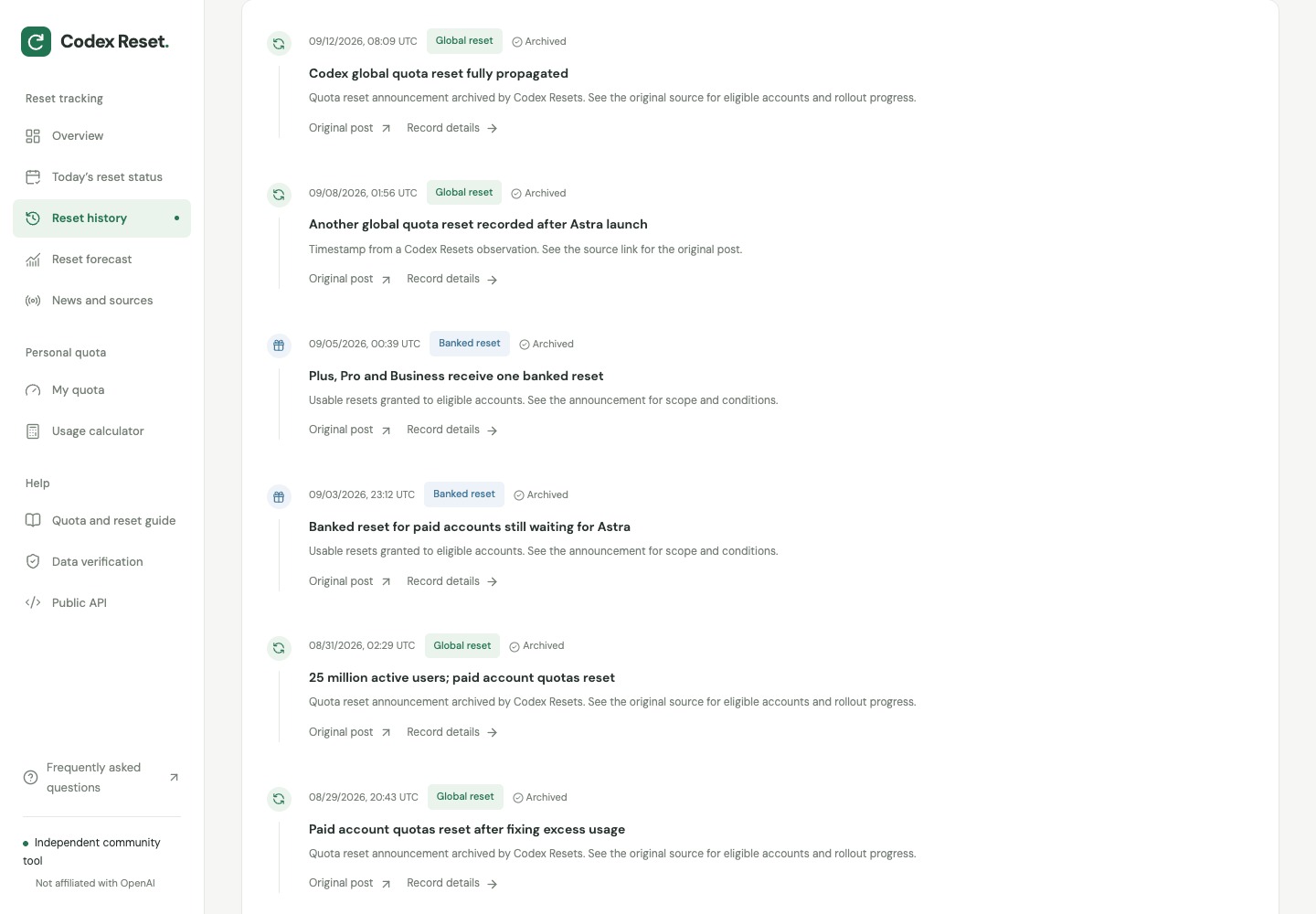
Source: Codex Reset — Reset history. The history view separates event types and exposes source links. “Archived” identifies a collected record that has not been independently checked by the site's maintainer.
Before relying on an entry, check three things: which accounts it covers, which allowance it affects, and whether it describes an immediate reset or a saved banked reset. History timestamps use UTC. An announcement timestamp does not establish the exact moment every eligible account received the change.
OpenAI describes a banked reset as a saved, single-use reset that you apply yourself. A full banked reset refreshes the eligible 5-hour and weekly windows and changes the weekly reset date. Availability and expiration depend on the offer; inspect the details shown in your account. An automatic global reset does not create a saved reset. See OpenAI's banked reset explanation.
What you should have: a source you can inspect and a clearer understanding of the event. Confirm the result in your own Usage page before scheduling work around it.
Step 4: Turn your remaining quota into a daily plan
The usage calculator answers a more useful planning question than a historical average: can your current allowance last until your displayed reset time?
Try this worked example:
- Weekly quota remaining: 40%.
- Time until reset: 4 days, 0 hours.
- Current daily usage: 14 percentage points.
Spreading 40 percentage points over four days gives a daily planning target of 10 percentage points. At a constant 14 points per day, the same allowance lasts about 2.9 days, leaving a gap before the reset.
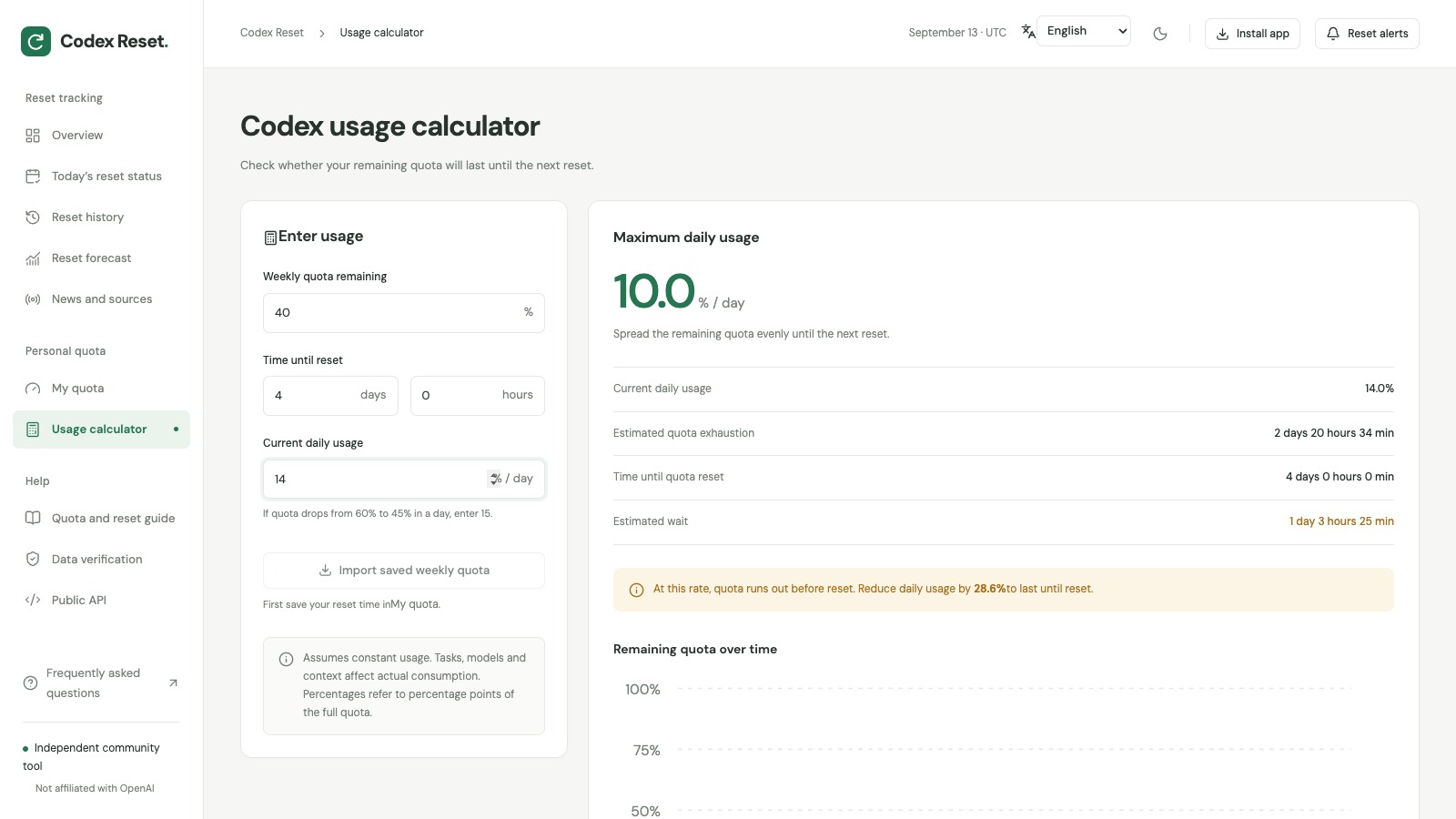
Source: Codex Reset — Usage calculator. A worked example entered into the live calculator. The result is a planning estimate, not a guaranteed number of coding tasks.
Use percentage points consistently. If your balance falls from 60% to 45% in a day, enter 15 as daily usage. This is different from taking 15% of whatever remains.
Task size, model choice, context and reasoning settings affect actual consumption, as OpenAI's pricing and usage documentation explains. A difficult debugging session can spend your budget differently from yesterday's work. Recheck your balance after a substantial task, and leave room for the work you most need to finish.
What you should have: a daily budget you can compare with observed usage, plus an estimate of whether your current pace leaves a waiting period.
If the numbers look wrong
| What you notice | What to check next |
|---|---|
| The tracker reached zero, but Codex still shows a limit | Refresh Codex Usage, check the affected allowance, then update the saved snapshot. The tracker cannot confirm that your account recovered. |
| Your weekly reset date changed | If you applied a full banked reset, reread the new reset time in Usage and replace the old timer. |
| A public reset was announced, but you cannot find a banked reset | Read the event type and eligibility. An automatic reset and a saved reset are different benefits. |
| Pasted text does not produce a reliable date | Use Manual setup with an explicit date, time and the correct local time zone. |
| You changed devices and your quota record is missing | Enter it again. Personal snapshots stay in the browser where you saved them. |
For a suspected account issue, use OpenAI Support rather than the tracker. Include the relevant limit, time and time zone, client, and account details requested by OpenAI's troubleshooting guidance.
Two questions worth settling before you rely on it
Can Codex Reset restore my allowance?
No. It provides a timer, records and calculations. Account changes happen through Codex and OpenAI's own systems. The tracker does not need your OpenAI login or an API key.
Can it tell me when the next global reset will happen?
The historical average is a description of past records, not an announced schedule. The site also marks its history as partial. Its forecast page can show insufficient data; that means no reliable probability is available. Plan around your account's displayed reset time.
For regular use, save your current values in Codex Reset, add a calendar reminder, and revisit the calculator after significant usage. The site supports English, Chinese, Korean, Japanese and German, with an installable app and offline access to saved tools and records. Fresh public reset information still requires a connection.
New to the terminal client? The Codex CLI entry on AI IDE List links to the tool and its official resources.
Sources and image credits
- OpenAI: Using Codex with your ChatGPT plan — checking usage, reset times and account-specific limits.
- OpenAI: How banked Codex resets work — saved resets, eligibility and expiration.
- OpenAI: Codex pricing and usage — factors that affect quota consumption.
- Codex Resets API documentation — the public archive used by the tracker.
- Thibault Sottiaux (@thsottiaux) on X — the source of reset announcement posts linked from the archive. Open each record's original post to check its wording and scope.
The cover image is a screenshot of the Codex Reset homepage. Each inline screenshot links to its source page in the caption.
Interface checked and screenshots captured on September 13, 2026. Quota screenshots use demonstration data; announcement counts and elapsed times are snapshots, not live values in this article.
Continue Reading
More articles connected to the same themes, protocols, and tools.

How to Build an MCP Server for Your Website on Cloudflare Workers

Dify New Agent Explained: Linux Sandboxes, Skills, Workflows, and the New Agent Runtime

Lauren Tan's Grok Bot Workflow: Chief of Staff, Cloud Agents, and pstack
Referenced Tools
Browse entries that are adjacent to the topics covered in this article.