

Fal AI
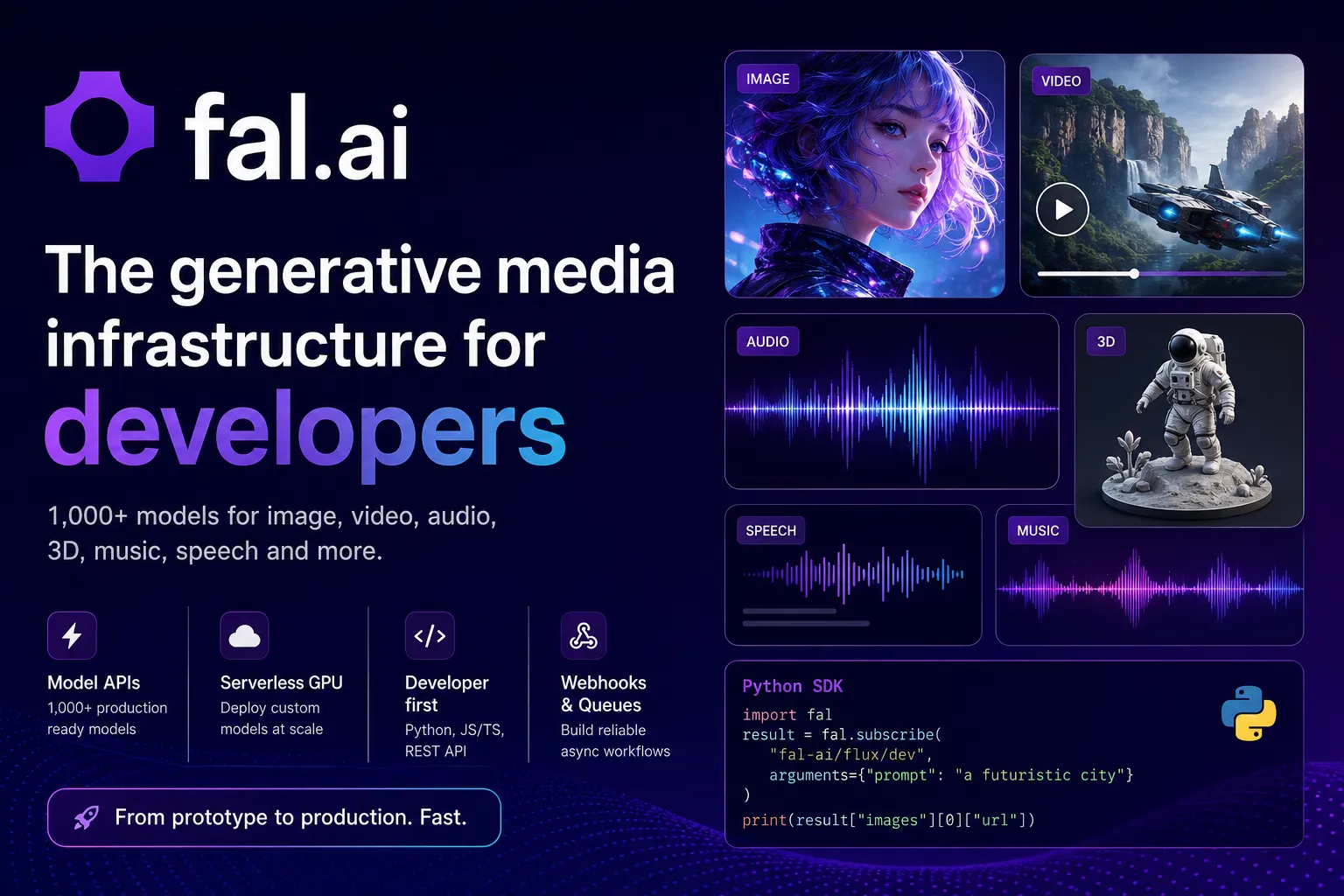
fal.ai is a generative media infrastructure platform for calling 1,000+ image, video, audio, music, speech, 3D, and multimodal models through one API or deploying custom models on serverless GPUs. It is best for developers building AI media features that need fast inference, scalable endpoints, and pay-as-you-go model access.
fal.ai is a strong choice for developers building AI media products that need fast hosted model APIs, async inference workflows, and a path to custom serverless GPU deployments. It is less suitable for users looking for an AI coding tool, a purely local model runtime, or general-purpose app hosting.
Pricing Plans
Free Tier
fal.ai advertises a free tier for getting started; usage beyond included credits is billed by model output or compute usage.
Model APIs
Prebuilt model endpoints are billed by output unit, such as per image, per megapixel, per second of video, or per video.
Image Models
Example public pricing includes Qwen image generation at $0.02 per megapixel and selected image models around $0.03-$0.04 per image.
Video Models
Example public pricing includes Wan 2.5 at $0.05 per output second, Kling 2.5 Turbo Pro at $0.07 per second, and Veo 3 at $0.40 per second.
Serverless & Compute
Custom deployments can run on GPU infrastructure, with H100 pricing shown as low as $1.89/hour.
Enterprise
Custom models, dedicated serverless infrastructure, SLA guarantees, private model hosting, SSO, user management, and enterprise support.
Core Features
1Model APIs
- 1,000+ optimized model endpoints
- Image, video, audio, music, speech, 3D, and multimodal models
- Unified API for hosted and custom endpoints
- Playground, schemas, pricing, and code examples on model pages
2Serverless GPU
- Deploy custom AI models and pipelines
- Autoscale from zero to thousands of GPUs
- Python class-based app deployment
- Per-second runner billing by machine type
3Developer SDKs
- Python client
- JavaScript and TypeScript client
- REST API access
- cURL examples for quick integration
4Inference Workflows
- Synchronous inference
- Queue-based asynchronous inference
- Streaming updates
- Webhook callbacks for long-running jobs
5Custom Model Hosting
- Private model endpoints
- Bring your own weights
- LoRA and fine-tuned model workflows
- ComfyUI serverless API patterns
6Enterprise Scale
- SOC 2 compliance
- Single Sign-On
- Private endpoints
- Usage analytics and priority support
Pros
- Strong fit for generative media apps that need image, video, audio, speech, music, and 3D models from one API.
- Fast path from playground testing to production API integration with Python, JavaScript, TypeScript, and REST.
- Serverless GPU model lets teams deploy custom models without managing GPU autoscaling directly.
- Queue, streaming, and webhook patterns are practical for long-running video and training workloads.
- Enterprise options cover private model hosting, custom models, dedicated infrastructure, SSO, and SLA needs.
Cons
- Not an AI IDE, code editor, or coding assistant by itself.
- Model pricing varies significantly by endpoint, output size, duration, and generation settings.
- Serverless custom deployments are enterprise-gated in the current documentation.
- Long-running media generation needs queue, webhook, retry, and cost-estimation logic in the application.
- Teams must review model-specific licensing, safety, privacy, and output-rights constraints before production use.
Why Choose fal.ai?
fal.ai is most useful when the product needs generative media infrastructure rather than a single model API. Many AI apps now need a mix of image generation, video generation, editing, upscaling, background removal, speech, music, sound effects, 3D, LoRA workflows, and custom pipelines. fal.ai packages those workflows behind a developer API with playgrounds, schemas, pricing, examples, and production-oriented inference patterns.
The core advantage is speed to integration. A developer can test a model in the browser, copy Python or JavaScript code, call it with an API key, and later move toward queues, webhooks, private endpoints, or custom serverless deployments as traffic grows.
Core Workflow
The simplest workflow starts with the Model APIs. Choose a model from the marketplace, test it in the playground, copy the code example, and call it from a backend or app using the Python client, JavaScript client, REST API, or cURL. This is the right entry point for most teams because it avoids infrastructure work and charges based on model output.
For long-running jobs such as video generation, training, or complex media pipelines, asynchronous inference is usually the better pattern. The app submits a request, tracks queue status, receives progress or logs, and retrieves the result when ready. Webhooks are important because they avoid keeping user-facing connections open while a model generates output.
For proprietary models or specialized pipelines, fal Serverless is the next step. The team writes a Python app, defines hardware requirements, controls model weights and runtime behavior, and lets fal handle provisioning, scaling, networking, and observability.
Use Cases
fal.ai fits products that generate or transform media: AI image editors, avatar apps, video-generation tools, creative suites, ad generation platforms, e-commerce media tools, music and sound-effect generators, voice products, 3D asset workflows, game asset pipelines, and AI design tools.
It is also useful for agentic creative workflows. A product can chain multiple endpoints: generate an image, upscale it, remove the background, animate it, create audio, and store the result. The platform is strongest when those chains are treated as production workflows with cost estimation, retries, queueing, and result handling.
Comparison to Alternatives
Compared with Replicate, fal.ai is more aggressively positioned around high-performance generative media inference and a large production model API surface. Replicate may feel simpler for some open-source model publishing workflows, while fal.ai is attractive when speed, model variety, media pipelines, and serverless GPU scaling matter.
Compared with RunPod, fal.ai abstracts more of the media API layer. RunPod is better when the team wants direct GPU Pods, serverless workers, and infrastructure control. fal.ai is better when the team wants ready-to-call models and a smoother path from hosted model APIs to private custom endpoints.
Compared with Modal, fal.ai is less general-purpose and more media-model focused. Modal is excellent for Python serverless compute and custom infrastructure logic, while fal.ai is optimized around generative media endpoints, model playgrounds, output-based pricing, and AI media workflows.
Compared with OpenAI or Google model APIs, fal.ai gives access to a wider mix of third-party and open media models from one interface. The tradeoff is that teams must evaluate each model’s quality, pricing, latency, safety profile, and licensing individually.
Best Configuration
For a new product, start with hosted Model APIs before deploying custom infrastructure. Pick one or two candidate models, test quality and latency in the playground, estimate costs using output pricing, and build a small integration with async queue handling.
For production apps, implement cost estimation early. Image, video, and audio generation can become expensive when resolution, duration, retries, or batch size grows. A good integration should show estimated cost, validate user inputs, enforce output limits, and handle failed or delayed jobs gracefully.
For long-running jobs, use webhooks rather than polling aggressively. Pair webhook callbacks with idempotent job handling so duplicate notifications, retries, or user refreshes do not create duplicate charges or inconsistent state.
For enterprise deployments, isolate sensitive workflows into private endpoints and review data handling, model access controls, user management, and SSO before connecting proprietary content or customer data.
Migration Notes
Teams moving from a single model provider should begin by mapping current prompts, parameters, output formats, and error handling to fal.ai’s endpoint schemas. Do not assume equivalent model names behave identically. Compare output quality, latency, price, seed behavior, aspect ratio support, safety filters, and post-processing needs.
Teams moving from self-managed GPUs should identify which workloads are truly custom. Commodity media generation may be cheaper and faster through hosted Model APIs, while proprietary fine-tunes, custom pipelines, or private weights may belong on Serverless.
Teams moving from prototype notebooks should formalize the production workflow: request validation, async job state, webhooks, storage, moderation, retry limits, cost caps, and model fallback. fal.ai removes much of the GPU management burden, but the application still needs strong product-level controls.
Best For
- AI apps that need fast image, video, audio, speech, music, or 3D generation APIs
- Developers adding generative media features to web, mobile, or backend products
- Teams comparing hosted model APIs before committing to custom infrastructure
- AI startups deploying private or fine-tuned media models
- Products that need async queues, webhooks, and scalable inference pipelines
- Enterprises that need private model hosting, custom fine-tunes, dedicated infrastructure, and SLA-backed support
Not Ideal For
- Developers looking for an AI code editor or IDE extension
- Teams that only need text LLM chat or code completion
- Users who want a fully local model runtime with no cloud dependency
- Projects that need simple static hosting or general app deployment rather than model inference
- Applications that cannot send prompts, media, model inputs, or outputs to a hosted AI infrastructure provider
Privacy Notes
fal.ai is a cloud-hosted generative AI media platform. Its terms state that customers retain rights to customer input subject to the license needed to provide the service, and enterprise materials state that enterprise customer data is not used to train fal models. Teams should review model-specific terms, API Services terms, Compute Infrastructure terms, privacy policy, acceptable use policy, data retention, endpoint exposure, and enterprise privacy settings before sending proprietary or regulated media data.
Alternatives
Sources
- Official website
- Official pricing
- Documentation overview
- Quickstart documentation
- Model APIs overview
- Inference methods documentation
- Asynchronous inference documentation
- Webhooks documentation
- Serverless introduction
- Serverless pricing documentation
- Platform pricing API
- Enterprise page
- fal Python GitHub repository
- fal JavaScript GitHub repository
- Terms of Service
- Privacy Policy
Update History
- Jun 16, 2026: Created initial directory entry using fal.ai official website, pricing, documentation, model API docs, serverless docs, enterprise page, SDK repositories, and legal pages.
Related Tools
More listings in a similar part of the directory.




Fal AI Articles
Guides, comparisons, and launch notes connected to this listing.

