On This Page8 sections
Key Takeaways
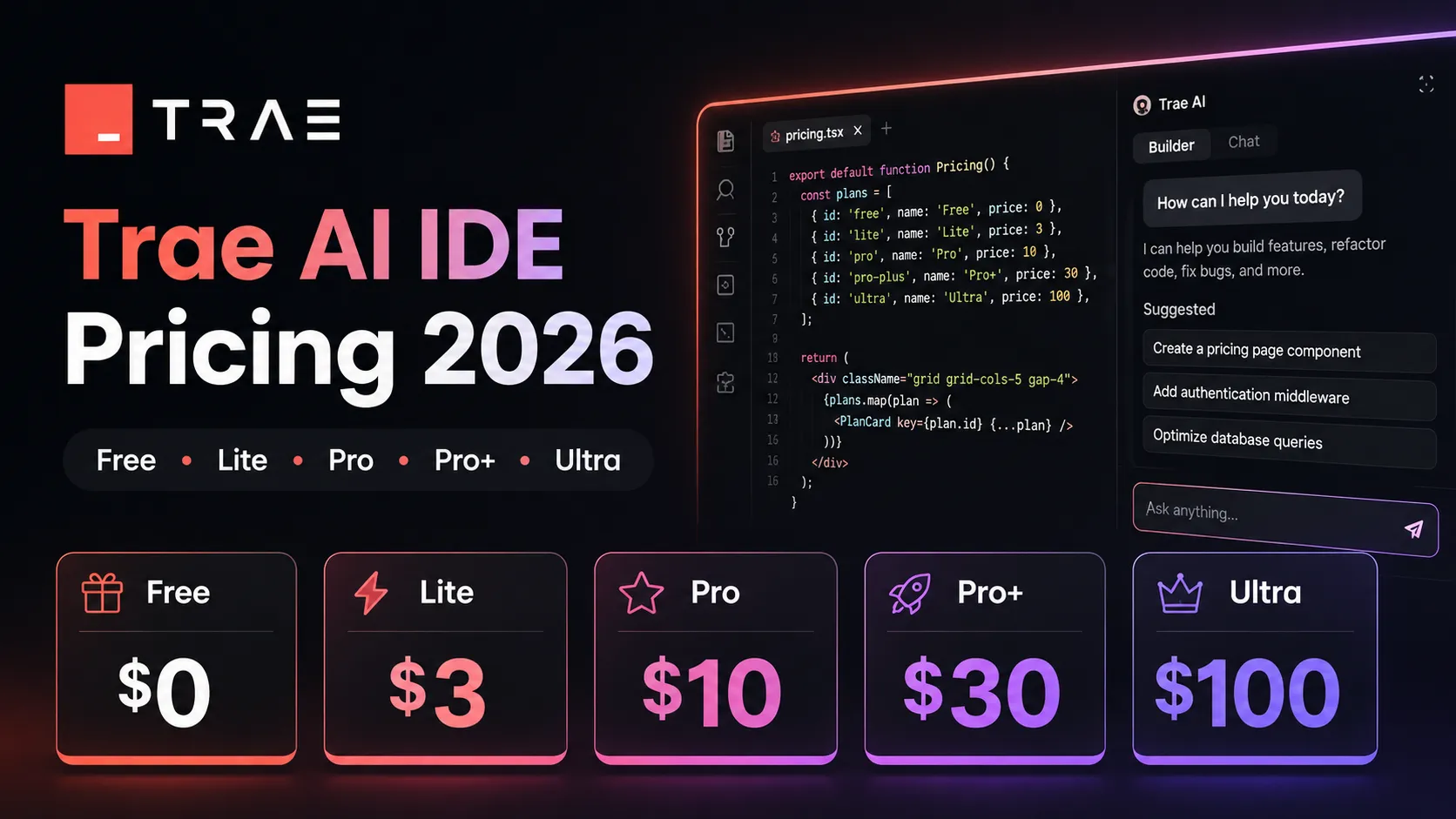
- Trae AI IDE is no longer just a simple “free vs Pro” product. In 2026, its public pricing page lists five tiers: Free, Lite, Pro, Pro+, and Ultra.
- The cheapest paid plan is Lite at $3/month, while the main developer plan is Pro at $10/month after a 7-day free trial.
- Trae now uses a token-based usage balance model, where AI work consumes Basic Usage and Bonus Usage rather than a simple fixed request count.
- Pro is the best default plan for most individual developers because it unlocks included SOLO mode, unlimited autocomplete, fast queue priority, and up to 10 concurrent cloud tasks.
- Pro+ and Ultra are not just “more expensive Pro.” They are aimed at heavier agentic workflows, multi-task cloud execution, and users who routinely burn through context-heavy sessions.
- Old Trae pricing guides mentioning 600 fast requests are outdated. Current 2026 pricing should be evaluated by token consumption, model choice, context size, and cloud-task concurrency.
Trae AI IDE Pricing 2026 at a Glance
As of June 26, 2026, Trae’s official pricing structure is built around five plans:
| Plan | Monthly price | Best for | Key usage signal |
|---|---|---|---|
| Free | $0 | Trying Trae, light autocomplete, occasional AI help | Limited usage, standard queue |
| Lite | $3/month | Students, hobby projects, small edits | $5 Basic Usage + Bonus Usage |
| Pro | $10/month | Daily individual developers | $20 Basic Usage + Bonus Usage |
| Pro+ | $30/month | Heavy AI coding sessions | $90 Basic Usage + Bonus Usage |
| Ultra | $100/month | Power users and advanced model access | $400 Basic Usage + Bonus Usage |
Trae also advertises yearly billing with 25% savings, so annual plans may materially reduce effective monthly cost for users who have already committed to the editor.
The important pricing shift is not only the plan list. The real change is the billing unit. Trae’s current model converts token-generated costs into a dollar-denominated usage balance, then deducts that balance from the user’s monthly allocation.
Why Trae Pricing Changed: From Simple Requests to Token Economics
Earlier Trae coverage often described the product in terms of fast requests, slow requests, or a fixed monthly prompt allowance. That framing is now incomplete.
The 2026 pricing page and billing documentation point to a model where usage depends on:
- Input tokens: the prompt, selected files, chat history, and repository context.
- Output tokens: generated code, explanations, refactors, and test files.
- Model choice: stronger models usually cost more per token.
- Context size: large repositories, long conversations, and broad codebase scans consume more.
- Agentic loops: multi-step tasks can trigger repeated planning, reading, editing, and verification.
A small inline fix and a full-stack refactor may both look like one prompt to a user, but they are not equal economically. Token-based billing makes that difference visible.
Estimated AI cost = input tokens + output tokens + cache/context operations × model rate
Monthly remaining usage = Basic Usage + Bonus Usage - consumed cost
This is why Trae’s 2026 pricing should be judged less like a normal IDE subscription and more like a packaged AI compute budget.
Free Plan: Good for Testing, Not for Daily Agentic Coding
The Free plan is still useful, but it should be treated as an evaluation tier rather than a serious production workflow tier.
According to the current plan comparison, Free includes:
- Limited monthly usage
- Standard queue priority
- 5,000 autocompletions per month
- 2 concurrent cloud tasks
- Limited TRAE IDE SOLO mode
- Limited model early access
The Free plan is a good fit for:
- Developers evaluating Trae against Cursor, Windsurf, or Copilot.
- Occasional coding assistance.
- Lightweight autocomplete.
- Small scripts, bug explanations, and low-context edits.
It is a poor fit for:
- Long coding sessions.
- Large repositories.
- Multi-file refactoring.
- Daily AI pair programming.
- Agentic workflows that require queue priority.
The main hidden cost of Free is not money. It is workflow interruption. Standard queue priority and limited usage can break momentum when AI assistance becomes part of the coding loop.
Lite Plan: The $3 Entry Plan for Light Builders
The Lite plan costs $3/month and includes:
- $5 Basic Usage + Bonus Usage
- Unlimited autocomplete
- Up to 2 concurrent cloud tasks in TRAE Work on web/desktop
- Fast queue priority
Lite is one of Trae’s most interesting 2026 pricing moves because it creates a very low-friction paid tier. Analysis shows this tier is designed for users who want better-than-free reliability without jumping straight to a full AI coding subscription.
Lite makes sense for:
- Students.
- Indie hackers validating small ideas.
- Developers using Trae as a secondary editor.
- Small bug fixes and single-file changes.
- Users who mostly need autocomplete and occasional chat.
Lite is not ideal for:
- Daily production coding.
- Heavy repository indexing.
- Multi-agent workflows.
- Large context prompts.
- Users who expect SOLO mode to be fully included.
The biggest practical limitation is that Lite keeps the same 2 concurrent cloud task ceiling as Free. For users who want Trae’s agentic workflow as the main value proposition, Pro is the cleaner upgrade.
Pro Plan: The Best Default Choice for Most Developers
The Pro plan costs $10/month after a 7-day free trial and is the most important Trae tier for individual developers. It includes:
- $20 Basic Usage + Bonus Usage
- Unlimited autocomplete
- TRAE IDE SOLO mode included
- Up to 10 concurrent cloud tasks in TRAE Work
- Fast queue priority
Pro is the plan that turns Trae from a low-cost AI editor into a more complete agentic coding environment.
The key upgrade is not just more usage. It is the combination of:
- SOLO mode included for more autonomous coding workflows.
- 10 concurrent cloud tasks, which supports parallel work.
- Unlimited autocomplete, which removes friction from normal editing.
- Fast queue priority, which matters during peak usage.
For most developers, Pro is the pricing sweet spot because it is cheaper than many competing AI coding subscriptions while still unlocking the core Trae experience.
Pro+ Plan: For Heavy Sessions, Not Casual Upgrades
The Pro+ plan costs $30/month. Trae describes it as including everything in Pro plus 3.5x more usage than Pro and up to 15 concurrent cloud tasks. The plan comparison table also lists $90 Basic Usage + Bonus Usage for Pro+.
Pro+ is best understood as a heavy-usage tier for developers who already know they are exhausting Pro.
It fits users who:
- Work with large codebases.
- Run long context-heavy prompts.
- Use agent mode for feature implementation.
- Frequently ask Trae to inspect multiple files.
- Need more parallel cloud tasks.
- Want fewer interruptions from usage limits.
Pro+ is probably overkill if Trae is only used for autocomplete, simple chat, or occasional refactoring.
A practical decision rule:
Start with Pro.
Upgrade to Pro+ only after usage history shows repeated Basic Usage exhaustion or workflow-blocking limits.
This avoids paying for capacity before knowing whether the actual bottleneck is usage, model choice, prompting style, or repository size.
Ultra Plan: Built for Power Users and Early Model Access
The Ultra plan costs $100/month and includes:
- $400 Basic Usage + Bonus Usage
- 20x more usage than Pro
- Model early access
- Up to 20 concurrent cloud tasks
- Included SOLO mode
Ultra is not a normal developer subscription. It is closer to a power-user AI compute plan.
Ultra makes sense when Trae is used as a core production system for:
- High-volume agentic coding.
- Multiple concurrent feature branches.
- Repeated large-repository analysis.
- Heavy prototyping.
- Early access to newer or more expensive models.
- Solo founders or technical operators replacing multiple lower-level tools.
The main risk is underutilization. A user who does not consistently consume heavy token volume may get better value from Pro or Pro+.
The Hidden Cost: Token Burn Can Vary Wildly
The most common pricing mistake is assuming every Trae prompt has roughly the same cost.
In practice, token burn can vary dramatically:
- Small prompt: Fix this TypeScript type error.
- Medium prompt: Refactor this component and update the tests.
- Large prompt: Analyze this Next.js app, find architecture issues, update auth, rewrite API handlers, and generate tests.
The third task can consume much more usage because it may require broader context, more file reads, longer reasoning, larger outputs, and multiple edit cycles.
Cost-sensitive users should avoid vague prompts like:
Improve this whole project and fix anything wrong.A better prompt is scoped:
Review only /src/auth and /src/api/session. Identify the top 3 security or reliability issues. Do not edit files yet. Return a plan with estimated files to change.This pattern reduces unnecessary context loading and prevents the agent from spending usage before the developer approves the direction.
Trae vs Cursor, Windsurf, GitHub Copilot, and Claude Code Pricing
Trae’s 2026 pricing sits in a competitive market where most AI coding tools are moving toward usage-aware billing.
| Tool | 2026 pricing signal | Practical comparison |
|---|---|---|
| Trae | Free, $3 Lite, $10 Pro, $30 Pro+, $100 Ultra | Lower entry price, strong value for individual developers |
| Cursor | Free Hobby, Pro at $20/month, higher Pro+/Ultra tiers | Strong ecosystem and frontier-model workflow, but higher base Pro price |
| Windsurf | Free, Pro at $20/month, Max at $200/month, Teams pricing | Strong agentic coding positioning, but Pro is now priced above Trae Pro |
| GitHub Copilot | Pro at $10/month, Pro+ and business tiers; AI Credits model rolling out | Best GitHub-native option, but credit usage requires budget awareness |
| Claude Code | Included with Claude Pro/Max subscriptions | Strong terminal-first coding assistant, especially for Claude-heavy workflows |
Trae’s strongest pricing advantage is the $10 Pro tier paired with included SOLO mode and 10 concurrent cloud tasks. Its weakness is that token-based usage is harder to predict than old request-based plans.
Which Trae Plan Should You Choose?
Choose Free if...
- You are evaluating Trae for the first time.
- You mostly want to test autocomplete quality.
- You do not need reliable queue priority.
- You are comparing it against Cursor, Windsurf, or Copilot.
Choose Lite if...
- You want the lowest paid tier.
- You work on small projects.
- You need unlimited autocomplete.
- You do not need heavy SOLO usage.
- You want fast queue priority without paying for Pro.
Choose Pro if...
- You code with AI daily.
- You want SOLO mode included.
- You want a serious AI IDE without paying $20/month.
- You run multi-file edits, debugging, and feature work.
- You benefit from up to 10 concurrent cloud tasks.
Choose Pro+ if...
- Pro usage is not enough.
- You run large context prompts.
- You use Trae for real product development.
- You frequently delegate tasks to agents.
- You need more concurrency and fewer usage interruptions.
Choose Ultra if...
- Trae is a core daily production tool.
- You need early model access.
- You run many cloud tasks in parallel.
- You consistently hit Pro+ limits.
- The cost is justified by saved engineering time.
Advanced Cost-Control Tips for Trae AI IDE
Token-based pricing rewards disciplined workflows. The following practices can materially reduce wasted usage.
1. Ask for a Plan Before Edits
Use Trae to inspect before it acts.
Analyze the issue and propose a minimal edit plan. Do not modify files until the plan is approved.This prevents broad, expensive changes from starting too early.
2. Limit File Scope Explicitly
Instead of asking Trae to inspect the whole repository, name the folders.
Only inspect /app/api, /lib/db, and /components/auth. Ignore unrelated files.3. Separate Diagnosis From Implementation
A single huge prompt can create unnecessary output. A better pattern is:
- Step 1: diagnose.
- Step 2: choose one fix.
- Step 3: implement.
- Step 4: generate tests.
This improves control and makes it easier to stop before spending more usage.
4. Use Cheaper or Faster Models for Routine Work
When model switching is available, reserve premium reasoning models for hard tasks:
- Architecture decisions.
- Security-sensitive changes.
- Multi-file refactors.
- Complex debugging.
Use lighter models for:
- Naming.
- Comments.
- Simple transformations.
- Boilerplate.
- Documentation drafts.
5. Keep Conversations Short
Long chat history can increase context cost. For a new task, start a fresh thread when the previous context is no longer needed.
6. Avoid “Do Everything” Prompts
Bad prompt:
Make this project production ready.Better prompt:
Review the deployment path only. Focus on environment variables, build errors, and runtime exceptions. Return a checklist first.Common Pitfalls in Trae Pricing
Pitfall 1: Comparing Only Monthly Subscription Price
Trae Pro at $10/month looks cheaper than Cursor Pro or Windsurf Pro at $20/month, but the real comparison depends on included usage, model quality, task complexity, and whether the tool fits the developer’s workflow.
Pitfall 2: Treating Bonus Usage as Guaranteed Cash Value
Bonus Usage is useful, but cost planning should be based on the published Basic Usage allocation first. Bonus mechanics may vary and should not be the only reason to choose a plan.
Pitfall 3: Upgrading Too Early
Many users should start with Pro, monitor usage, then upgrade only if limits become a repeated bottleneck.
Pitfall 4: Ignoring Cloud Task Concurrency
Concurrency matters for users who delegate multiple tasks. Free and Lite list 2 concurrent cloud tasks, Pro lists 10, Pro+ lists 15, and Ultra lists 20.
Pitfall 5: Using Large Context by Default
Large context feels convenient, but it can quickly consume usage. Precision beats volume in token-based AI coding.
Is Trae AI IDE Worth Paying for in 2026?
For most individual developers, yes — Pro is the best-value Trae plan in 2026.
The reasoning is straightforward:
- Free is useful but limited.
- Lite is cheap but still constrained for agentic work.
- Pro unlocks the core Trae experience at $10/month.
- Pro+ is valuable only after usage pressure is proven.
- Ultra is for unusually heavy users.
Trae’s pricing is especially attractive for developers who want an AI IDE with agentic features but do not want to start at the $20/month level common among major competitors.
However, the move to token-based usage means the cheapest plan is not always the cheapest outcome. A developer who writes vague prompts against large repositories may burn through usage faster than expected, while a disciplined user can get strong value from Pro.
Conclusion
Trae AI IDE pricing in 2026 is best understood as low-cost entry plus usage-aware AI compute. The headline prices are simple — Free, $3, $10, $30, and $100 — but the real cost depends on how much context, model power, and agentic execution each workflow consumes.
For most developers, the recommended path is:
- Start on Free to test editor fit.
- Move to Pro if Trae becomes part of daily coding.
- Upgrade to Pro+ only when usage history proves Pro is too small.
- Use Ultra only when Trae is saving enough engineering time to justify a $100/month tool.
The smartest buying decision is not simply choosing the plan with the highest usage. It is matching the plan to the actual coding workflow, then controlling token burn with scoped prompts, shorter sessions, and deliberate model selection.
Continue Reading
More articles connected to the same themes, protocols, and tools.
Referenced Tools
Browse entries that are adjacent to the topics covered in this article.