On This Page8 sections
Key Takeaways
- dshplugin usually refers to the emerging DeepSeek Harness plugin ecosystem, commonly written as DSH plugin, DSH plugins, or DeepSeek Harness plugins.
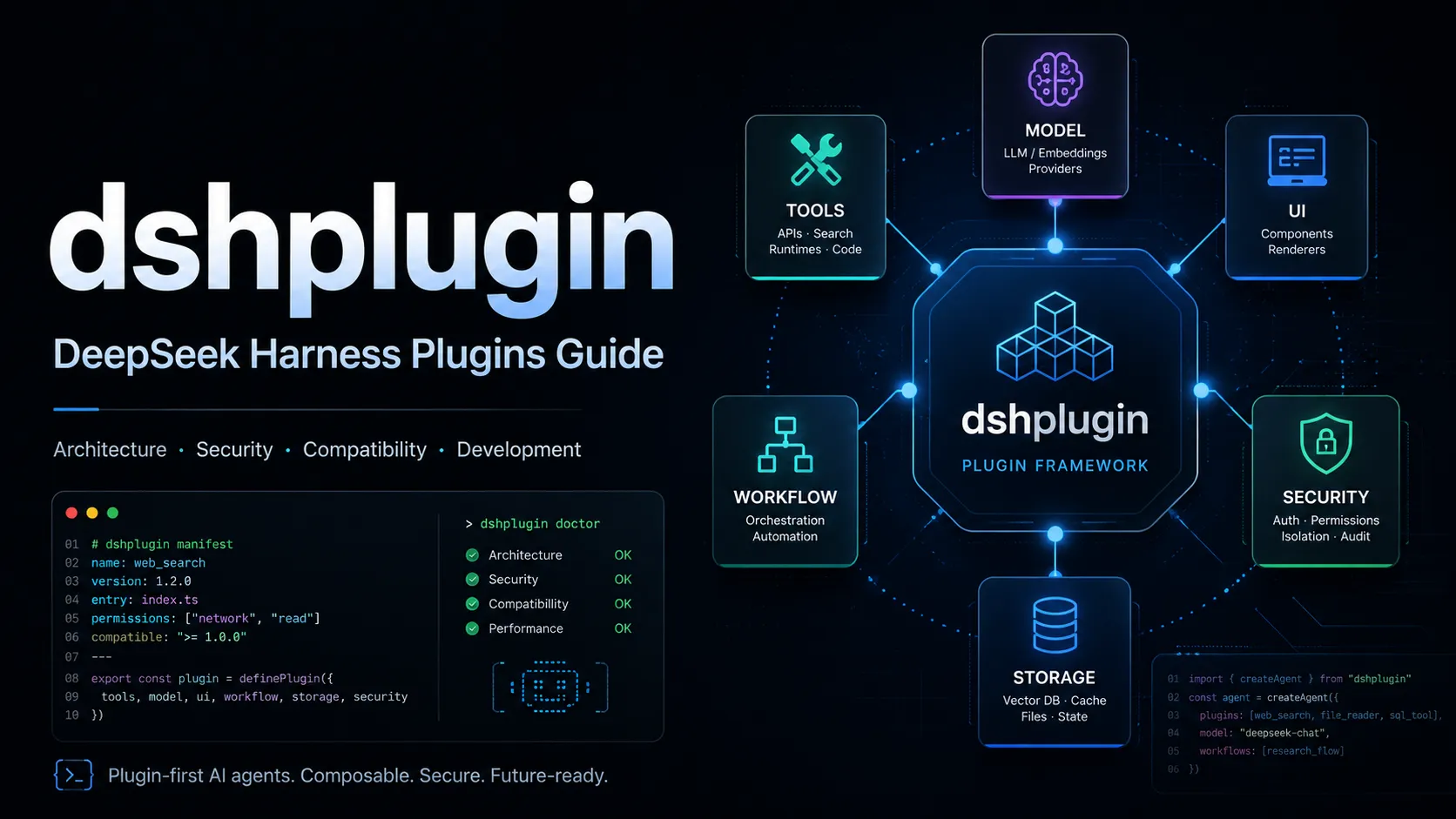
- DeepSeek Harness, abbreviated DSH, is an open-source agent harness built around a deliberately plugin-first architecture. DeepSeek describes the project with the principle “Everything is a plugin.”
- DSH plugins are more fundamental than typical IDE extensions. Model adapters, tools, sessions, persistence, sandbox behavior, agent loops, UI components, and other capabilities can all be implemented or replaced through plugins.
- The architecture is built on Cordis, which gives plugins access to shared services, typed events, lifecycle-aware effects, and composable configuration.
- DeepSeek Harness remains in developer preview, so compatibility-breaking changes should be expected. Plugin users should check recent commits, DSH compatibility, dependencies, permissions, and installation scripts before adopting community packages.
- For developers, the opportunity is larger than building simple tool integrations. DSH can be extended with tools, model providers, UI behavior, permission hooks, storage, workflows, sandbox layers, and other agent infrastructure.
- For users searching for
dshplugin, the most useful resources are likely to become plugin directories, compatibility databases, security scanners, installation guides, and curated lists of reliable DSH plugins rather than ordinary blog lists.
What Is dshplugin?
dshplugin is an emerging search term associated with plugins for DeepSeek Harness, the open-source agent harness developed by DeepSeek AI.
The official project uses dsh as the short name for DeepSeek Harness. DeepSeek describes the architecture as plugin-based and explicitly invites developers to participate in the DSH plugin ecosystem.
The keyword appears in several forms:
dshplugindsh plugindsh pluginsdsh-pluginDeepSeek Harness pluginDeepSeek Harness plugins
These phrases generally describe the same ecosystem, but they are not equally important technically.
dsh plugin is the clearer natural-language form, while dsh-plugin is especially important for discovery because DeepSeek asks plugin authors to associate their GitHub repositories with the dsh-plugin topic.
This distinction matters because the unspaced keyword dshplugin can be ambiguous. Someone searching it today is likely looking for one of four things:
- A directory of DSH plugins.
- Instructions for installing a DeepSeek Harness plugin.
- Documentation for developing a DSH plugin.
- Recommendations for useful or trustworthy plugins.
Understanding that search intent is more useful than treating dshplugin as the formal name of one specific product.
What Is DeepSeek Harness?
DeepSeek Harness is an agent harness: the infrastructure surrounding an AI model that turns model inference into a usable agent system.
An LLM by itself generates tokens. An agent harness adds the systems required to perform useful work, such as:
- tool execution;
- file access;
- shell commands;
- session state;
- persistent storage;
- model routing;
- permissions;
- sandboxing;
- planning and workflows;
- subagents;
- user interfaces.
DeepSeek Harness exposes much of this infrastructure through plugins rather than embedding every capability into a rigid application core. Its architecture makes model adapters, the tool registry, session handling, and the agent loop replaceable through configuration.
That makes DSH substantially different from an application where plugins merely add optional convenience features.
In DSH, plugins are part of the architecture itself.
Why “Everything Is a Plugin” Matters
The phrase can sound like marketing until the architecture is examined more closely.
A conventional coding assistant might roughly resemble:
Application
├── Model provider
├── Agent loop
├── Tools
├── Memory
└── Optional extensions
DeepSeek Harness instead moves toward a composition model closer to:
DeepSeek Harness
├── Model plugins
├── Tool plugins
├── Session plugins
├── Storage plugins
├── Sandbox plugins
├── Permission plugins
├── Agent-loop plugins
├── UI plugins
├── Workflow plugins
└── Other capability plugins
This has several practical consequences.
First, customization can happen below the UI layer. A plugin does not need to be a button, panel, or command. It can change how a fundamental agent capability works.
Second, capabilities can be replaced rather than merely extended. Cordis plugins can contribute services, typed events, and reversible effects to a shared context.
Third, an organization can create a specialized agent configuration without maintaining a full fork of DeepSeek Harness. In principle, the organization can assemble the required model provider, tools, security policy, storage, sandbox, and workflow behavior as composable layers.
That is why the DSH plugin ecosystem may become more strategically important than a conventional extension marketplace.
How the DSH Plugin Architecture Works
Understanding four concepts makes the ecosystem much easier to evaluate: Cordis, plugins, profiles, and bundles.
Cordis
Cordis is the framework underneath the DSH plugin system. Plugins can contribute services, typed events, and reversible effects to a shared context.
A useful mental model is:
Cordis Context
     │
     ├── model service
     ├── tools service
     ├── session service
     ├── filesystem service
     ├── shell service
     ├── sandbox service
     └── custom plugin services
Plugins can register capabilities with that context and depend on other capabilities being available.
This is more structured than simply loading arbitrary JavaScript files into an application process.
Plugins
A plugin provides or modifies a capability.
Examples can include:
- adding an agent tool;
- intercepting a tool call;
- exposing a model provider;
- changing approval behavior;
- rendering additional UI;
- implementing persistence;
- adding a browser capability;
- introducing a new workflow service.
Plugins can also hook into execution points such as tool pre-execution, making policy enforcement a native extension pattern rather than an external workaround.
Profiles
A profile represents a named DSH composition.
A running DSH instance can be assembled as a plugin tree from ordered layers. A profile can contain bundles, out-of-tree plugins, and user-specific configuration patches.
This is important because two users can run DeepSeek Harness with very different capability sets while still using the same underlying project.
Bundles
Bundles group configuration and plugin code into reusable layers.
A simplified relationship looks like this:
Profile
  ↓
Bundles
  ↓
Plugin configuration
  ↓
Cordis plugin tree
  ↓
Running agent
This layering model is one of the reasons plugin compatibility deserves more attention than it might in a simpler extension system.
What Can a DSH Plugin Actually Do?
The potential scope is broad.
Tool Plugins
Tool plugins expose actions an agent can call.
Typical examples could include:
- querying an internal API;
- manipulating project files;
- interacting with databases;
- running specialized analysis;
- fetching external data;
- performing deployment operations.
Tool arguments and outputs can be defined with structured schemas.
Structured schemas matter because agents perform more reliably when tool contracts are explicit rather than relying on loosely formatted text.
Model Plugins
A model plugin can provide or modify access to an LLM backend.
This opens the possibility of configurations using:
- DeepSeek-hosted models;
- custom model gateways;
- OpenAI-compatible providers;
- local inference;
- organization-specific routing logic.
The broader architectural significance is that the model itself becomes replaceable infrastructure rather than the permanent center of the application.
UI Plugins
UI plugins can render information from agent events or add user-facing interaction components.
Potential uses include:
- specialized tool result cards;
- debugging interfaces;
- approval screens;
- visual workflow panels;
- domain-specific dashboards.
Permission and Policy Plugins
This category could become especially important for enterprise deployment.
A policy plugin can intercept operations before execution and decide whether they should proceed.
Possible policies include:
- block destructive shell commands;
- require approval for network access;
- restrict writable directories;
- allow specific tools only in trusted workspaces;
- apply different policies to different agent profiles.
Session, Storage, and Memory Plugins
Agent quality depends heavily on state management.
Plugins at this layer could control:
- session persistence;
- conversation history;
- long-term memory;
- checkpoints;
- external storage systems;
- retrieval layers.
These plugins are potentially more consequential than ordinary productivity extensions because they affect what an agent remembers and how reliably work can be resumed.
How to Start DeepSeek Harness Before Using Plugins
DeepSeek Harness can be launched through its npm-based command-line workflow, including the Web UI mode:
npx @deepseek-ai/dsh webDevelopers working directly from the repository can instead clone and build the project before running DSH from the workspace.
Because DeepSeek Harness is still in developer preview, plugin installation instructions should always be checked against the current version of both DSH and the individual plugin repository rather than copied indefinitely from an old tutorial.
For plugin development, developers can also use development-specific configuration and profile workflows to mount experimental plugins without treating them as permanent production components.
The key lesson is that DSH plugin installation is not yet something users should treat as a permanently stable marketplace workflow.
How to Evaluate a DSH Plugin Before Installing It
The most common mistake in a young plugin ecosystem is evaluating plugins only by stars or screenshots.
A stronger review process checks at least six dimensions.
1. DSH Compatibility
DeepSeek Harness remains in developer preview, so compatibility-breaking changes should be expected.
Check:
- when the plugin was last updated;
- which DSH revision or release it targets;
- whether recent Harness API changes are supported;
- whether unresolved compatibility issues exist;
- whether the maintainer actively follows upstream development.
A plugin last updated several months earlier can be more risky than a newer plugin with fewer stars.
2. Scope of Access
Determine what the plugin can actually touch.
Questions worth answering include:
- Can it execute shell commands?
- Can it read arbitrary files?
- Can it modify files?
- Does it access the network?
- Does it receive model prompts or responses?
- Does it handle credentials?
- Does it intercept tool calls?
A sidebar plugin and a permission plugin have fundamentally different risk profiles.
3. Dependency Chain
Inspect dependencies rather than auditing only the plugin's own source.
A small plugin can pull in a much larger transitive dependency tree. Higher-risk indicators include:
- unnecessary dependencies;
- native binaries;
- install-time scripts;
- abandoned packages;
- dependencies loaded from unusual locations;
- rapidly changing unpinned dependencies.
4. Maintenance Activity
Useful signals include:
- recent commits;
- meaningful release notes;
- issue response time;
- dependency updates;
- compatibility fixes after DSH changes.
Maintenance activity is especially important during developer preview because upstream interfaces can evolve rapidly.
5. Source Transparency
For an agent plugin with broad permissions, source visibility matters.
Prefer projects where users can inspect:
- plugin implementation;
- package manifest;
- build scripts;
- dependencies;
- configuration schema;
- permissions and required credentials.
6. Reproducibility
For production or sensitive environments, avoid loosely defined installations when a reproducible alternative exists.
Pinning versions or known revisions reduces the chance that an installation changes unexpectedly between machines or deployments.
DSH Plugin Security: Why It Deserves Special Attention
Agent plugins have a different security profile from many browser or editor extensions.
An AI agent may already have permission to:
- read source code;
- modify repositories;
- execute commands;
- interact with external APIs;
- inspect environment variables;
- use authentication credentials.
A plugin that participates in those execution paths therefore deserves the same scrutiny as other privileged development tooling.
A useful security checklist is:
- Review the repository before installation.
- Inspect package scripts and dependencies.
- Understand every requested credential.
- Prefer least-privilege filesystem and network access.
- Use sandboxing where available.
- Separate experimental profiles from important production environments.
- Pin trusted versions for reproducible deployments.
- Re-audit after major DSH upgrades.
The last point is frequently overlooked. A plugin that was safe and compatible with one API surface may behave differently after a substantial upstream change.
How to Develop a DSH Plugin
DeepSeek Harness uses TypeScript extensively and expects plugins to integrate through Cordis services and configuration.
A simplified conceptual plugin can look like:
import type { Context } from '@deepseek-ai/cordis'

export const name = 'example-plugin'

export function apply(ctx: Context) {
  // Register a service, event handler, tool, or other capability.
}
Real plugins often need additional metadata, dependency injection, schemas, or DSH-specific packages depending on what they provide.
A sensible development sequence is:
- Define one capability clearly. Avoid building a large multi-purpose plugin before understanding lifecycle behavior.
- Identify required DSH services. Tool, filesystem, shell, UI, and session integrations have different contracts.
- Declare dependencies explicitly. Do not rely on accidental plugin initialization order.
- Develop against a dedicated profile or patch. This isolates experimental configuration.
- Test unloading and failure behavior. Lifecycle correctness matters in a composable plugin architecture.
- Document permissions and side effects. Users should know whether the plugin writes files, calls APIs, or executes commands.
- State compatible DSH versions or revisions. This becomes essential while APIs remain unstable.
- Add the
dsh-pluginGitHub topic when publishing. This improves ecosystem discovery.
DSH Plugins vs MCP Servers
DSH plugins and MCP servers can overlap in purpose, but they operate at different architectural levels.
| Capability | DSH Plugin | MCP Server |
|---|---|---|
| Add callable tools | Yes | Yes |
| Run inside the Harness architecture | Yes | Usually external |
| Replace internal DSH services | Potentially | Generally no |
| Modify UI behavior | Yes | Not its primary role |
| Intercept Harness lifecycle events | Yes | Generally no |
| Implement permission policy | Yes | Limited to protocol-level design |
| Cross-client portability | Lower | Higher |
| Deep DSH integration | Very high | Moderate |
MCP is strongest as an interoperability protocol. The same MCP server may work with multiple compatible AI applications.
A DSH plugin is strongest when deep integration with DeepSeek Harness is required.
For example, exposing a remote search service could make sense as MCP. Replacing a DSH agent-loop component or intercepting internal tool execution is much more naturally implemented as a native Harness plugin.
The two approaches are therefore complementary rather than mutually exclusive.
DSH Plugins vs Agent Skills
Skills and plugins solve another pair of related but distinct problems.
A skill typically gives an agent reusable knowledge, procedures, instructions, or task-specific behavior.
A plugin can add actual runtime capabilities or infrastructure.
A useful distinction is:
Skill  → teaches the agent how to do something
Plugin → changes what the harness can do
There are edge cases where the boundaries overlap, but this mental model helps users decide where a capability belongs.
If the requirement is primarily procedural guidance, a skill may be sufficient.
If it requires a new tool, runtime service, UI component, storage backend, policy hook, or deep lifecycle integration, a plugin is usually the more appropriate abstraction.
Common dshplugin Problems and Troubleshooting Tips
Plugin Stops Working After a DSH Update
This should be expected during developer preview.
Check:
- upstream breaking changes;
- plugin repository activity;
- dependency versions;
- renamed services or APIs;
- changes to Cordis configuration;
- open compatibility issues.
Plugin Loads but Its Tool Is Missing
Potential causes include:
- the plugin did not register with the tool service;
- a required dependency was unavailable;
- the wrong profile is running;
- plugin configuration was not mounted;
- initialization failed earlier in the plugin tree.
Inspect runtime logs before assuming the model simply chose not to call the tool.
Tool Exists but Never Gets Called
The issue may be tool design rather than plugin loading.
Improve:
- tool name clarity;
- parameter descriptions;
- argument schemas;
- tool description specificity;
- output format;
- prompt context explaining when the tool should be used.
Agents perform better when tool boundaries are obvious.
Plugin Works Locally but Not in Another Environment
Check:
- Node.js versions;
- OS-specific dependencies;
- environment variables;
- filesystem paths;
- shell availability;
- native dependencies;
- DSH revision differences.
Two Plugins Conflict
Because DSH is compositional, conflicts can involve more than duplicate commands.
Two plugins may:
- provide competing services;
- intercept the same event;
- modify the same configuration;
- depend on incompatible versions;
- assume different lifecycle ordering.
Debug conflicts by reducing the active profile to the smallest reproducible plugin set and reintroducing plugins individually.
How to Find Good DSH Plugins
DeepSeek encourages developers to make community plugins discoverable by adding the dsh-plugin GitHub topic to their repositories.
However, discovery alone does not establish quality.
A useful DSH plugin directory should eventually provide more than repository links. High-value metadata would include:
- compatible DSH version or revision;
- plugin category;
- installation method;
- last successful compatibility check;
- last repository update;
- license;
- dependency health;
- required credentials;
- network access;
- filesystem access;
- shell access;
- maintained/unmaintained status;
- known conflicts;
- security review status;
- screenshots or demos;
- alternatives.
This kind of structured data would address an important weakness of GitHub topic discovery: GitHub can show that a repository exists, but it does not automatically tell users whether that repository is safe, maintained, compatible, or appropriate for a specific DSH configuration.
What Makes a High-Quality DSH Plugin?
The strongest plugins tend to have several characteristics in common.
Focused scope: The plugin solves a clear problem instead of becoming an unrelated collection of features.
Explicit interfaces: Inputs, outputs, configuration, and dependencies are well defined.
Safe defaults: Potentially destructive actions require appropriate controls.
Useful failure messages: Users can distinguish configuration errors from upstream compatibility failures.
Version transparency: Supported Harness versions or commits are documented.
Minimal privilege: The plugin accesses only what it needs.
Active maintenance: Compatibility updates follow meaningful upstream changes.
Clear documentation: Installation, configuration, permissions, and removal are understandable without reading the entire source tree.
For the DSH ecosystem specifically, compatibility transparency may matter even more than popularity while the underlying Harness remains in preview.
The Bigger Opportunity Behind dshplugin
The most important aspect of dshplugin is not the keyword itself. It is the architectural direction the keyword represents.
AI coding systems are evolving from monolithic assistants into composable agent runtimes.
In that environment, competitive differentiation increasingly comes from combinations of:
- models;
- tools;
- skills;
- memory;
- security policies;
- sandboxes;
- execution workflows;
- interfaces;
- integrations.
DeepSeek Harness makes those components unusually replaceable through its plugin architecture.
If the ecosystem grows, several secondary markets are likely to become valuable:
- DSH plugin registries for discovery;
- compatibility trackers for fast-moving APIs;
- security scanners for privileged plugins;
- plugin benchmarks comparing alternatives;
- configuration bundles for particular workflows;
- enterprise policy plugins;
- migration tools when interfaces change;
- plugin development templates and testing utilities.
That makes dshplugin more than a narrow informational query. It is an early search signal around a potentially larger agent infrastructure ecosystem.
Frequently Asked Questions
Is dshplugin an official product name?
Not exactly. DeepSeek Harness is the official project name and dsh is its short form. dshplugin is an emerging search-style spelling referring to DSH plugins. DeepSeek itself uses terminology such as the DSH plugin ecosystem and the dsh-plugin GitHub topic.
Are DSH plugins only for coding tools?
No. DeepSeek Harness is an agent harness, so plugins can operate at many levels, including tools, model integration, storage, UI, permissions, sessions, workflows, sandboxing, and other infrastructure.
Is DeepSeek Harness stable?
Not yet. DeepSeek currently labels it developer preview, so compatibility-breaking changes should be expected.
Are community DSH plugins officially verified by DeepSeek?
A repository appearing under the dsh-plugin GitHub topic should not automatically be interpreted as an official security or compatibility certification. The topic primarily functions as a discovery mechanism for community projects.
Should a DSH integration be a plugin or MCP server?
Use MCP when cross-client interoperability is the main objective. Use a native DSH plugin when the integration needs deep access to Harness services, lifecycle hooks, UI, policies, or replaceable internal capabilities.
What should be checked before installing a DSH plugin?
At minimum, review compatibility, source code, maintenance activity, package scripts, dependencies, required credentials, filesystem access, network access, and shell permissions.
Conclusion
dshplugin is becoming shorthand for one of the most important ideas behind DeepSeek Harness: agent infrastructure that can be composed and replaced through plugins instead of being locked inside a monolithic application.
That architecture creates opportunities far beyond ordinary extensions. DSH plugins can potentially affect tools, models, memory, security, sessions, storage, workflows, user interfaces, and the agent loop itself.
The tradeoff is maturity. DeepSeek Harness remains in developer preview, so users should treat compatibility and security verification as first-class requirements, not afterthoughts.
For developers exploring the ecosystem, the most productive next step is to study the current DSH architecture, build a narrowly scoped plugin, test it against an isolated profile, document its permissions and compatibility, and publish it with the dsh-plugin topic so other users can discover it.
For users, the priority should be equally clear: choose DSH plugins based on maintained compatibility, transparent permissions, and technical quality—not popularity alone.
Continue Reading
More articles connected to the same themes, protocols, and tools.

Referenced Tools
Browse entries that are adjacent to the topics covered in this article.