
On This Page8 sections
Key Takeaways
- GenOffice is a free, open-source (Apache-2.0) desktop office suite from Genspark that runs on macOS, Windows, and Linux.
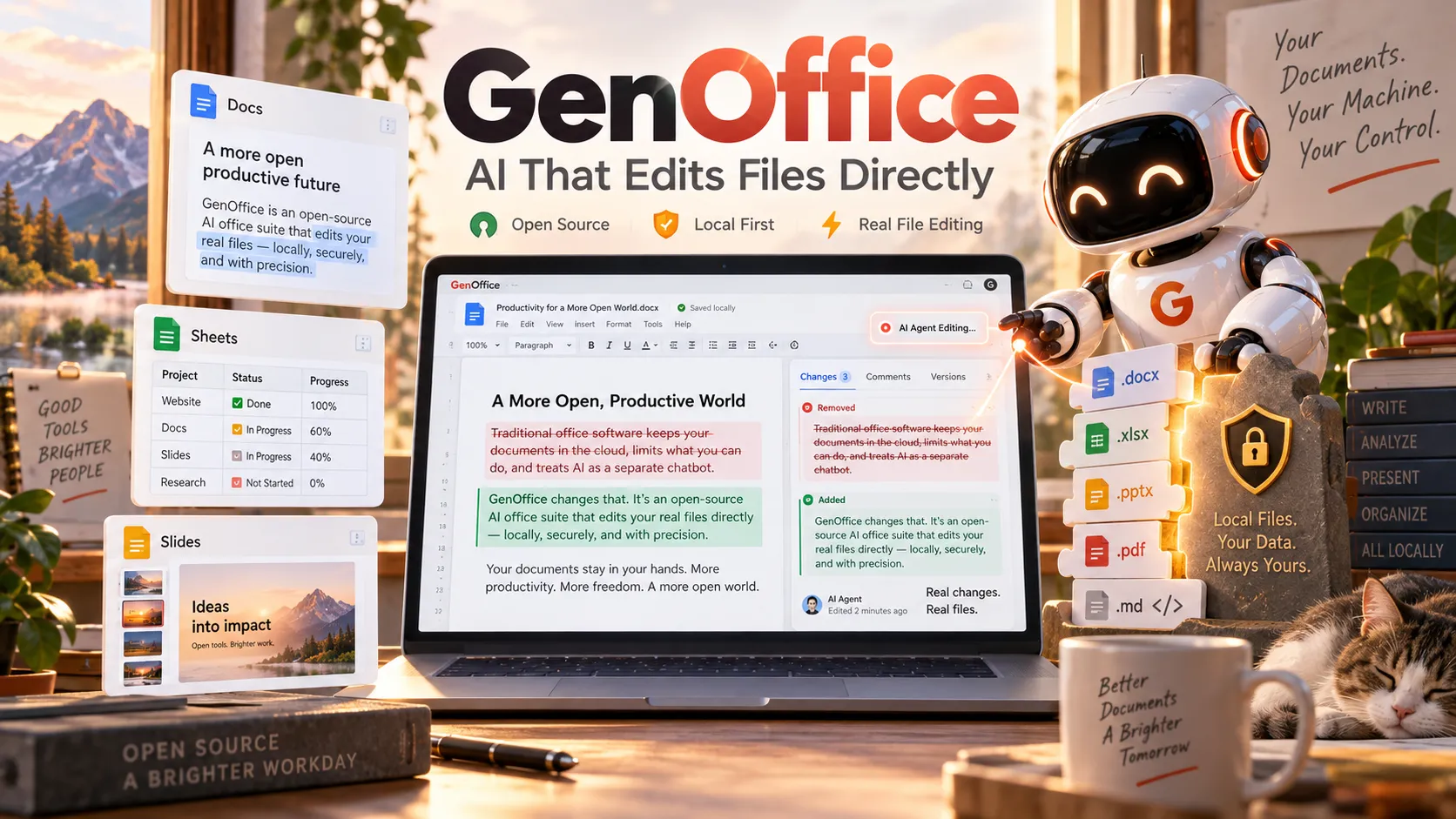
- It treats AI as an active editor inside the document: the agent reads the file, proposes block-level changes, shows diffs/snapshots, and supports one-click revert.
- Core file operations stay local. Opening, editing, saving, and PDF-to-Office conversions never upload the file.
- Byte-preserving saves for
.docxand.pptxrewrite only the changed fragments; the rest of the archive is copied byte-for-byte. - AI can run via Genspark credits or bring-your-own-key (Claude, OpenAI, Gemini, DeepSeek, Grok, Qwen, local OpenAI-compatible endpoints, OpenRouter, and others).
- A
genofficeCLI plus MCP server and agent skills let coding agents (Claude Code, Cursor, Codex, etc.) create and edit real Office files without a GUI. - Rapid development continues (v0.11.x releases in October 2026); complex formatting edge cases still exist and should be tested before high-stakes sharing.
What Is GenOffice?
GenOffice is a free and open-source office suite developed by Genspark. It packages six editors—Docs (.docx), Sheets (.xlsx), Slides (.pptx), PDF, Markdown, and HTML—into a single Electron desktop application available for macOS (Apple Silicon and Intel), Windows (x64 and Arm), and Linux (deb, rpm, AppImage).
Unlike traditional suites that bolt a chat sidebar onto a conventional editor, GenOffice embeds an AI agent that operates directly on the document model. The agent reads the open file, applies requested changes at the block or object level, and surfaces the exact differences. Users can accept, revise, or revert with a single click.
The project launched in early August 2026 after a rapid build (one engineer, roughly one week, and approximately $10,000 in tokens for the alpha). By mid-October 2026 the repository had accumulated roughly 9–10k stars and was shipping signed installers under frequent v0.11.x releases. Local editing requires no account; AI features do.
How the AI Agent Actually Works
The AI is not a separate chat window that returns text for the user to paste. It is a tool-calling agent with access to the document’s structured state.
In Docs the agent works at paragraph/block granularity. It can draft a section, restyle a paragraph, rewrite for a different audience, or insert content while the editor records a snapshot and generates a visual diff. In Sheets it can insert formulas, build pivot tables, or generate charts that remain live. In Slides it can produce a full deck from a topic description and then refine individual objects. PDF supports in-place text and image edits (original fonts preserved) plus Q&A over page content.
Every AI-driven change is reviewable. The suite keeps snapshots so users can roll back. This design addresses a common complaint about generative document tools: opaque rewrites that destroy layout or tracked changes.
AI calls leave the machine only when the user invokes them. The destination is either Genspark’s proxy (after sign-in) or a user-configured provider via bring-your-own-key.
The Six Editors and Their Engines
| Editor | Formats | Notable Technical Details |
|---|---|---|
| Docs | .docx | Byte-preserving OOXML patching; only dirty paragraphs regenerated |
| Sheets | .xlsx | Univer UI core + in-house Rust sidecar (calamine read + IronCalc) |
| Slides | .pptx | In-house parse/render engine with masters, layouts, smart guides |
| PDFium content-stream rewriting; real text/image edit, not annotation overlays; local conversion to Office formats | ||
| Markdown | .md | Tiptap block editor; local export to Word; Mermaid/KaTeX support |
| HTML | .html | Design-first generation of self-contained pages; local conversion to Word or PDF |
Sheets also supports pivot tables, slicers, conditional formatting, formula tracing, and large-workbook streaming modes. PDF conversion to Word/Excel/PowerPoint runs entirely on-device and does not consume AI credits. Scanned pages can use system OCR on macOS and Windows.
Byte-Preserving Fidelity and Local Conversions
One of the most technically distinctive features is the byte-preserving write path for Office formats.
When a .docx or .pptx is opened, the original archive is hashed and stored. On save, only the XML fragments that correspond to edited blocks are regenerated and spliced back in. Untouched parts of the zip archive are copied byte-for-byte. This preserves styles, comments, tracked changes, equations, and other OOXML elements that many alternative suites rewrite wholesale and sometimes corrupt.
Local conversions further reduce risk:
- PDF → Word / Excel / PowerPoint
- Markdown → Word
- HTML → Word
- Office formats → PDF
All of these run on the user’s machine. Analysis of the architecture shows that no document content is uploaded for ordinary open/edit/save/convert operations.
AI Options: Genspark Credits vs Bring Your Own Key
Users have two paths:
- Genspark sign-in — Routes requests through Genspark’s proxy. Free accounts receive a limited daily credit allotment. Paid Plus and Pro plans supply higher monthly credits (starting at roughly 10,000 and 125,000 respectively, with annual discounts). Core models may be included at no credit cost up to a usage cap depending on plan generation; flagship models consume credits.
- Bring-your-own-key (BYOK) — Connect keys or custom endpoints for Claude, OpenAI, Gemini, DeepSeek, Kimi, GLM, Qwen, Doubao, MiniMax, Grok, Mistral, OpenRouter, Requesty, and any OpenAI-compatible server (including local models). Additional providers cover web search and image analysis.
The suite also supports declarative profiles for custom endpoints and per-turn token usage display. This flexibility lets teams keep sensitive documents local while still choosing the model that best matches cost, latency, or capability requirements.
CLI, MCP, and Coding Agent Integration
GenOffice ships a headless genoffice command-line tool and an agent skill. Coding agents can therefore create, convert, read, and edit real Office files without launching a window.
Example operations include:
genoffice convert report.md --to pdf
genoffice create --type docx --from notes.md --out notes.docx
genoffice docs read report.docx --range 0-9 --json
An MCP server exposes dozens of tools (info, convert, create_docx, docs_read/apply, slides operations, render, etc.) over stdio or a local HTTP endpoint. Skills can be installed for Claude Code, Cursor, Codex, Gemini CLI, GitHub Copilot, OpenCode, and Windsurf. This turns GenOffice into both a user-facing suite and a programmable document engine for agentic workflows.
Local full-text search (SQLite, CJK-aware) indexes file names and extracted content. Optional TypeSafe Jev reranking can improve relevance; only excerpts of the top hits leave the device when that feature is enabled.
Privacy, Security, and Local-First Design
Document content never leaves the machine for open, edit, save, or conversion operations. AI prompts and context are sent only to the provider the user selects. Official builds can send limited usage analytics; this can be disabled in Settings → General. The privacy documentation states that document content, file names, paths, and account identity are not included in analytics.
Signed installers are published for macOS and Windows. The core code is Apache-2.0; an ee/ directory is reserved under a separate enterprise license. Because the engines are pure TypeScript (with a Rust sidecar only for the spreadsheet path), the document logic can be reused outside the Electron shell—for example as an MCP server or in other agent runtimes.
GenOffice vs Microsoft 365, OnlyOffice, and LibreOffice
| Aspect | GenOffice | Microsoft 365 | OnlyOffice | LibreOffice |
|---|---|---|---|---|
| Local editing | Yes | Yes (desktop) | Yes | Yes |
| Native Office formats | High (byte-preserving) | Highest | High | Good, occasional layout shifts |
| Built-in AI as editor | Yes (block-level + diffs) | Copilot (plan-dependent) | Limited / add-on | None by default |
| Open source | Yes (Apache-2.0) | No | Yes (community) | Yes |
| Price for local use | Free | Subscription | Free desktop | Free |
| Coding-agent / CLI | First-class | Different ecosystem | Limited | Limited |
| Mobile / real-time collab | Not yet | Strong | Strong | Limited |
Community feedback and early reviews suggest GenOffice appeals most to users who want AI that modifies the actual file (with auditability) while avoiding subscription costs for basic editing and cloud uploads for conversions. Microsoft 365 remains stronger for enterprise administration, real-time co-authoring, and the deepest feature set. OnlyOffice is mature for collaboration and fidelity; LibreOffice offers the broadest traditional feature set and longest track record. GenOffice differentiates on AI-native editing, byte-preserving saves, and agent programmability.
Advanced Tips, Edge Cases, and Common Pitfalls
- Test complex documents first. Byte-preserving helps, but deeply nested tables, custom XML, or heavily tracked-change files can still surface edge cases. Open the same file in Microsoft Office after editing to verify.
- Prefer BYOK or local endpoints for sensitive material. Genspark’s proxy sends prompts to third-party models under Genspark’s terms.
- Large Sheets benefit from the streaming and Full-Load modes; the Rust sidecar handles calculation and import/export.
- PDF editing rewrites content streams and preserves fonts, but highly complex annotations or forms may need verification. Digital signatures can be added and verified in recent releases.
- CLI/MCP workflows are ideal for generating reports or converting batches from coding agents. Restrict
GENOFFICE_ALLOWED_ROOTSwhen exposing the HTTP MCP server. - No mobile apps yet. The suite is desktop-only as of October 2026.
- AI cost. Local editing is free; non-trivial AI use consumes credits or incurs provider charges. Monitor token usage in the panel.
- Rapid iteration. Features and bug fixes land frequently. Check the GitHub releases for the current installer and changelog before relying on a specific behavior.
Common pitfalls reported in early coverage include expecting full Microsoft feature parity on day one, underestimating AI credit consumption on large rewrites, and assuming offline AI (only local models via BYOK provide that).
Conclusion
GenOffice represents a distinct approach to AI in productivity software: an open-source desktop suite in which the model acts as an auditable editor rather than a side chat, while core file operations and conversions remain local and fidelity-focused. Byte-preserving OOXML handling, a practical BYOK story, and first-class CLI/MCP integration for coding agents set it apart from both traditional open-source suites and closed AI copilots.
It is still maturing—complex formatting edge cases and the absence of mobile or real-time collaboration are real limits—but the combination of zero cost for local use, transparent diffs, and programmable document engines makes it a serious option for individuals and teams that prioritize control and AI-assisted editing.
Download the latest signed installers from the official site or GitHub releases, test it on representative files, and decide whether the AI-native workflow fits your documents. The source is public, so the implementation details are available for inspection.
Continue Reading
More articles connected to the same themes, protocols, and tools.
Cloudflare Void: Open-Source SDK, CLI, and Platform for Full-Stack Vite Apps on Workers

LASRecomp: AI-Powered Static Recompilation of Zelda Link's Awakening from Switch to Native PC
OpenCode 2.0 Is Here: Code Mode, Background Agents, and a Major Rebuild of the Open-Source Coding Agent
Referenced Tools
Browse entries that are adjacent to the topics covered in this article.





