
On This Page8 sections
Key Takeaways
- Liquid glass JS is a family of browser effects—not one single library—that creates translucent, lens-like UI with JavaScript, SVG filters, WebGL shaders, or a combination of these technologies.
- For a liquid glass demo online, start with Yassine Bouanane's interactive WebGL playground, Liquid Glass for the Web, or the Liquid Glass JS demo.
- CSS
backdrop-filteris the simplest production option for frosted glass; SVG displacement or WebGL is more appropriate when the background must visibly bend like a lens. - A glass banner UI component for a website should prioritize readable text, a working call-to-action, responsive layout, and a fallback before advanced optical effects.
- The open-source @ybouane/liquidglass package provides a practical JavaScript example, although its DOM capture and WebGL rendering require careful performance testing.
What Is Liquid Glass JS for the Web?
Liquid glass JS refers to JavaScript-powered interfaces that make buttons, banners, cards, navigation bars, and floating panels appear to be made of curved glass. The design combines transparency with visual depth: background content can blur, distort, shift color at the edges, or respond to pointer movement.
It is different from traditional glassmorphism, which usually relies on a translucent background, border, shadow, and CSS backdrop-filter. Realistic liquid glass adds an optical illusion: the content behind a curved surface appears displaced rather than merely softened.
There is no single universal liquid glass web standard or package. Several independent projects implement the aesthetic with different techniques, performance characteristics, and browser fallbacks. These projects are inspired by broader interface design trends, but they should not be confused with Apple's native Liquid Glass APIs.
Quick answer: For an ordinary website banner, begin with CSS. For a striking interactive demo or a landing-page hero where the distortion itself matters, consider a well-scoped WebGL or SVG-enhanced component.
Best Liquid Glass Demo Online: Three Interactive Examples
The fastest way to understand the difference between frosted glass and refractive glass is to compare working demos over images, gradients, and moving content.
1. Yassine Bouanane's Liquid Glass WebGL Demo
Live demo: liquid-glass.ybouane.com
Source code: ybouane/liquidglass on GitHub
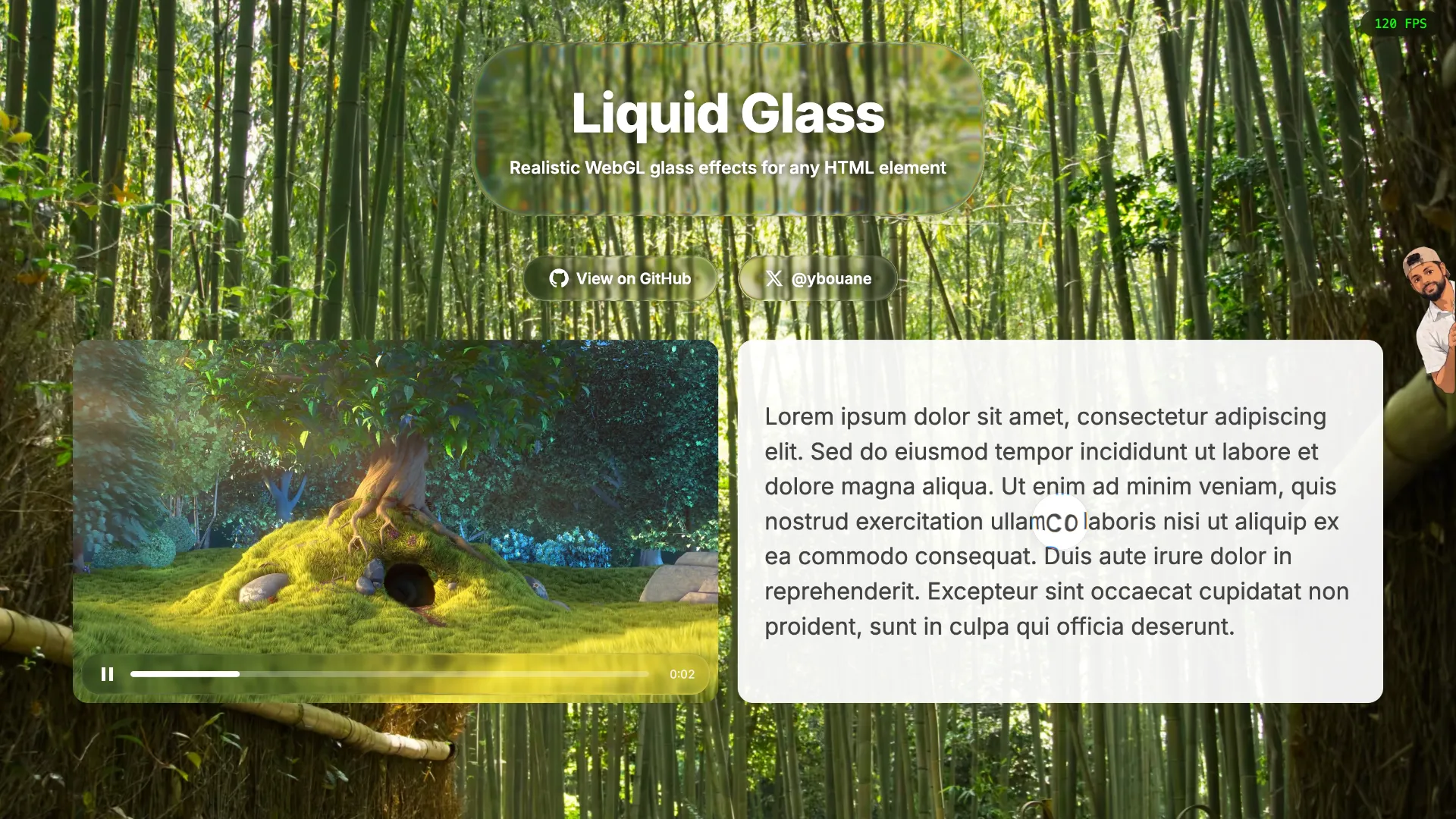
This is a strong starting point for developers interested in liquid glass JS with WebGL. The page presents regular, frosted, and dark glass treatments plus a draggable playground. Users can change refraction, chromatic aberration, blur, and edge lighting to see how the material responds.
Its JavaScript/TypeScript library captures the content behind each glass panel, processes it through a shader pipeline, and supports layered glass compositing. It can work over HTML, images, canvas elements, and video within documented capture constraints.
Best for: evaluating realistic WebGL refraction, experimenting with shader parameters, and prototyping a single high-impact glass panel.
Trade-off: the underlying DOM capture stage can be costly when content changes frequently.
2. Liquid Glass for the Web: Ready-Made Web Components
Live demo and playground: liquidglass.dev
Documentation: liquidglass.dev/docs
This project focuses on reusable browser components such as navigation, buttons, lenses, menus, toasts, and controls. Its documented approach uses displacement maps and SVG/CSS filtering rather than requiring every effect to follow the same WebGL pipeline.
The project distinguishes glass over known image backgrounds from glass over arbitrary live page content. Its own compatibility table indicates that some arbitrary-backdrop effects fall back to frosted blur outside Chromium-based browsers.
Best for: comparing reusable UI components, studying progressive enhancement, and experimenting with glass navigation or controls.
Trade-off: cross-browser refraction depends on which surface is being sampled; the effect is not identical everywhere.
3. Liquid Glass JS: WebGL Buttons and Containers
Live demo: dashersw.github.io/liquid-glass-js
Source code: dashersw/liquid-glass-js
This interactive page demonstrates buttons, containers, and controls for edge intensity, rim lighting, blur radius, ripple effects, and tint. The repository includes examples for circular, pill-shaped, and rounded-rectangle glass elements.
Best for: visually exploring glass button styles, nested containers, and how distortion changes with different surface shapes.
Trade-off: the project's background sampling relies on html2canvas; as with other capture-based approaches, dynamic pages deserve extra testing.
| Online demo | Main technique | Most useful experiment |
|---|---|---|
| Bouanane WebGL demo | DOM capture + WebGL shader | Refraction, frosted/dark presets, draggable layers |
| Liquid Glass for the Web | SVG displacement + CSS-based rendering/fallback | Navigation, buttons, reusable components |
| Liquid Glass JS demo | WebGL + page capture | Glass buttons, shape options, lighting controls |
Liquid Glass Web Effects: CSS vs. SVG vs. WebGL
The term liquid glass web covers several implementations that can look superficially similar but behave very differently.
| Approach | How it works | Advantages | Limitations |
|---|---|---|---|
| CSS glassmorphism | Semi-transparent layer plus backdrop-filter | Small implementation, native text and controls, easy fallback | Blur alone does not bend background imagery |
| SVG displacement | A displacement map shifts sampled pixels | Expressive lens contours, reusable effects | Some backdrop-filter: url(...) techniques have limited cross-browser support |
| WebGL shader | Rasterized scene is sampled and distorted on the GPU | Fine control over refraction, chromatic fringing, lighting, and compositing | Additional JavaScript, textures, rendering contexts, and capture costs |
A subtle but important distinction: SVG applied to a known image is not the same as an SVG filter applied directly to arbitrary live backdrop pixels. Browser engines may support the first approach while differing on the second. The MDN backdrop-filter reference documents the baseline CSS behavior; projects implementing refraction often add their own compatibility strategies.
Choose CSS for pricing cards, notification banners, and dashboards where readability and stability matter most. Choose SVG when a controlled image background can produce the desired distortion. Choose WebGL when complex refraction or layered glass is central to the visual experience.
Glass Banner UI Component for a Website: Build a Working Example
A common practical use case is a glass banner UI component website design: a translucent promotional panel floating over a colorful hero background, with a headline and a clickable action.
This example starts with HTML and CSS that work without JavaScript. A later section adds an optional Liquid Glass JS enhancement. That separation is intentional: the content remains accessible when effects fail.
Step 1: Add Semantic HTML
<section class="glass-hero glass-fallback" id="glass-hero">
  <div class="glass-hero__background" aria-hidden="true"></div>

  <div class="glass-banner" id="glass-banner">
    <p class="glass-banner__eyebrow">Interactive UI Inspiration</p>
    <h2>Make your web interface feel alive</h2>
    <p>Explore fluid surfaces, optical depth, and modern glass effects.</p>
    <a class="glass-banner__button" href="/components/">Explore components</a>
  </div>
</section>
Keep the decorative background and the glass panel as siblings inside the root. This matters to the Bouanane library, which captures root children rather than the root's own background and expects glass elements to be direct children of the root.
Step 2: Style a Responsive Glass Banner with CSS
.glass-hero {
  position: relative;
  isolation: isolate;
  display: grid;
  place-items: center;
  min-height: 440px;
  padding: 48px 20px;
}

.glass-hero__background {
  position: absolute;
  inset: 0;
  z-index: -1;
  background:
    radial-gradient(circle at 25% 30%, #ffe7a5, transparent 45%),
    radial-gradient(circle at 75% 65%, #ff7c99, transparent 50%),
    linear-gradient(125deg, #f7aa78, #926dc7);
}

.glass-banner {
  position: relative;
  z-index: 1;
  box-sizing: border-box;
  width: min(100%, 720px);
  padding: clamp(24px, 5vw, 48px);
  border-radius: 28px;
  color: #241a2e;
  text-align: center;
}

.glass-fallback .glass-banner {
  background: rgba(255, 255, 255, 0.42);
  border: 1px solid rgba(255, 255, 255, 0.7);
  -webkit-backdrop-filter: blur(16px);
  backdrop-filter: blur(16px);
  box-shadow: 0 20px 50px rgba(57, 28, 54, 0.16);
}

.glass-banner__eyebrow {
  font-size: 0.85rem;
  font-weight: 700;
  letter-spacing: 0.08em;
  text-transform: uppercase;
}

.glass-banner h2 {
  margin: 12px 0;
  font-size: clamp(1.8rem, 4.5vw, 3.4rem);
  line-height: 1.1;
}

.glass-banner__button {
  display: inline-block;
  margin-top: 16px;
  padding: 12px 20px;
  border-radius: 999px;
  background: #241a2e;
  color: white;
  text-decoration: none;
}

.glass-banner__button:focus-visible {
  outline: 3px solid #fff;
  outline-offset: 3px;
}
The gradient and frosted surface are CSS-only. This gives a usable baseline for browsers where WebGL is blocked, unsupported, or too expensive.
Step 3: Enhance the Banner with Liquid Glass JS
For an actual refractive lens effect, install the open-source package used in Bouanane's demo:
npm install @ybouane/liquidglassThen initialize the glass panel from a client-side JavaScript module after the HTML exists:
import { LiquidGlass } from '@ybouane/liquidglass';

const root = document.querySelector('#glass-hero');
const banner = document.querySelector('#glass-banner');

banner.dataset.config = JSON.stringify({
  blurAmount: 0.22,
  refraction: 0.65,
  chromAberration: 0.03,
  edgeHighlight: 0.08,
  cornerRadius: 28,
});

let glass;

try {
  glass = await LiquidGlass.init({
    root,
    glassElements: [banner],
  });
  root.classList.remove('glass-fallback');
} catch (error) {
  console.warn('Glass enhancement unavailable:', error);
}

// When the component is permanently unmounted:
// glass?.destroy();
The original HTML remains the content layer. The library injects a canvas for its shader output. The glass-fallback class is removed only after successful initialization, so a failed enhancement leaves the simpler design intact.
The snippet assumes a modern bundler and a browser environment that supports the required rendering APIs. In React or Next.js, initialize it from a client-side lifecycle hook after mounting and clean up the instance on unmount; never initialize WebGL during server rendering.
How to Customize a Liquid Glass JS Effect
The Bouanane playground exposes meaningful tuning controls. Instead of maximizing every slider, adjust them in this order:
- Start with layout and content. Choose banner dimensions, a readable text color, and a background with enough variation to reveal the refraction.
- Set
cornerRadiusto match the component shape. In Bouanane's library, its value is measured in CSS pixels. - Adjust
refractionuntil bending is visible but not distracting. The library's documented default is0.69. - Add
blurAmountfor frosted glass; the default0keeps the backdrop sharper. - Keep
chromAberrationrestrained. Large colored fringes can become an unwanted visual artifact, especially around text and high-contrast edges. - Tune lighting last with
edgeHighlight,fresnel, andspecularinstead of compensating for weak layout with extreme effects.
In the documented API, button: true adds pointer feedback, and floating: true enables dragging. For a conventional banner, both can remain disabled: a banner's primary job is communication and navigation, not becoming a draggable object.
Performance and Browser Compatibility: What Online Demos Do Not Prove
A liquid glass demo online can run smoothly over a curated image yet become expensive on a real website with live charts, videos, animations, and nested DOM elements.
Common issues to check before launch:
- DOM recapture: In
@ybouane/liquidglass, ordinary root children can be rasterized usinghtml-to-image. Elements markeddata-dynamic, and video elements, may force updates every frame. - Unnecessary redraws: For one-off updates to a canvas or image, use the documented
instance.markChanged(element)method rather than treating the entire scene as continuously animated. - Cross-origin media: Canvas texture capture can fail if externally hosted images lack appropriate CORS permissions.
- Fonts: Initialize after webfonts load, or refresh the library's font cache when font stylesheets change.
- Multiple instances: Each Bouanane library instance creates a WebGL context. Large numbers of independent instances can exhaust browser resources.
- Clipped shadows: An ancestor using
overflow: hiddencan cut off a glass surface's shader-generated shadow. - Mobile input: Test scrolling, touch targets, resize behavior, and low-powered GPUs rather than relying solely on desktop FPS.
The Bouanane project documentation requires WebGL 1.0, Canvas 2D, and SVG foreignObject. It documents optimizations for static content, but those optimizations do not remove the cost of constantly changing scenes.
A practical deployment strategy is to render one primary glass banner, monitor responsiveness and frame rate, and keep a CSS fallback available. Avoid making every page element a separate refractive surface without profiling.
UX, Accessibility, and SEO Considerations
A visual effect should support the content rather than make the page harder to use.
- Preserve HTML text. Keep the headline, description, and CTA as readable DOM elements rather than baking them into a screenshot or video.
- Protect contrast. Test the component against the lightest and darkest parts of the image beneath it. Use a stronger tint or an opaque text background when necessary.
- Maintain keyboard access. Links and buttons must remain focusable and show clear focus indicators.
- Respect reduced-motion preferences. Avoid unnecessary motion and consider simpler interaction for users who request reduced motion.
- Reserve layout space. Give the hero an explicit minimum height so initialization does not create a large layout shift.
- Avoid render-blocking effects. The base banner should remain visible before the JavaScript enhancement finishes.
- Measure real performance. Compare Core Web Vitals and runtime smoothness with and without the WebGL enhancement instead of assuming a shader automatically improves perceived quality.
For SEO, the relevant principle is straightforward: search engines and users need useful text, accessible navigation, and a stable page—not a particular rendering effect. A liquid glass component can improve presentation, but it does not independently confer a ranking benefit.
FAQ: Liquid Glass JS, Web Demos, and Banner Components
What is the best liquid glass JS library for a website?
There is no universal best choice. Bouanane's LiquidGlass is useful for shader-driven WebGL refraction; Liquid Glass for the Web emphasizes reusable web components and fallbacks. Choose based on the surface to be rendered, browser requirements, licensing, and measured performance.
Where can I try a liquid glass demo online for free?
Start with liquid-glass.ybouane.com, liquidglass.dev, and dashersw's Liquid Glass JS demo. Each offers browser-accessible examples without requiring a local development setup just to view the effect.
Can liquid glass work on the web without JavaScript?
Yes, for the frosted-glass look. CSS backdrop-filter, transparency, and shadows can create a useful glass aesthetic with no JavaScript. More elaborate simulated refraction often needs SVG, JavaScript, or WebGL.
How do I add a glass banner UI component to my website?
Use a semantic section with a background layer and a readable content panel. Apply the CSS fallback first, then optionally enhance the panel with a JavaScript rendering library. The example above includes the essential HTML, responsive CSS, and WebGL initialization.
Does liquid glass JS work in React, Vue, and Next.js?
Libraries using ordinary browser DOM elements can often be integrated into these frameworks, but setup must run on the client. Carefully handle mounting, cleanup, reactive updates, and framework-specific rendering behavior. Check each library's actual API before assuming a framework-specific component exists.
Is liquid glass web UI the same as Apple's Liquid Glass?
No. These are independent web implementations inspired by a similar visual language. Browser libraries cannot be assumed to reproduce Apple's native material engine, behaviors, accessibility features, or cross-platform rendering exactly.
Conclusion
Liquid glass JS for the web is most useful when the interface needs more than a generic blurred card. Today's options range from straightforward CSS glassmorphism to SVG-based components and elaborate WebGL refraction.
For inspiration, compare several liquid glass demos online. For production, begin with a readable glass banner UI component, confirm its CSS fallback, and add JavaScript-driven optics only if they improve the experience on the actual devices your audience uses.
Explore the WebGL source and implementation notes, test different visual treatments in the online playground, and evaluate the simpler web-component alternative before choosing your rendering strategy.
Continue Reading
More articles connected to the same themes, protocols, and tools.

Referenced Tools
Browse entries that are adjacent to the topics covered in this article.





