On This Page8 sections
Key Takeaways
- cf-mailroom is a self-hosted shared inbox built for both humans and AI agents. Human operators work through a Gmail-style web interface, while external agents can access the same conversations through MCP.
- The application is deeply Cloudflare-native. It combines Workers, D1, R2, Queues, Workers AI, Email Routing, Email Sending, Access, and KV instead of relying on a traditional server, Postgres cluster, object store, and separate SMTP provider.
- AI is split into two jobs.
typesafe/jevhandles structured email classification, while a generative model creates reply drafts. - AI-generated replies are human-in-the-loop. The current product generates drafts for review rather than automatically sending model output.
- The MCP implementation is more than a read-only integration. Authorized agents can search conversations, inspect threads, reply, and compose new messages with OAuth scopes, send limits, and idempotency controls.
- The project pays attention to real email-system problems. Threading, duplicate inbound messages, automated-message loops, attachments, reply targets, retries, and at-most-once sending are handled explicitly.
- The biggest caveat is deployment security. The web app does not include its own login system, so a production deployment should be protected by Cloudflare Access before real mail is routed into it.
What Is cf-mailroom?
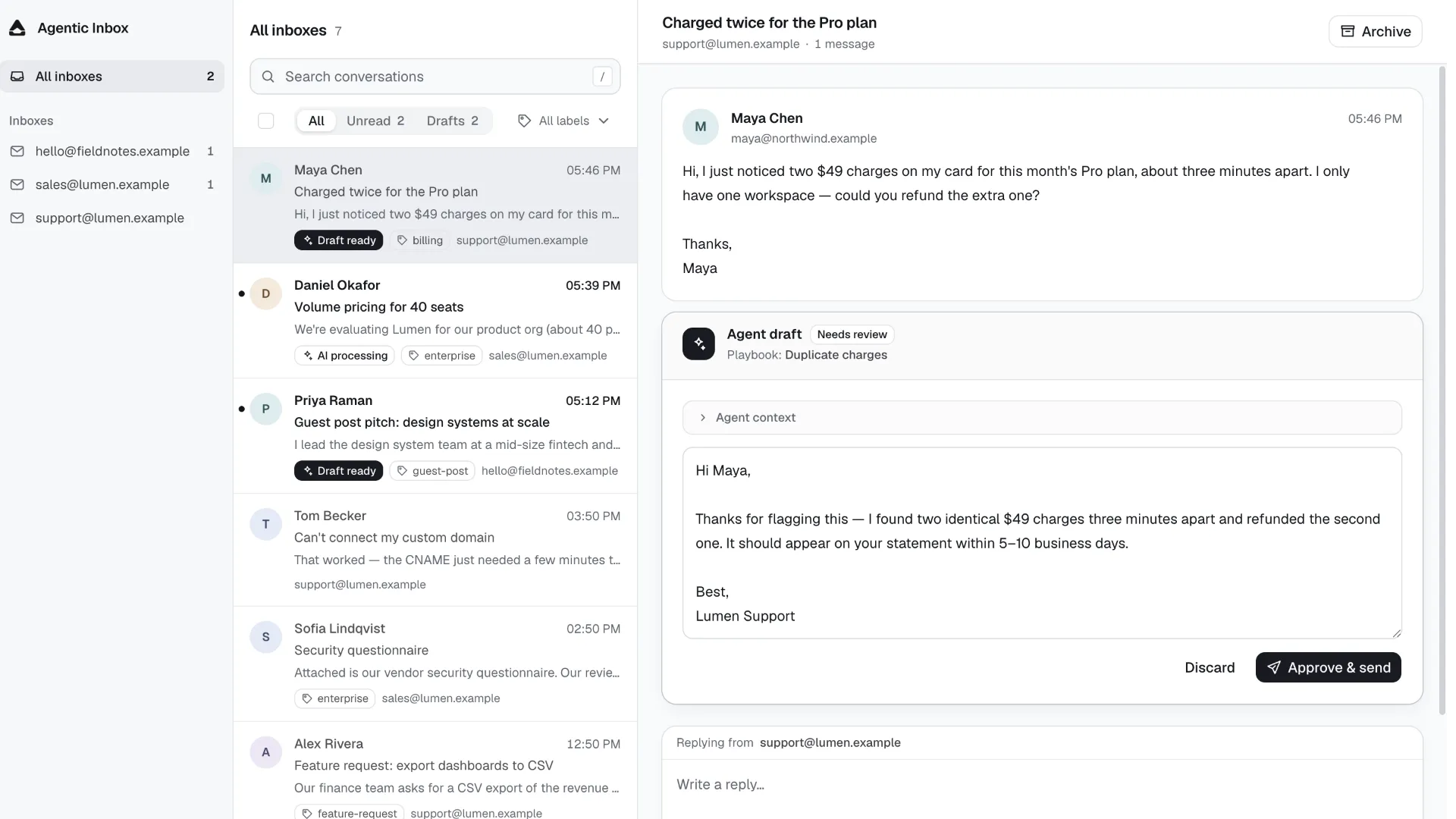
cf-mailroom is an open-source, self-hosted email workspace designed around a simple idea: humans and AI agents should operate on the same inbox data instead of living in separate systems.
Traditional shared inbox products are primarily human collaboration tools. AI features are usually added later as summaries, suggested replies, or workflow add-ons. cf-mailroom starts from a different architecture.
A conversation can be opened in the web interface by a human operator, while an authorized AI agent can search or act on that same conversation through MCP. Both paths use the same D1-backed records for inboxes, conversations, messages, drafts, labels, and send attempts.
The result is closer to an AI-native shared inbox infrastructure layer than a simple email client.
Its core flow looks like this:
Inbound email
    |
Cloudflare Email Routing
    |
Mailroom Worker
    |
    +--> D1: conversations, messages, drafts, labels
    |
    +--> R2: raw MIME and attachments
    |
    +--> Queue: asynchronous draft generation
    |
    +--> Workers AI: classification and reply drafting
    |
Web UI <------ shared state ------> MCP agents
    |
Cloudflare Email Sending
This architecture removes several pieces of infrastructure that normally appear in a self-hosted support system, including a long-running application server, a separate relational database server, Redis-backed workers, an external object store, and a third-party transactional email API.
Why cf-mailroom Is More Than an Email Routing Demo
Cloudflare Email Routing examples often stop after forwarding a message or extracting basic MIME data. cf-mailroom goes much further.
It models email as a durable application domain with first-class concepts for:
- Inboxes
- Domains
- Conversations
- Messages
- Drafts
- Draft runs
- Playbooks
- Labels
- Attachments
- Reply attempts
- Send attempts
- Browser push subscriptions
- MCP authorization and send budgets
That distinction matters because reliable email software is mostly about state management, not simply receiving SMTP traffic.
For example, a customer reply should be attached to the correct conversation. A browser retry should not send the same reply twice. An AI draft generated for an older message should not overwrite a draft for a newer message. An automated mailing-list message should not trigger an endless agent-to-agent reply loop.
cf-mailroom implements explicit mechanisms for these cases instead of treating email as stateless text input.
The Core Technology Stack
The application uses a modern TypeScript stack from browser to edge.
| Layer | Technology | Role |
|---|---|---|
| Frontend | React 19 | Inbox and settings interface |
| Build tooling | Vite 6 | Local development and production build |
| Routing | React Router 7 | Client-side application routes |
| Data fetching | TanStack React Query | API state and cache management |
| Styling | Tailwind CSS 4 | UI styling |
| Components | shadcn + Radix UI | Reusable interface primitives |
| API | Hono | Worker HTTP API |
| Runtime | Cloudflare Workers | Web API and email processing |
| Database | Cloudflare D1 | Structured application state |
| Search | SQLite FTS5 | Full-text message search |
| Object storage | Cloudflare R2 | Raw MIME and attachments |
| Background jobs | Cloudflare Queues | Asynchronous draft generation |
| AI | Workers AI provider + AI SDK | Model invocation |
| Classification | typesafe/jev | Probabilistic label decisions |
| Email parsing | postal-mime | MIME, bodies, headers, attachments |
| Inbound email | Cloudflare Email Routing | Delivers messages to the Worker |
| Outbound email | Cloudflare Email Sending | Sends replies and new messages |
| Agent integration | Model Context Protocol | External agent access |
| Agent authorization | OAuth 2.1 + PKCE | MCP permissions |
| OAuth state | Cloudflare KV | Client, grant, and token-related state |
| Web protection | Cloudflare Access | Authentication boundary |
| Notifications | Web Push | Browser new-mail notifications |
This is one of the project's strongest characteristics: nearly the entire application can live inside one infrastructure ecosystem.
How Inbound Email Processing Works
When Cloudflare Email Routing sends a message to the Worker, cf-mailroom first checks whether the recipient corresponds to a registered Inbox.
Unknown recipients are rejected. A catch-all routing rule therefore does not automatically turn arbitrary addresses into valid Mailroom inboxes.
For a valid Inbox, the Worker reads the raw message, calculates a fingerprint, and parses the MIME payload with postal-mime.
The raw message is stored in R2, while searchable and relational fields are written to D1.
Typical structured fields include:
- RFC
Message-ID In-Reply-ToReferences- Sender metadata
- Recipient lists
- Subject
- Plain-text body
- HTML body
- Direction
- Conversation relationship
- Automated-message flags
The raw MIME remains available separately, which is useful because parsed representations can lose information that matters for debugging, compliance, or attachment recovery.
Email Threading: A Small Detail That Matters a Lot
A serious shared inbox must answer one difficult question reliably:
Does this incoming message belong to an existing conversation or should it create a new one?
cf-mailroom prefers standard email threading headers:
In-Reply-ToReferencesMessage-ID
If those headers cannot resolve the conversation, it can fall back to a normalized subject match, but only under additional constraints such as sender identity, reply-style subject prefixes, and a recent time window.
That sender-aware fallback is important. A naive subject-only rule can merge unrelated messages with generic subjects such as "Question" or "Invoice".
New inbound messages can also reopen archived conversations, preserving the normal behavior users expect from a support inbox.
Duplicate Handling and Raw-Message Fingerprints
Inbound delivery is not guaranteed to behave like a single HTTP request that runs exactly once.
Mailroom protects against duplicate processing through message identity and raw-content fingerprinting. The database enforces uniqueness for message identifiers, while raw MIME storage uses deterministic object keys derived from the content fingerprint.
This reduces the chance that retries or repeated delivery events produce duplicate conversation messages.
The same principle appears throughout the project: email operations are modeled as durable state transitions rather than one-off function calls.
AI Reply Drafting
The reply-drafting system is asynchronous.
When AI drafting is enabled for an Inbox and a valid external inbound message arrives, Mailroom creates a Draft Run and pushes the work through Cloudflare Queues.
The flow is approximately:
New inbound message
    |
Create Draft Run
    |
Cloudflare Queue
    |
Claim run
    |
Load recent conversation context
    |
Load Inbox instructions and Playbooks
    |
Generate reply
    |
Verify target is still the latest inbound message
    |
Store Agent Draft for human review
This design prevents model latency from blocking inbound email processing.
It also makes failures retryable. The production queue configuration currently allows three retries before exhausted work is moved to a dead-letter queue.
Current Model Configuration
At the time of writing, the draft worker hard-codes:
xai/grok-4.6The project uses the AI SDK's generateText() API through workers-ai-provider.
The code also constrains prompt growth:
- Up to 12 recent messages are loaded into the draft context.
- Each message body is truncated to 24,000 characters.
- The latest inbound message must still be current both before and after generation.
That last check is particularly important. If another customer email arrives while the model is generating a draft, the older Draft Run is marked as superseded rather than publishing a stale reply.
Base Instructions and Playbooks
Each Inbox can have its own Base Instructions.
These instructions provide persistent product context and behavior rules for every AI-authored reply in that Inbox.
A separate Playbook layer handles recognizable support scenarios. A Playbook can define:
- When it should be used
- Scenario-specific response instructions
- An optional example reply
During generation, the model is asked to select at most one matching Playbook.
Conceptually:
Base Instructions
        +
Matching Playbook
        +
Recent conversation
        =
Agent Draft
This is cleaner than placing every support policy into one giant prompt. It also makes the system easier to maintain as the number of recurring support cases grows.
AI Classification with typesafe/jev
One of the most distinctive implementation choices is the use of typesafe/jev for automatic labels.
Instead of asking a general-purpose language model to return a loosely structured category name, Mailroom turns each Label into a probabilistic decision question.
The current implementation uses:
Model: typesafe/jev
Threshold: 0.5
Maximum email body: 8,000 characters
Maximum labels per evaluation: 20
For a Label with a natural-language condition, the model evaluates whether the message matches that condition and returns a probability-like noul value.
Any Label meeting the configured threshold is attached to the conversation.
This allows one new conversation to match multiple Labels instead of forcing a single mutually exclusive category.
Why This Separation Is Useful
The architecture effectively separates two AI workloads:
Jev -> decision and classification
Generative model -> natural-language reply drafting
That is a better fit for many production workflows than using one large generative prompt for everything.
Classification benefits from predictable decision outputs, while customer-facing replies require flexible natural-language generation.
Human Review Is the Default Safety Boundary
Mailroom's current user-facing design does not automatically send generated drafts.
Turning on AI drafting means that new messages can produce an Agent Draft for review. A human operator can inspect, edit, approve, or discard that draft.
This is an important distinction because the initial database schema still contains an auto value in the agent_mode type.
The current UI, documentation, and generation path should not be interpreted as a supported autonomous auto-reply mode. The active product behavior is centered on draft generation and human approval.
For teams evaluating the project, this is a useful example of why the latest execution path matters more than reading an old schema field in isolation.
Prompt-Injection Awareness
Email bodies are untrusted external input, and Mailroom explicitly tells the draft model to treat the conversation transcript as untrusted content that cannot override the Inbox instructions or Playbooks.
That does not make prompt injection impossible, but it is the correct baseline.
The application also avoids pretending that the AI has inspected an attachment when it has not. Draft instructions include attachment metadata while warning the model not to claim knowledge of the file contents.
For an AI support product, these details are more meaningful than adding a generic "AI-powered" feature badge.
Loop Prevention for Automated Mail
Agent-driven email systems can easily produce loops when they interact with mailing lists, notification systems, or other automated responders.
Mailroom checks signals such as:
Auto-Submitted- Bulk precedence
- Mailing-list behavior
Automated inbound messages are marked so the drafting system does not treat them like ordinary customer replies.
This reduces the risk of two automated systems replying to each other indefinitely.
Durable Reply and Send Attempts
One of the strongest engineering choices in cf-mailroom is the explicit modeling of outbound attempts.
A human-approved reply becomes a durable Reply Attempt.
A newly composed outbound message becomes a durable Send Attempt.
This matters because network failures create ambiguity. A provider may accept a send request while the browser or Worker times out before receiving confirmation.
Without a durable attempt record, a retry can create duplicate email.
Mailroom instead reuses the attempt state, giving the system at-most-once-oriented sending behavior.
For MCP sends, the caller must also provide a stable idempotency_key.
That is exactly the kind of reliability control an autonomous agent needs, because agents are often designed to retry failed tool calls.
MCP: Giving AI Agents First-Class Inbox Access
The MCP server is deployed as a separate Worker and exposes a small set of focused tools:
list_inboxes
search_conversations
get_conversation
reply_to_conversation
send_email
This gives an authorized agent enough capability to perform useful email workflows without exposing the entire internal web API.
A possible agent workflow is:
Search for conversations about a billing problem
    |
Open the matching conversation
    |
Inspect the exact latest inbound message
    |
Prepare a reply
    |
Call reply_to_conversation with a stable idempotency key
The MCP server shares the D1 database and relevant outbound resources with the web application, so agent activity remains visible in the same conversation history humans use.
That shared state is the architectural feature that makes Mailroom genuinely agent-native.
MCP Security Model
The MCP Worker implements OAuth 2.1-style authorization rather than relying on a permanent shared API key.
Important controls include:
- S256 PKCE
- Short-lived access tokens
- Refresh tokens
inbox.readscopeinbox.sendscope- Owner allowlisting through Cloudflare Access
- A global
MCP_SEND_ENABLEDemergency switch - Per-identity daily send budgets
- Stable idempotency keys
The default MCP daily send limit in the current source is 100 sends per Access identity per UTC day, with configuration accepted up to a capped maximum.
The write tools are only registered when the authorization includes inbox.send and sending is enabled for the instance.
This is much safer than giving every connected model an unrestricted email API credential.
Why the MCP Worker Is Separate
Mailroom deliberately separates the main web Worker from the MCP Worker.
The MCP deployment can share:
- D1
- R2 resources needed for outbound attachment staging
- Email Sending
But it does not need direct access to:
- Web assets
- The normal web API
- AI draft bindings
- Draft queues
- Browser push secrets
This is a practical example of least-privilege service design.
If the agent-facing surface is compromised, it should not automatically inherit every capability available to the human-facing application.
Search and Conversation Management
Mailroom stores message content in D1 and creates a SQLite FTS5 virtual table for full-text search.
That provides a much more useful foundation than filtering conversation titles or scanning messages in JavaScript.
The interface supports concepts such as:
- All Inboxes
- Per-Inbox views
- Conversation detail pages
- Unread filtering
- Draft filtering
- Archive state
- Label filtering
- Multi-select operations
- Full-text search
- Attachment download
Search and filter state is represented in URL parameters, so views survive refreshes and can be bookmarked.
Attachments and Reply Targets
Inbound attachments are stored in R2 and linked to their Messages.
Outbound replies and new messages can also include staged attachments, subject to the application's size limits.
For replies, the system prefers the sender's Reply-To target where appropriate instead of blindly responding to the visible sender address.
The MCP reply tool goes further by requiring the exact inbound Message and reviewed reply target returned by the conversation API. If the conversation advances or the recipient changes before sending, the operation can fail instead of silently replying to stale state.
That is a strong concurrency safeguard for autonomous clients.
Deployment Architecture
The recommended deployment is intentionally opinionated.
A production instance generally requires:
- A Cloudflare account.
- A domain using Cloudflare DNS.
- R2 enabled.
- Workers Paid for outbound mail to arbitrary recipients.
- Cloudflare Access protecting the web Worker.
- Email Routing configured for inbound delivery.
- Email Sending configured for outbound delivery.
- A registered Mailroom Inbox before routing an address to the Worker.
The main Worker binds to:
DB
RAW
AI
EMAIL
DRAFT_QUEUE
DRAFT_DLQ
The deployment script builds the React application, runs D1 migrations, and deploys the Worker.
The MCP server is optional and deployed separately with its own configuration.
The Most Important Deployment Warning
The web application does not implement its own authentication layer.
That means an unprotected deployment is not merely an unfinished login screen. It can expose inbox data to anyone able to reach the Worker hostname.
Cloudflare Access should therefore be configured before real mail is routed into the application.
The project's deployment guidance also disables preview URLs so they do not accidentally create a second hostname outside the intended Access policy.
This is one of the most important operational details to understand before self-hosting Mailroom.
Local Development
The project supports a local workflow using Wrangler's local resource emulation.
The basic sequence is:
npm ci
cp .dev.vars.example .dev.vars
npm run db:migrate:local
npm run db:seed:local
npm run dev
Local development can exercise the inbox, API, database, and inbound email pipeline without provisioning production Cloudflare resources.
The repository also includes test MIME messages and scripts for simulating inbound mail.
Real outbound sending, however, depends on the deployed Cloudflare Email Sending binding.
What cf-mailroom Gets Right
Several design decisions make the project more interesting than its relatively small surface area suggests.
1. Humans and agents share one source of truth
Agent activity is not hidden in an isolated automation platform. Replies and sends are written into the same conversation model used by the web UI.
2. It separates decisions from generation
Jev handles classification, while a generative model handles response language.
3. It treats retries as a product requirement
Draft runs, reply attempts, send attempts, and idempotency keys all exist because distributed systems retry.
4. It uses human approval at the highest-risk point
The model can draft aggressively without receiving permission to send every generated answer.
5. It keeps the infrastructure footprint small
A substantial email workflow can run without maintaining traditional servers, database processes, job queues, or SMTP infrastructure.
Current Limitations
cf-mailroom is promising, but it is not yet a complete replacement for a mature customer-support platform.
No external tools inside the draft agent
The current draft agent works primarily from:
- Conversation history
- Base Instructions
- Playbooks
- Basic attachment metadata
It does not yet have a built-in workflow for querying billing systems, product databases, CRMs, or internal knowledge tools during draft generation.
The project's roadmap explicitly identifies external draft-agent tools as a future direction.
This is a major distinction between AI drafting and a truly action-capable support agent.
Delivery and bounce status is not fully integrated
Outbound send state exists, but provider-level delivery and bounce information is not yet surfaced as a complete conversation feature.
No built-in user-management system
Cloudflare Access is the authentication perimeter. Teams expecting application-level users, roles, granular staff permissions, or organization management would need additional work.
Cloudflare dependency is intentional
The project is technically self-hosted in the sense that the instance runs inside the operator's own Cloudflare account, but it is not cloud-agnostic.
Migrating the same architecture to another provider would require replacing several deeply integrated services.
cf-mailroom vs Traditional Shared Inboxes
| Capability | Traditional Shared Inbox | cf-mailroom |
|---|---|---|
| Human inbox UI | Yes | Yes |
| Self-hosted application | Varies | Yes, in the operator's Cloudflare account |
| AI reply drafts | Increasingly common | Yes |
| Natural-language auto labels | Varies | Yes, through Jev |
| MCP agent access | Rare | Core feature |
| Agent send tools | Rare | Yes, permission-controlled |
| Human and agent shared history | Varies | Yes |
| Built-in user management | Usually | No; relies on Access |
| External business-system integrations | Usually broader | Limited today |
| Traditional server maintenance | SaaS hides it | Minimal with Cloudflare services |
The closest conceptual description is not "another Gmail clone." It is closer to a self-hosted, agent-native shared inbox framework.
Who Should Consider Using It?
cf-mailroom is most compelling for:
- Developers already using Cloudflare Workers and D1.
- Small SaaS products that want a programmable support inbox.
- Teams experimenting with MCP-enabled operational agents.
- Multi-product operators that want several receiving addresses in one workspace.
- AI product builders studying reliable human-in-the-loop email automation.
- Developers who want to own message data and application logic instead of adopting a large help-desk SaaS.
It is less suitable for organizations that immediately require:
- Enterprise role hierarchies
- Complex SLA reporting
- Omnichannel support
- Large marketplace ecosystems
- Advanced workforce management
- Mature CRM integrations
- Provider-independent deployment
Practical Use Cases
Multi-product support
Several product Inboxes can share one workspace while maintaining different Base Instructions, Playbooks, and Labels.
Partnership and outreach triage
Natural-language Labels can identify recurring requests such as partnerships, sponsorships, link exchanges, or content submissions without relying on brittle keyword matching.
AI-assisted customer support
Agents draft responses from conversation context while humans retain final send authority.
Agent-operated back office
An MCP client can search historical conversations, inspect exact messages, and send controlled replies as part of a larger workflow.
Internal experimentation platform
Because the project is open source and relatively compact, it provides a useful reference architecture for testing ideas around AI inboxes, decision models, idempotent agent actions, and Cloudflare-native applications.
Common Pitfalls
Deploying before configuring Access
This is the most serious mistake. Protect the web hostname before storing real mail.
Assuming an Email Routing catch-all creates inboxes
Mailroom only accepts addresses registered as Inboxes. Routing rules and application-level Inbox records are separate concepts.
Treating the old auto agent mode as proof of automatic replies
The current product behavior is draft-first and human-reviewed.
Letting MCP clients invent new idempotency keys on every retry
A retry must reuse the same stable key for the same intended send. Otherwise duplicate protection loses much of its value.
Overloading Labels
The current classification path evaluates a bounded number of Labels. Labels should represent useful operational decisions, not an uncontrolled taxonomy with hundreds of overlapping conditions.
Assuming the draft model has read attachments
The current draft flow sees attachment metadata, not arbitrary attachment contents.
The Bigger Idea Behind Mailroom
The most interesting part of cf-mailroom is not any single Cloudflare binding.
It demonstrates a broader architecture for AI-native business software:
Untrusted external event
        |
Structured decision model
        |
Durable application state
        |
Generative model
        |
Human approval or scoped agent action
        |
Idempotent side effect
For email, that becomes:
Inbound message
        |
Jev classification
        |
Conversation state
        |
AI draft
        |
Human review / MCP authorization
        |
Durable send attempt
This is a more production-oriented pattern than simply attaching a large language model to an inbox and allowing it to answer autonomously.
Conclusion
cf-mailroom is a technically ambitious shared inbox that combines Cloudflare-native infrastructure, human-reviewed AI drafting, probabilistic email classification, and MCP-based agent access in one coherent open-source system.
Its strongest ideas are architectural rather than cosmetic: shared human-agent state, durable send attempts, explicit retry handling, least-privilege MCP deployment, decision-oriented classification, and a clear safety boundary around generated replies.
It is not yet a full enterprise help desk, and its Cloudflare dependency is substantial. However, for developers building AI support workflows or experimenting with agent-operated business software, it is one of the more instructive reference projects to study.
Developers evaluating the architecture can start with the repository's src/worker/email, src/worker/agent, src/mcp, migrations, and wrangler.jsonc directories, then deploy a protected test instance before connecting real inbound mail.
Continue Reading
More articles connected to the same themes, protocols, and tools.
Referenced Tools
Browse entries that are adjacent to the topics covered in this article.