

Coda
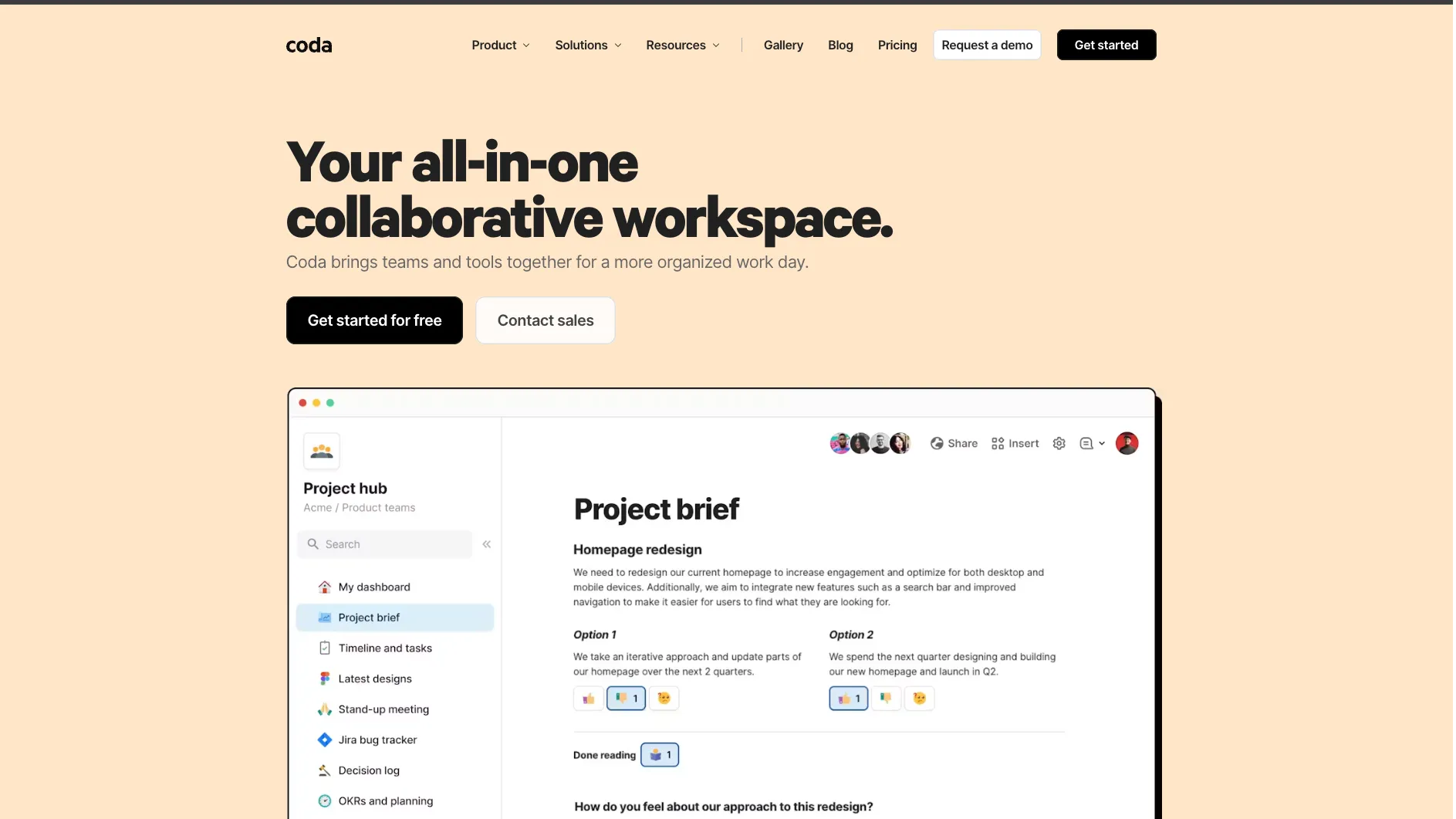
Coda is an all-in-one AI workspace for teams that want docs, databases, lightweight apps, automation, integrations, and agent-accessible workflows in one browser-based platform.
Information checked: Jun 30, 2026 ·View sources
Tool details
- Type
- Developer workflows
- Platforms
- Web, iOS, Android, API, MCP, Browser
- Free plan
- Yes
- Open source
- No
- Bring your own key
- No
- Local models
- No
Overview
Best for
- Product teams building roadmaps, decision docs, launch plans, and team hubs
- Engineering teams tracking Jira work, planning headcount, and coordinating projects
- Operations teams building lightweight internal tools without a full app stack
- Teams that want docs, tables, automations, and integrations in one workspace
- AI-agent workflows that need structured access to workspace content through MCP
- Makers who want app-like documents without writing a full web application
Strengths
- Excellent for turning team docs into lightweight workflow apps.
- Maker-based billing can be efficient when many collaborators only edit or view.
- Coda AI works directly with doc context, tables, and rows instead of only plain text.
- MCP and API access make Coda useful in AI-agent and developer automation workflows.
- Packs give non-developers and developers a shared integration layer.
Limitations & trade-offs
- Developers looking for an AI IDE like Cursor, Windsurf, or Replit IDE
- Teams that need source-controlled production software with custom frontend and backend code
- Large relational databases or analytics workloads that require dedicated database tooling
- Highly regulated workflows that require strict system-of-record guarantees outside Coda's intended scope
- Users who only need simple note-taking and do not need tables, formulas, automations, or integrations
- Workflows where AI agents should not have write access to operational data
- Not an AI code editor, cloud IDE, or autonomous coding agent.
- Complex docs can become slow or difficult to maintain without good structure.
- Deep app logic, custom UI, and production software workflows still belong in a real codebase.
- AI usage is credit-based and varies by workspace plan and content size.
- MCP access can read and write real workspace content, so permissions need careful control.
Get started
Pricing & usage limits
Official pricingFree tier available
Free workspace plan for individuals and teams, with limits on shared docs, rows, attachments, automations, and AI credits.
Paid maker plan with larger doc limits, Pro Packs, 30-day version history, custom branding options, and included Coda AI credits.
Team plan with unlimited automations, unlimited version history, doc locking, folder access controls, Team Packs, and more AI credits.
Enterprise security, admin controls, SSO, SCIM, audit logs, advanced access controls, Enterprise Packs, and higher AI credit allocations.
Pricing checked: Jun 30, 2026 · Subscription, usage limits, and model costs may be billed separately.
Features & details
Docs That Act Like Apps
- Flexible docs and nested pages
- Interactive tables, views, charts, and forms
- Buttons, formulas, filters, and controls
- Kanban, calendar, detail, and dashboard-style views
Coda AI
- AI chat inside docs
- AI assistant for writing, rewriting, and table creation
- AI columns for structured row-level generation
- AI blocks for summaries, insights, and action items
- Credit-based AI usage included for Doc Makers on paid plans
Workflow Automation
- Time-based and event-based automations
- Button-triggered actions
- Webhook-triggered workflows
- Cross-doc sync and connected tables
- Notification and approval workflows
Integrations & Packs
- 600+ integrations and Packs
- Slack, Jira, Google Calendar, Gmail, Figma, Salesforce, and GitHub workflows
- Pack sync tables, buttons, formulas, and column formats
- Custom Pack development with JavaScript and TypeScript
Developer Access
- REST API for docs, pages, tables, rows, formulas, and controls
- Coda MCP server for AI clients
- OAuth and personal access token workflows
- Pack SDK and CLI
- Postman API reference
Admin & Governance
- Doc Maker, editor, and admin roles
- SAML SSO and SCIM on enterprise tiers
- Audit logs and Admin API
- Pack controls and personal token controls
- Sharing, publishing, and export restrictions
Why Choose Coda?
Coda is useful when a team has outgrown static documents but does not want to build a full internal app. It gives teams a middle layer: flexible enough for writing and planning, structured enough for operational data, and interactive enough to replace small workflow tools.
For developer and product teams, the appeal is not that Coda writes code. It is that Coda can become the operating surface around code: specs, roadmaps, release checklists, bug triage, customer feedback, headcount planning, decision logs, and lightweight dashboards can live in one place and stay connected through tables, formulas, buttons, and integrations.
Coda's newer AI and MCP direction makes it more relevant for agent-era workflows. Instead of only asking an assistant to summarize a document, teams can let an AI client read, update, and operate on structured workspace content. That is powerful, but it also makes governance more important.
Core Workflow
A typical Coda workflow starts as a doc: a product brief, team hub, roadmap, meeting system, or tracker. As the process becomes more repeatable, the doc turns into a small app by adding tables, views, filters, formulas, buttons, and automations.
This is where Coda differs from ordinary document tools. A roadmap can become a status dashboard. A meeting note can create tasks. A feedback table can sync with Jira. A launch checklist can notify Slack. The value comes from reducing the distance between written context and operational action.
For technical teams, the workflow can extend through the API, Packs, and MCP. The REST API is better for deterministic integrations and backend automation. Packs are better for reusable workspace extensions. MCP is better when an AI client needs to inspect or modify Coda content through natural-language instructions.
Use Cases
Coda works especially well for product operations, engineering planning, sales account planning, HR workflows, lightweight CRMs, team hubs, content calendars, internal request systems, meeting forums, decision docs, and approval processes.
It is also a strong prototyping layer. Before investing in a custom internal tool, a team can model the process in Coda and learn what data, permissions, views, and actions are actually needed. If the workflow becomes mission-critical or too complex, that model can later inform a proper database or app build.
Comparison to Alternatives
Compared with Notion, Coda generally feels more app-like and table-driven. Notion is excellent for knowledge management and polished team documentation, while Coda is stronger when the doc needs formulas, buttons, synchronized views, and operational workflows.
Compared with Airtable, Coda starts from a doc canvas rather than a database base. Airtable is often better for database-centric workflows and structured records at scale. Coda is often better when narrative context, decisions, tables, and actions need to live together in one collaborative surface.
Compared with Google Sheets, Coda reduces the spreadsheet sprawl problem by turning tables into shared apps with views, controls, buttons, and integrations. However, spreadsheet-native users may still prefer Sheets for pure modeling, ad hoc analysis, and familiar formula-heavy work.
Compared with Retool or custom internal tools, Coda is faster for collaborative workflow apps but less suitable for complex user interfaces, strict backend logic, or production-grade system design. It is a good workspace layer, not a replacement for all software engineering.
Best Configuration
The best Coda setup starts with information architecture. Teams should define which docs are hubs, which docs are workflows, and which tables are sources of truth. Without that discipline, Coda can become another place where knowledge and trackers multiply.
For AI usage, start with read-heavy and summarization-heavy workflows before enabling write-heavy MCP actions. AI-generated summaries, action items, and table enrichment are lower risk than allowing an agent to update operational data, trigger buttons, or modify structured tables.
For developer workflows, use the API for repeatable backend tasks and MCP for assistant-driven exploration. Do not treat MCP as a replacement for integration testing, access controls, or auditability. Agent access should be scoped to the docs and permissions needed for the task.
Migration Notes
Migrating from spreadsheets usually starts by separating data from views. A single spreadsheet tab may become several Coda tables, each with filtered views for different roles. This makes the final doc easier to maintain, but it requires cleaning columns, relationships, permissions, and formulas.
Migrating from Notion or Confluence is more about deciding which pages should stay as knowledge and which should become workflow apps. Not every wiki page needs tables and buttons. The best migrations preserve clear documentation while converting repeated processes into structured Coda systems.
Migrating away from Coda should be planned if a workflow is becoming a core production system. Teams should document table schemas, formulas, automations, Pack dependencies, API usage, and permission assumptions so that a future rebuild in a database, internal tool platform, or custom app is possible.
Model support & data privacy
Privacy & data handling
Coda is a hosted SaaS workspace and is now part of the Superhuman productivity suite. Enterprise teams should review Coda and Superhuman privacy, security, AI, MCP, Pack, token, and admin-control documentation before connecting sensitive company data. Coda's MCP can provide read and write access to docs through AI clients, so scoped tokens, workspace permissions, audit logs, and human review are important.
Guides, reviews & fixes
View allNo published guides yet. Start with the official documentation above.
Product updates
No verified product updates listed yet. Follow this tool to see new relevant content in Saved.
See the content timelineAlternatives
Sources & verification
Verification dates record when this directory checked the information. Product release dates appear separately above.
Directory revision history
Created directory entry and checked official Coda website, pricing, billing docs, AI docs, MCP docs, API docs, Packs docs, GitHub SDK, limits, and enterprise security documentation.