ArticleAugust 26, 202622
Cindy Agent Review 2026: The Open-Source AI Agent That Unifies Claude Code, Codex, and Pi
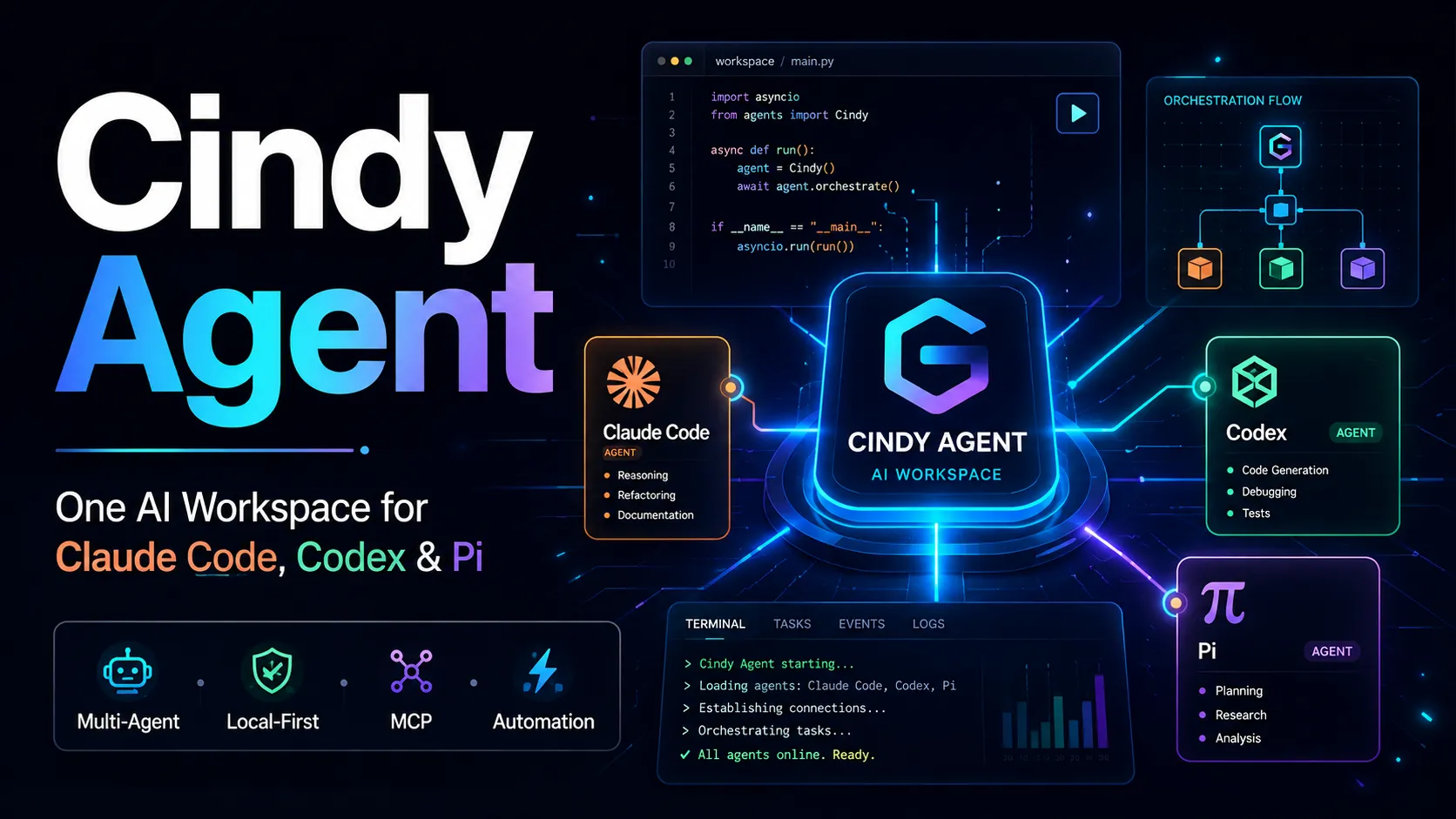
Cindy Agent is an open-source AI agent environment designed to complete work directly inside a user's real computing environment rather than operate only as a chat interface. Its client runs locally and can interact with projects, files, terminals, browsers, applications, remote hosts, and connected collaboration systems.
The important distinction is architectural: Cindy is an agent control layer, not the intelligence model itself.
A modern coding-agent stack can be separated into three layers:
Cindy primarily targets the third layer while also bundling and managing harnesses. That positioning explains why the product can support Claude Code, Codex, and Pi rather than competing with them only as replacements.
Most coding agents are optimized around a single agent runtime. Even when they support several models, the workflow normally belongs to that one harness.
Cindy introduces a different abstraction: the task belongs to Cindy, while the harness and model can become replaceable execution components.
That has practical consequences.
A difficult engineering task might use:
Instead of manually copying context between separate agent applications, Cindy attempts to keep the task state above those individual runtimes.
This is the most important idea behind Cindy Agent: model choice becomes a routing decision rather than a permanent workspace decision.
Cindy currently promotes support for Claude Code, Codex, and Pi, with additional harnesses planned and a Cindy-native harness under development.
A harness is more than an API wrapper. It determines how an agent:
This means two agents using the same underlying model can behave differently when placed inside different harnesses.
Cindy's architecture is therefore useful for developers who already have opinions about which harness performs best for different jobs. Claude Code may be preferred for one workflow, Codex for another, and Pi for a highly customizable or multi-provider workflow.
The advantage is not that Cindy guarantees one combination will always outperform another. The advantage is keeping the cost of switching low.
Cindy's core design allows supported models and harnesses to be mixed rather than treated as one fixed bundle.
This can improve both quality and cost efficiency. High-cost reasoning models can be reserved for architecture or review, while cheaper or faster models handle mechanical work.
Cindy runs on the user's machine and can work with existing files, development environments, applications, and authenticated browser sessions.
For real projects, this matters because setup friction often comes from reproducing the environment rather than writing code.
Cindy emphasizes isolated workspaces, line-by-line review, checkpoints, and rollback. It can also pause at critical moments rather than independently making irreversible decisions.
These controls are essential for agentic work because the risk increases as an agent gains access to terminals, files, browsers, and external services.
Cindy can coordinate several workers around a shared task. A typical workflow can separate planning, parallel execution, and independent review across different harness-model combinations.
The deeper value of multi-agent execution is not simply running more models. It is role separation.
Good multi-agent workflows assign independent responsibilities such as:
Parallelism is most useful when these responsibilities can proceed without repeatedly editing the same files.
Cindy treats memory and skills as layers that can persist beyond a single model or harness.
This can reduce one of the largest hidden costs of switching AI coding tools: repeatedly re-explaining repository rules, naming conventions, testing expectations, release procedures, and personal preferences.
Cindy supports MCP-based extension and reusable skills, allowing external systems and specialized tools to be added to the agent environment.
For advanced users, this makes Cindy closer to an agent operating system than a single-purpose code editor.
Cindy's desktop agent can continue working on the computer while the user checks progress or approves actions from mobile. It can also support delegated and scheduled workflows.
This changes the interaction model from "sit in front of the terminal while the agent works" to "delegate, inspect, and intervene when necessary."
Cindy should not be evaluated as if these products occupy exactly the same layer.
Claude Code is Anthropic's coding agent and can work across terminal and IDE workflows. Codex is OpenAI's coding agent for writing, reviewing, and shipping code, including agentic software-development workflows. Pi is positioned as a minimal, customizable agent harness with broad model-provider flexibility.
| Tool | Primary Role | Main Strength | When It Makes Sense |
|---|---|---|---|
| Cindy Agent | Multi-harness agent workspace | Keeps tasks, tools, memory, and workflows continuous across harnesses | Users who want one control plane for several agents and models |
| Claude Code | Anthropic coding agent | Deep integration with Claude-centric development workflows | Developers who mainly want the Claude coding stack |
| Codex | OpenAI coding agent | End-to-end software engineering workflows | Teams centered on the OpenAI coding ecosystem |
| Pi | Minimal extensible harness | High customization and broad provider flexibility | Power users who want to shape the harness itself |
The key question is therefore not "Is Cindy better than Claude Code?" A more useful question is:
Does the workflow benefit enough from orchestration, switching, shared memory, remote control, and automation to justify adding Cindy above the individual coding agents?
For a user who spends the entire day inside one harness, the answer may be no. For someone already juggling several coding agents, model providers, local tools, and remote environments, Cindy can remove substantial coordination overhead.
Cindy separates the software layer from the model-access layer.
Its model-access options can include:
The client can be used with bring-your-own-key or supported existing subscriptions, while an optional managed model service provides a more integrated experience.
This pricing model matters because agent costs can otherwise become difficult to understand. The real expense is often not the agent UI but model inference.
A sensible cost strategy is to route tasks by difficulty:
The cheapest agent workflow is not necessarily the one with the lowest token price. A more capable model can still be cheaper when it completes the task in fewer iterations.
Cindy is designed so that code, files, and chat history can remain on the local computer by default, while changes can be isolated, reviewed, and rolled back.
That is a meaningful design advantage, but local-first should not be interpreted as fully offline.
When a cloud model is selected, the model must receive enough information to perform the requested task. Depending on the workflow, that may include prompts, code snippets, file contents, tool outputs, screenshots, or other context.
Security therefore has at least three separate layers:
For sensitive repositories, organizations should evaluate all three.
A strong operating pattern is to keep high-impact actions approval-gated, use isolated workspaces for code changes, inspect diffs before merging, and restrict external integrations to the minimum necessary scope.
This is the clearest target audience. If a developer already switches between Claude Code, Codex, and other model providers, Cindy can reduce context fragmentation.
Tasks involving architecture, implementation, testing, documentation, and review benefit from role separation. Cindy's shared task state is more valuable here than for a five-minute code edit.
Parallel workers can be useful for independent modules, test suites, research, or review. Cindy provides an orchestration layer for this pattern instead of requiring several manually managed terminals.
Cindy is particularly interesting when tasks run on a desktop or remote host but need to be monitored from another device.
Recurring work such as issue triage, dependency checks, reporting, repository maintenance, or monitoring can potentially be turned into scheduled agent tasks.
Because local models can be connected alongside cloud models, Cindy can provide a single environment for comparing or routing between them.
Cindy is not automatically the best choice for every developer.
It may add unnecessary complexity when:
The value of an orchestration layer rises with workflow complexity. For simple use cases, another layer can become overhead rather than leverage.
A practical onboarding sequence is more effective than enabling every feature on day one.
Start with Cindy on the machine where the actual project files and development tools are available.
Start with only one of the following:
This makes cost and behavior easier to diagnose.
Select a project with good version control and automated tests. Avoid making the first experiment a production repository with secrets and irreversible deployment access.
Use Claude Code, Codex, or Pi for the initial task. Learn how Cindy handles permissions, diffs, checkpoints, and context before adding routing complexity.
Agent performance improves when the task specifies measurable completion conditions.
A stronger task description includes:
Good reasons include independent review, a model-specific strength, lower execution cost, or a task that benefits from parallel workers.
Avoid switching simply because the feature exists.
Instead of deciding that one model is "best," define model roles.
For example:
This reduces vendor loyalty as a technical constraint.
Parallel agents perform poorly when they constantly overwrite the same files.
Split tasks by boundaries such as:
Persistent memory is useful, but outdated assumptions can become persistent errors.
Repository standards that must never drift should still live in version-controlled project documentation. Agent memory should complement those files rather than silently replace them.
Create a recoverable boundary before dependency upgrades, migrations, mass refactors, generated-file changes, or automation that touches external systems.
Long-running agents eventually need to summarize or compact context. Compression is useful, but it can also remove details that later become important.
For critical projects, important decisions and acceptance criteria should be stored in explicit project files rather than left only in conversation history.
Useful agent metrics include:
These metrics reveal whether multi-agent routing is actually improving productivity.
Changing from Cindy to another application does not necessarily mean changing the model, and changing the model inside Cindy does not necessarily mean changing the harness.
Understanding these layers is essential for debugging quality differences.
More autonomy can improve speed, but it also increases the blast radius of mistakes and prompt injection.
Permissions should match the task.
Three expensive workers producing conflicting edits can cost more time than one strong agent.
Parallelism should be used only when the work can be decomposed cleanly.
Using a cloud model introduces network transmission to that provider. Privacy decisions must account for the complete stack.
Switch when there is a concrete expected benefit: better reasoning, different tools, lower cost, independent review, or a reliability workaround.
A manual agent workflow should become reliable before it becomes scheduled. Otherwise automation simply repeats the failure without supervision.
Cindy provides an open-source client under the Apache-2.0 license, including desktop and mobile applications plus shared packages.
This distinction is worth noting: the downloadable client and agent-side code being open source does not automatically mean every managed cloud-service component is implemented in the same public repository.
For organizations evaluating self-hosting, auditability, or compliance, the relevant question is not only "Is Cindy open source?" but also which exact components will be used in the intended deployment.
No.
Coding is an obvious use case because Cindy supports major coding harnesses, repositories, terminals, diffs, and development workflows. But its design extends into browser control, files, collaboration tools, remote servers, mobile interaction, MCP extensions, and scheduled tasks.
That makes Cindy closer to a general computer-work agent with strong software-development capabilities than a traditional IDE assistant.
The broader opportunity is workflow delegation: taking a task that spans several applications and allowing an agent to complete the sequence under reviewable controls.
There is no universal answer because the products solve different layers of the problem.
Claude Code and Codex are themselves increasingly capable agent platforms. Cindy's argument is different: use those capabilities inside a higher-level workspace that can switch, combine, automate, and remotely control them.
Cindy is therefore most compelling when the user values flexibility between ecosystems.
A developer who is fully satisfied with one vendor's agent may gain less.
No. Cindy can use Claude Code as one of its supported harnesses. Its role is to coordinate the broader workspace and make switching between agent stacks easier.
Yes. Codex is one of the supported harnesses associated with Cindy's multi-agent architecture.
Yes. Pi can be used as one of Cindy's agent engines, providing additional flexibility for model selection and customizable agent workflows.
Yes. Local models are useful when their capability is sufficient and privacy, latency, experimentation, or inference cost matters.
Supported coding subscriptions can reduce the need to purchase duplicate model access, although users should always verify the current terms and usage policies of the underlying provider.
The client can be used with supported existing subscriptions, user-provided API credentials, or local models. Optional managed services may carry additional costs.
Cindy follows a local-first architecture where project files and history can remain locally managed. However, when cloud models are used, the context required for inference can still be transmitted to the selected provider.
Cindy Agent represents an important shift in the AI coding market: the competitive layer is moving from individual models toward orchestration.
Claude Code, Codex, Pi, and future agent harnesses will continue improving independently. Cindy's value proposition is that users should not have to rebuild their workflow every time the best model or harness changes.
Its most compelling features are multi-harness continuity, local workspace execution, reusable memory and skills, multi-agent routing, reviewable changes, remote control, and scheduled automation. For developers who already operate across several AI coding ecosystems, that combination can turn fragmented tools into a coherent agent workspace.
For users evaluating Cindy, the best next step is not to migrate an entire development process immediately. Start with one real, bounded task, measure the quality and intervention rate, then add model routing, additional harnesses, or automation only when each layer provides a measurable benefit.
More articles connected to the same themes, protocols, and tools.
Browse entries that are adjacent to the topics covered in this article.